FastAPI has become the go-to framework for building modern Python APIs, and Vercel offers one of the simplest deployment platforms available. But how does Vercel actually run FastAPI applications? Unlike traditional servers, Vercel uses a serverless architecture that’s fundamentally different.
In this guide, we’ll understand how Vercel deploys FastAPI. Then build a real e-commerce API with products, a shopping cart, and orders, all deployed globally.
What you’ll learn:
- How Vercel’s serverless architecture works with Python
- Building a complete e-commerce API with FastAPI
- Deploying to Vercel with zero configuration
- Handling databases in serverless environments
- Common pitfalls and how to fix them
What we’ll build:
A production-structured demo e-commerce API with:
- Product catalog (list, details, search)
- Shopping cart (add, update, remove items)
- Order management (create, view orders)
- SQLite database (for demo purposes)
- Deployed globally with automatic HTTPS
⚠️ Note: This is a learning project demonstrating FastAPI on Vercel. For production, you’ll need user authentication, persistent databases, and additional security measures covered in the best practices section.
Tested Environment: Python 3.12, FastAPI 0.109.0, Vercel Functions (as of February 2026)
Table of Contents
How Vercel Deploys FastAPI: The Architecture

Serverless vs Traditional Deployment
Traditional deployment runs your application on a server 24/7. Vercel uses serverless functions that:
- Start on-demand when requests arrive
- Scale automatically from 0 to millions of requests
- Costs nothing when idle (pay per execution)
- Deploy to regions with edge routing
Here’s the flow:
Client Request → Vercel CDN (Edge) → Regional Function → Your FastAPI Code
When you deploy to Vercel:
- Your FastAPI app becomes a serverless function
- Vercel detects ASGI applications automatically (FastAPI, Starlette, etc.)
- The function is deployed region-first to Vercel’s infrastructure (configurable regions on Pro/Enterprise)
- Requests are routed through Vercel’s global CDN to your function’s deployed region(s)
Key differences:
| Traditional Server | Vercel Serverless         |
| ------------------ | ------------------------- |
| Always running     | Runs on-demand            |
| Manual scaling     | Auto-scales               |
| Fixed costs        | Pay per request           |
| Single location    | Regional + Edge routing   |
| You manage servers | Vercel manages everything |
How Vercel Handles Python & FastAPI
Vercel’s Python runtime supports ASGI applications natively. When you export an app variable that’s a FastAPI instance, Vercel automatically:
- Detects it as an ASGI application
- Wraps it in the appropriate serverless handler
- Routes requests to your FastAPI routes
No adapters or special configuration needed – just export app = FastAPI().
How routing works: Vercel treats Python files under api/ (or other configured paths) as Functions. A file at api/index.py exporting app handles all requests to /api/* routes. Note that FastAPI’s internal routing (e.g., @app.get("/products")) still controls the specific paths—Vercel simply mounts your app at the /api prefix, so /api/products maps to your @app.get("/products") route.
Important Limitations
With Fluid Compute (enabled by default):
- Execution timeout:
- Hobby: 300s (5 minutes) default and max
- Pro: 300s default, up to 800s max (configurable)
- Deployment size: 250MB uncompressed (including layers, enforced by infrastructure)
- File system: Read-only except
/tmp(~500MB scratch space) - Stateless: No persistent memory between requests
- Python versions: 3.12 (default), 3.13, 3.14
💡 Note: If you disable Fluid Compute, different timeout limits apply: 10s/60s max for Hobby, 15s/300s max for Pro. See Vercel duration docs for details.
Now that we understand how it works, let’s build something real.
Setting Up the Project
Project Structure
Create this simple structure:
ecommerce-api/
├── api/
│   └── index.py       # Our FastAPI app
	└── requirements.txt    # Dependencies
💡 Note: No vercel.json needed! Vercel auto-detects FastAPI.
Create the Files
1. Create project directory:
mkdir ecommerce-api
cd ecommerce-api
mkdir api
2. Install dependencies locally:
python -m venv venv
source venv/bin/activate  # On Windows: venv\\Scripts\\activate
pip install fastapi uvicorn
3. Create requirements.txt:
fastapi==0.109.0
pydantic==2.5.0
uvicorn==0.27.0  # For local development only (not needed on Vercel)
💡 Tip: To generate requirements.txt from your environment:
pip freeze > requirements.txtThat’s it! No vercel.json, no adapters, no complex configuration.
Key Constraint:
- Before we build, remember that serverless functions are stateless and ephemeral. Any data stored in memory or
/tmpwill be lost when the function cools down. This shapes our database choices—we’ll use SQLite for this demo, but production apps need persistent external databases (covered in the code comments and best practices section).
Building the E-commerce API

Now let’s build a real API with proper models and error handling.
File: api/index.py
from fastapi import FastAPI, HTTPException, status
from fastapi.middleware.cors import CORSMiddleware
from pydantic import BaseModel, Field
from typing import List, Optional
import sqlite3
import json
import os

# Initialize FastAPI
app = FastAPI(
    title="E-commerce API",
    description="A production-structured demo e-commerce API on Vercel",
    version="1.0.0"
)

# CORS Configuration
# For production, replace with specific domains
app.add_middleware(
    CORSMiddleware,
    allow_origins=["http://localhost:3000"],  # Add your frontend domains
    allow_credentials=True,
    allow_methods=["GET", "POST", "PUT", "DELETE"],
    allow_headers=["*"],
)

# ============================================================================
# DATABASE SETUP
# ============================================================================

DB_PATH = "/tmp/ecommerce.db"

def init_db():
    """Initialize SQLite database with tables

    ⚠️ WARNING: SQLite in /tmp is ephemeral and not reliable for persistence.
    Vercel archives inactive functions (within 2 weeks for production deployments,
    48 hours for preview deployments), clearing /tmp on unarchive. Additionally,
    multiple concurrent function instances each get their own isolated /tmp
    directory, causing data inconsistency under load. SQLite also experiences
    lock contention under concurrent writes.

    This is suitable for:
    - Demos and learning
    - Low-traffic prototypes
    - Read-only applications

    For production, use:
    - Supabase (PostgreSQL)
    - PlanetScale (MySQL)
    - MongoDB Atlas
    - Vercel Postgres
    """
    conn = sqlite3.connect(DB_PATH)
    cursor = conn.cursor()

    # Create products table
    cursor.execute("""
        CREATE TABLE IF NOT EXISTS products (
            id INTEGER PRIMARY KEY AUTOINCREMENT,
            name TEXT NOT NULL,
            description TEXT,
            price REAL NOT NULL,
            stock INTEGER DEFAULT 0,
            created_at TIMESTAMP DEFAULT CURRENT_TIMESTAMP
        )
    """)

    # Create cart table
    # ⚠️ NOTE: This is a global cart shared by all users (for demo simplicity)
    # In production, add user_id or session_id to make carts user-specific
    cursor.execute("""
        CREATE TABLE IF NOT EXISTS cart (
            id INTEGER PRIMARY KEY AUTOINCREMENT,
            product_id INTEGER NOT NULL,
            quantity INTEGER NOT NULL,
            FOREIGN KEY (product_id) REFERENCES products (id)
        )
    """)

    # Create index for better query performance
    cursor.execute("""
        CREATE INDEX IF NOT EXISTS idx_cart_product_id ON cart(product_id)
    """)

    # Create orders table
    cursor.execute("""
        CREATE TABLE IF NOT EXISTS orders (
            id INTEGER PRIMARY KEY AUTOINCREMENT,
            items TEXT NOT NULL,
            total REAL NOT NULL,
            status TEXT DEFAULT 'pending',
            created_at TIMESTAMP DEFAULT CURRENT_TIMESTAMP
        )
    """)

    # Seed some sample products
    cursor.execute("SELECT COUNT(*) FROM products")
    if cursor.fetchone()[0] == 0:
        sample_products = [
            ("Wireless Headphones", "Premium noise-cancelling headphones", 199.99, 50),
            ("Smart Watch", "Fitness tracker with heart rate monitor", 299.99, 30),
            ("Laptop Stand", "Ergonomic aluminum laptop stand", 49.99, 100),
            ("USB-C Cable", "Fast charging USB-C cable 2m", 19.99, 200),
            ("Phone Case", "Protective silicone phone case", 29.99, 150),
        ]
        cursor.executemany(
            "INSERT INTO products (name, description, price, stock) VALUES (?, ?, ?, ?)",
            sample_products
        )

    conn.commit()
    conn.close()

def get_db():
    """Get database connection"""
    # Initialize DB if not exists
    if not os.path.exists(DB_PATH):
        init_db()
    # check_same_thread=False is safe here because we create new connections per request
    # (not sharing connections across requests/threads)
    return sqlite3.connect(DB_PATH, check_same_thread=False)

# ============================================================================
# PYDANTIC MODELS
# ============================================================================

class Product(BaseModel):
    id: int
    name: str
    description: Optional[str] = None
    price: float = Field(gt=0)
    stock: int = Field(ge=0)

class CartItem(BaseModel):
    id: int
    product_id: int
    quantity: int = Field(gt=0)
    product: Optional[Product] = None

class CartItemCreate(BaseModel):
    product_id: int
    quantity: int = Field(gt=0, default=1)

class OrderItem(BaseModel):
    """Input model: item to add to order"""
    product_id: int
    quantity: int = Field(gt=0, default=1)

class OrderLineItem(BaseModel):
    """Response model: detailed line item in order"""
    product_id: int
    name: str
    quantity: int
    price: float
    subtotal: float

class Order(BaseModel):
    id: int
    items: List[OrderLineItem]
    total: float
    status: str
    created_at: str

class OrderCreate(BaseModel):
    cart_items: List[OrderItem] = Field(min_length=1)

# ============================================================================
# API ENDPOINTS
# ============================================================================

@app.get("/")
def root():
    """Root endpoint"""
    return {
        "message": "Welcome to E-commerce API",
        "docs": "/docs",
        "endpoints": {
            "products": "/api/products",
            "cart": "/api/cart",
            "orders": "/api/orders"
        }
    }

@app.get("/api/health")
def health():
    """Health check"""
    return {"status": "healthy", "platform": "Vercel"}

# ============================================================================
# PRODUCT ENDPOINTS
# ============================================================================

@app.get("/api/products", response_model=List[Product])
def list_products(skip: int = 0, limit: int = 100):
    """
    Get all products

    - **skip**: Number of products to skip (pagination)
    - **limit**: Maximum products to return
    """
    conn = get_db()
    cursor = conn.cursor()

    cursor.execute(
        "SELECT id, name, description, price, stock FROM products LIMIT ? OFFSET ?",
        (limit, skip)
    )

    products = []
    for row in cursor.fetchall():
        products.append({
            "id": row[0],
            "name": row[1],
            "description": row[2],
            "price": row[3],
            "stock": row[4]
        })

    conn.close()
    return products

@app.get("/api/products/{product_id}", response_model=Product)
def get_product(product_id: int):
    """
    Get specific product by ID

    - **product_id**: The product ID
    """
    conn = get_db()
    cursor = conn.cursor()

    cursor.execute(
        "SELECT id, name, description, price, stock FROM products WHERE id = ?",
        (product_id,)
    )

    row = cursor.fetchone()
    conn.close()

    if not row:
        raise HTTPException(
            status_code=status.HTTP_404_NOT_FOUND,
            detail=f"Product {product_id} not found"
        )

    return {
        "id": row[0],
        "name": row[1],
        "description": row[2],
        "price": row[3],
        "stock": row[4]
    }

# ============================================================================
# CART ENDPOINTS
# ============================================================================

@app.get("/api/cart", response_model=List[CartItem])
def get_cart():
    """Get all items in cart

    ⚠️ NOTE: This demo uses a global cart. In production, implement
    user-specific carts with authentication.
    """
    conn = get_db()
    cursor = conn.cursor()

    cursor.execute("""
        SELECT c.id, c.product_id, c.quantity,
               p.id, p.name, p.description, p.price, p.stock
        FROM cart c
        JOIN products p ON c.product_id = p.id
    """)

    cart_items = []
    for row in cursor.fetchall():
        cart_items.append({
            "id": row[0],
            "product_id": row[1],
            "quantity": row[2],
            "product": {
                "id": row[3],
                "name": row[4],
                "description": row[5],
                "price": row[6],
                "stock": row[7]
            }
        })

    conn.close()
    return cart_items

@app.post("/api/cart", status_code=status.HTTP_201_CREATED)
def add_to_cart(item: CartItemCreate):
    """
    Add item to cart

    - **product_id**: ID of the product
    - **quantity**: Quantity to add
    """
    conn = get_db()
    cursor = conn.cursor()

    try:
        # Check if product exists and has stock
        cursor.execute(
            "SELECT stock FROM products WHERE id = ?",
            (item.product_id,)
        )
        result = cursor.fetchone()

        if not result:
            raise HTTPException(
                status_code=status.HTTP_404_NOT_FOUND,
                detail=f"Product {item.product_id} not found"
            )

        if result[0] < item.quantity:
            raise HTTPException(
                status_code=status.HTTP_400_BAD_REQUEST,
                detail=f"Insufficient stock. Available: {result[0]}"
            )

        # Add to cart
        cursor.execute(
            "INSERT INTO cart (product_id, quantity) VALUES (?, ?)",
            (item.product_id, item.quantity)
        )

        cart_id = cursor.lastrowid
        conn.commit()

        return {
            "message": "Item added to cart",
            "cart_id": cart_id,
            "product_id": item.product_id,
            "quantity": item.quantity
        }

    except HTTPException:
        # Re-raise HTTPException as-is (don't convert to 500)
        raise
    except Exception as e:
        # Only catch unexpected errors
        raise HTTPException(
            status_code=status.HTTP_500_INTERNAL_SERVER_ERROR,
            detail=f"Failed to add item to cart: {str(e)}"
        )
    finally:
        conn.close()

@app.delete("/api/cart/{cart_id}")
def remove_from_cart(cart_id: int):
    """
    Remove item from cart

    - **cart_id**: ID of the cart item to remove
    """
    conn = get_db()
    cursor = conn.cursor()

    try:
        cursor.execute("DELETE FROM cart WHERE id = ?", (cart_id,))

        if cursor.rowcount == 0:
            raise HTTPException(
                status_code=status.HTTP_404_NOT_FOUND,
                detail=f"Cart item {cart_id} not found"
            )

        conn.commit()
        return {"message": f"Cart item {cart_id} removed"}

    except HTTPException:
        raise
    except Exception as e:
        raise HTTPException(
            status_code=status.HTTP_500_INTERNAL_SERVER_ERROR,
            detail=f"Failed to remove cart item: {str(e)}"
        )
    finally:
        conn.close()

# ============================================================================
# ORDER ENDPOINTS
# ============================================================================

@app.post("/api/orders", response_model=Order, status_code=status.HTTP_201_CREATED)
def create_order(order: OrderCreate):
    """
    Place an order

    - **cart_items**: List of OrderItem objects with product_id and quantity
    """
    conn = get_db()
    cursor = conn.cursor()

    try:
        # Begin transaction to ensure atomicity
        cursor.execute("BEGIN")

        total = 0.0
        items = []

        # Validate and calculate total
        for item in order.cart_items:
            cursor.execute(
                "SELECT name, price, stock FROM products WHERE id = ?",
                (item.product_id,)
            )
            result = cursor.fetchone()

            if not result:
                raise HTTPException(
                    status_code=status.HTTP_404_NOT_FOUND,
                    detail=f"Product {item.product_id} not found"
                )

            name, price, stock = result

            if stock < item.quantity:
                raise HTTPException(
                    status_code=status.HTTP_400_BAD_REQUEST,
                    detail=f"Insufficient stock for {name}"
                )

            # Update stock
            cursor.execute(
                "UPDATE products SET stock = stock - ? WHERE id = ?",
                (item.quantity, item.product_id)
            )

            item_total = price * item.quantity
            total += item_total

            items.append({
                "product_id": item.product_id,
                "name": name,
                "quantity": item.quantity,
                "price": price,
                "subtotal": item_total
            })

        # Create order
        cursor.execute(
            "INSERT INTO orders (items, total, status) VALUES (?, ?, ?)",
            (json.dumps(items), total, "pending")
        )

        order_id = cursor.lastrowid

        # Clear cart
        cursor.execute("DELETE FROM cart")

        # Commit transaction
        conn.commit()

        # Get created order
        cursor.execute(
            "SELECT id, items, total, status, created_at FROM orders WHERE id = ?",
            (order_id,)
        )
        row = cursor.fetchone()

        return {
            "id": row[0],
            "items": json.loads(row[1]),
            "total": row[2],
            "status": row[3],
            "created_at": row[4]
        }

    except HTTPException:
        # Re-raise HTTPException without wrapping
        conn.rollback()
        raise
    except Exception as e:
        # Rollback on any unexpected error to maintain data consistency
        conn.rollback()
        raise HTTPException(
            status_code=status.HTTP_500_INTERNAL_SERVER_ERROR,
            detail=f"Failed to create order: {str(e)}"
        )
    finally:
        conn.close()

@app.get("/api/orders", response_model=List[Order])
def list_orders(skip: int = 0, limit: int = 100):
    """
    Get all orders

    - **skip**: Number of orders to skip
    - **limit**: Maximum orders to return
    """
    conn = get_db()
    cursor = conn.cursor()

    cursor.execute(
        "SELECT id, items, total, status, created_at FROM orders ORDER BY created_at DESC LIMIT ? OFFSET ?",
        (limit, skip)
    )

    orders = []
    for row in cursor.fetchall():
        orders.append({
            "id": row[0],
            "items": json.loads(row[1]),
            "total": row[2],
            "status": row[3],
            "created_at": row[4]
        })

    conn.close()
    return orders
What’s Different in This Corrected Version?
- No Mangum – Vercel handles ASGI natively
- Proper CORS – Uses specific origins, not wildcard with credentials
- Fixed Exception Handling – HTTPExceptions pass through correctly
- Typed Models – Uses proper Pydantic models (OrderItem for input, OrderLineItem for responses)
- Transaction Safety – BEGIN/COMMIT/ROLLBACK for data consistency
- Sync functions – Uses def not async def for sync SQLite operations (mixing async def with sync DB calls, blocks the event loop; use all-sync or switch to
aiosqlite) - SQLite threading – Uses
check_same_thread=Falsesafely (new connection per request) - Comprehensive warnings – About SQLite limitations and global cart
Check out the amazing Materio MUI Next.js Template, which works smoothly with Vercel projects.

This is one of the best Vercel Template to use for professional web apps.
Testing Locally Before Deployment

Before deploying to Vercel, always test your API locally:
Run Development Server
# Make sure you're in the virtual environment
source venv/bin/activate  # or venv\Scripts\activate on Windows

# Run with uvicorn
uvicorn api.index:app --reload --port 8000
What this does:
api.index:app– Loads theappobject fromapi/index.py-reload– Auto-reloads on code changes-port 8000– Runs on http://localhost:8000
Test Your Endpoints
# Open interactive docs in browser
open <http://localhost:8000/docs>

# Or test with curl
curl <http://localhost:8000/api/products>
curl <http://localhost:8000/api/health>
Expected output:
INFO:     Uvicorn running on <http://127.0.0.1:8000> (Press CTRL+C to quit)
INFO:     Started reloader process [12345] using StatReload
INFO:     Started server process [12346]
INFO:     Waiting for application startup.
INFO:     Application startup complete.
When you visit http://localhost:8000/docs, you’ll see FastAPI’s automatically generated interactive API documentation:
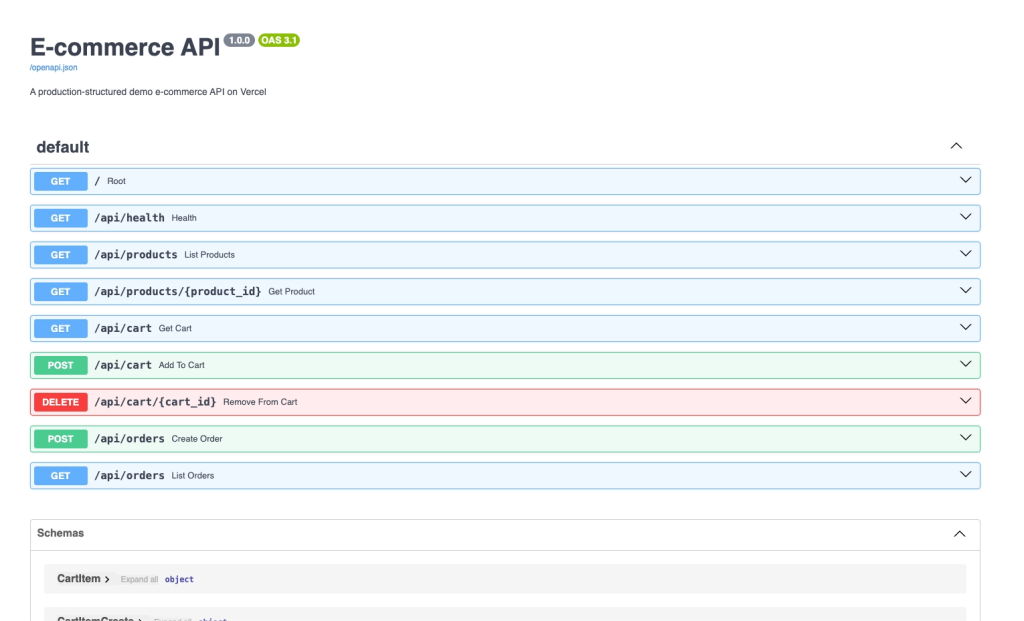
FastAPI’s Swagger UI showing all your e-commerce endpoints with automatic schema validation
💡 Pro Tip: Keep the local server running while developing. The
--reloadflag automatically restarts when you save changes.
Deploying to Vercel

Method 1: Vercel CLI (Fastest)
# Install Vercel CLI
npm install -g vercel

# Login
vercel login

# Deploy (from project root)
vercel

# Follow prompts:
# ? Set up and deploy? Yes
# ? Project name? ecommerce-api
# ? Which directory? ./

# ✅ Deployed! You'll get a URL like:
# <https://ecommerce-api-abc123.vercel.app>
Method 2: GitHub Integration
Push to GitHub:
git init
git add .
git commit -m "E-commerce API with FastAPI"
git remote add origin https://github.com/yourusername/ecommerce-api.git
git push -u origin main
Connect Vercel:
- Go to vercel.com
- Click “New Project”
- Import your GitHub repository
- Click “Deploy”
Vercel automatically detects Python/FastAPI and deploys! Every push to main triggers a new deployment.
Optional: Configure Timeout (if needed)
If your functions need more than 5 minutes (Hobby) or need to be customized:
Create vercel.json:
{
  "functions": {
    "api/index.py": {
      "maxDuration": 300
    }
  }
}Note: With Fluid Compute (default), Hobby plan max is 300s, Pro can go up to 800s.
Testing Your Live API
Once deployed, test your endpoints
1. Get All Products
curl <https://your-app.vercel.app/api/products>Response:
[
  {
    "id": 1,
    "name": "Wireless Headphones",
    "description": "Premium noise-cancelling headphones",
    "price": 199.99,
    "stock": 50
  },
  ...
]
Here’s what the live API response looks like:
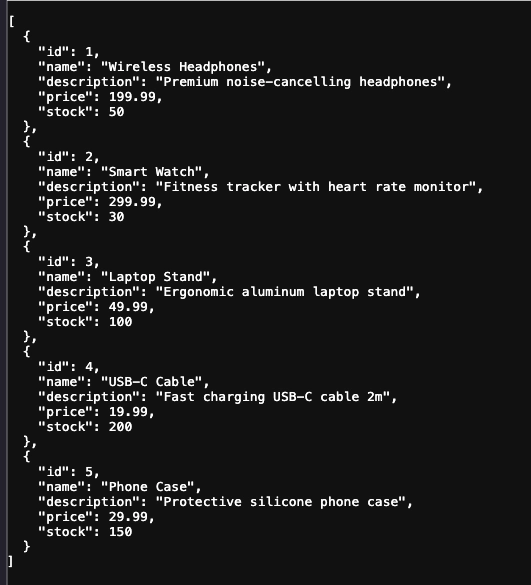
Your FastAPI e-commerce API running on Vercel, returning product data
2 Get Product Details:
curl https://your-app.vercel.app/api/products/13. Add to Cart:
curl -X POST <https://your-app.vercel.app/api/cart> \\
  -H "Content-Type: application/json" \\
  -d '{"product_id": 1, "quantity": 2}'
4. Place Order
curl -X POST <https://your-app.vercel.app/api/orders> \\
  -H "Content-Type: application/json" \\
  -d '{
    "cart_items": [
      {"product_id": 1, "quantity": 2},
      {"product_id": 3, "quantity": 1}
    ]
  }'
5. API Documentation:
Visit https://your-app.vercel.app/docs for interactive Swagger documentation!
Common Issues and Solutions
Issue 1: Database Resets Between Requests
Problem: Data disappears after some time.
Why: Serverless functions are stateless and ephemeral. Vercel archives inactive functions (within 2 weeks for production, 48 hours for preview deployments), clearing /tmp on unarchive. Additionally, multiple concurrent function instances each get their own isolated /tmp directory, creating separate databases. SQLite also experiences lock contention under concurrent writes.
Solutions:
- Option A: Use an external database (Recommended for production)
# Supabase (PostgreSQL)
from supabase import create_client
import os

supabase = create_client(
    os.getenv("SUPABASE_URL"),
    os.getenv("SUPABASE_KEY")
)

@app.get("/api/products")
def list_products():
    response = supabase.table("products").select("*").execute()
return response.data- Option B: Accept ephemeral data
- For demos and prototypes, knowing data resets is fine.
⚠️ Important: The cart in this demo is global (shared across all users) for simplicity. In production:
• Add
user_idorsession_idto the cart table• Implement authentication (JWT, OAuth2, etc.)
• Use proper database with connection pooling
Issue 2: “Module not found” Error
Problem: ModuleNotFoundError: No module named 'fastapi'
Solution: Ensure requirements.txt exists in project root:
fastapi==0.109.0
pydantic==2.5.0
Issue 3: 404 on ALL Routes
Problem: All endpoints return 404.
Solution:
- Ensure your file is at one of these paths:
api/index.pyapi/app.pyindex.pyapp.py
- Ensure FastAPI instance is named
app:
app = FastAPI()  # ✅ Correct
# application = FastAPI()  # ❌ Wrong
Issue 4: CORS Errors
Problem: The browser can’t access the API from your frontend.
Solution: Update the CORS middleware already in the code (lines 165-174). Replace the allow_origins list:
# For local development (already in code)
allow_origins=["<http://localhost:3000>"]

# For production - use your actual domain(s)
allow_origins=[
    "<https://yourdomain.com>",
    "<https://www.yourdomain.com>"
]
⚠️ Never use
allow_origins=["*"]withallow_credentials=True– it’s invalid and insecure!
💡 Note: Don’t add the middleware twice. Just modify the
allow_originslist in the existing configuration.
Issue 5: Slow First Request (Cold Start)
Problem: First request takes longer than subsequent requests.
Why: Vercel needs to spin up the Python runtime and load your code. Cold-start latency varies by region, function size, and initialization time (typically 1-3 seconds).
Solutions:
- Accept it: Subsequent requests are fast (typically <100ms with warm function)
- Upgrade to Pro: Vercel Pro has optimizations for cold starts
- Keep warm (optional): Use a cron job to ping your API every 5-10 minutes (not guaranteed to prevent all cold starts)
Production Best Practices
1. Use Environment Variables
Never hardcode secrets. Use Vercel’s environment variables:
In Vercel Dashboard
Settings → Environment Variables
→ Add: DATABASE_URL, API_KEY, etc.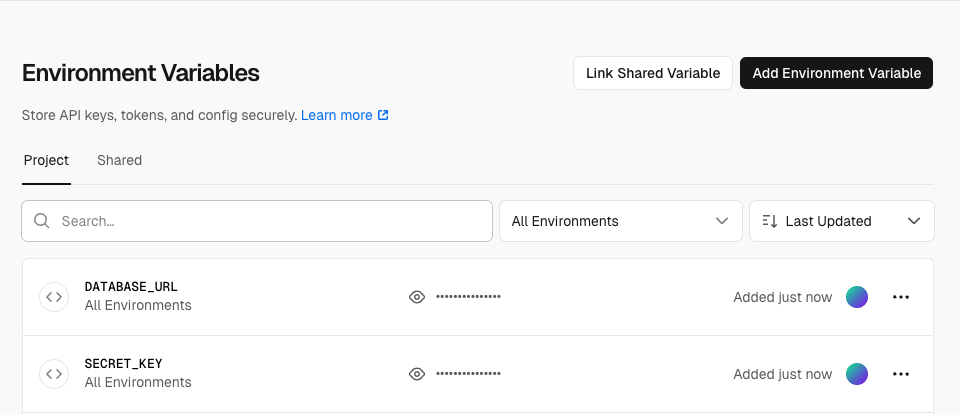
Configuring environment variables in the Vercel Dashboard for secure credential management
In your code:
import os

DATABASE_URL = os.getenv("DATABASE_URL")
SECRET_KEY = os.getenv("SECRET_KEY")

if not SECRET_KEY:
    raise ValueError("SECRET_KEY environment variable not set")
2. Use a Real Database
For production, replace SQLite with:
- Supabase: PostgreSQL with 500MB free tier, built-in connection pooling
- PlanetScale: MySQL with a generous free tier, serverless-friendly
- MongoDB Atlas: NoSQL database with free tier
- Vercel Postgres: Native integration with Vercel
💡 Production Tip: Use connection pooling (e.g., PgBouncer for PostgreSQL) to avoid exhausting database connections in serverless environments where many function instances may spin up under load.
3. Add Authentication
Implement user authentication:
from fastapi.security import HTTPBearer, HTTPAuthorizationCredentials
from fastapi import Depends, HTTPException
import jwt

security = HTTPBearer()

def verify_token(credentials: HTTPAuthorizationCredentials = Depends(security)):
    try:
        token = credentials.credentials
        payload = jwt.decode(token, SECRET_KEY, algorithms=["HS256"])
        return payload
    except jwt.InvalidTokenError:
        raise HTTPException(status_code=401, detail="Invalid token")

@app.get("/api/protected")
def protected_route(user=Depends(verify_token)):
    return {"message": f"Hello {user['email']}"}
4. Optimize Bundle Size
If you hit the 250MB limit, create .vercelignore:
tests/
*.pyc
__pycache__/
.venv/
.pytest_cache/
docs/
*.md
Or configure excludeFiles in vercel.json:
{
  "functions": {
    "api/**/*.py": {
      "excludeFiles": "{tests/**,__pycache__/**,**/*.pyc,**/test_*.py}"
    }
  }
}
5. Add Proper Logging
import logging

logging.basicConfig(level=logging.INFO)
logger = logging.getLogger(__name__)

@app.get("/api/products", response_model=List[Product])
def list_products(skip: int = 0, limit: int = 100):
    logger.info(f"Fetching products (skip={skip}, limit={limit})")
    conn = get_db()
    cursor = conn.cursor()
    cursor.execute(
        "SELECT id, name, description, price, stock FROM products LIMIT ? OFFSET ?",
        (limit, skip)
    )
    products = []
    for row in cursor.fetchall():
        products.append({
            "id": row[0],
            "name": row[1],
            "description": row[2],
            "price": row[3],
            "stock": row[4]
        })
    conn.close()
    logger.info(f"Returned {len(products)} products")
    return products
View logs in Vercel Dashboard: Deployments → Select deployment → Logs (or Runtime Logs tab depending on your Vercel plan)
💡 Note: Function execution logs appear in the deployment’s log viewer. For more detailed monitoring, consider integrating a dedicated logging service, such as Datadog or Sentry.
6. Implement Rate Limiting
from slowapi import Limiter, _rate_limit_exceeded_handler
from slowapi.util import get_remote_address

limiter = Limiter(key_func=get_remote_address)
app.state.limiter = limiter

@app.get("/api/products", response_model=List[Product])
@limiter.limit("20/minute")
def list_products(skip: int = 0, limit: int = 100):
    """Max 20 requests per minute per IP"""
    conn = get_db()
    cursor = conn.cursor()
    cursor.execute(
        "SELECT id, name, description, price, stock FROM products LIMIT ? OFFSET ?",
        (limit, skip)
    )
    products = []
    for row in cursor.fetchall():
        products.append({
            "id": row[0],
            "name": row[1],
            "description": row[2],
            "price": row[3],
            "stock": row[4]
        })
    conn.close()
    return products
Add to requirements.txt :
slowapi==0.1.9Conclusion
Congratulations! You’ve learned how Vercel deploys FastAPI and built a production-structured demo e-commerce API with:
- 5 working endpoints (products, cart, orders)
- Database integration (SQLite for demo, with path to production databases)
- Deployed globally with automatic HTTPS
- Auto-generated documentation at
/docs - Transaction handling for data consistency
- Proper error handling (HTTPExceptions don’t become 500s)
- Production best practices and realistic limitations
Key Takeaways
- Vercel uses serverless functions – Your Python code runs on-demand via Vercel’s infrastructure
- No adapters needed – FastAPI works with just
app = FastAPI(), Vercel detects ASGI automatically - Zero config deployment – No
vercel.jsonneeded for basic FastAPI apps - SQLite is for demos only – Use external databases (Supabase, PlanetScale) for production due to concurrency, lock contention, and persistence issues
- Cold starts exist – First request may take 1-3 seconds, subsequent requests are typically <100ms
- 250MB deployment limit – Keep dependencies minimal, use
excludeFiles - Timeout with Fluid Compute – Default 300s (5 min) for all plans, Pro can configure up to 800s
- Stateless by design – Each request may hit a different function instance
- Test locally first – Always run
uvicorn api.index:app --reloadbefore deploying
When to Use Vercel for FastAPI
✅ Perfect for:
- REST APIs and microservices
- Prototypes and MVPs
- Side projects and personal APIs
- Webhooks and integrations
- Low-to-medium traffic applications (with a proper database)
- Stateless operations
- APIs with <5-13 minute response times
❌ Consider alternatives for:
- WebSocket servers (require persistent connections)
- Long-running tasks (>5-13 minutes depending on plan)
- High-frequency concurrent write operations (unless using a proper database with connection pooling)
- Applications needing file system persistence
- Real-time collaborative applications requiring persistent state
Next Steps
Immediate Improvements:
- Add user authentication: Implement JWT or OAuth2 to make carts user-specific
- Connect a real database: Migrate from SQLite to Supabase (PostgreSQL) or PlanetScale (MySQL)
- Add proper error tracking: Integrate Sentry for production monitoring
Advanced Features:
- Add payment processing: Integrate Stripe or PayPal
- Implement search: Add product search with filters
- Add image uploads: Use Cloudinary or AWS S3 with pre-signed URLs
- Write tests: Add pytest for comprehensive API testing
- Add rate limiting: Protect endpoints from abuse
- Implement caching: Use Redis for frequently accessed data
Resources
Official Documentation:
Code Examples:
You’ve successfully deployed a FastAPI application on Vercel! 🚀
This guide was tested and verified with Python 3.12, FastAPI 0.109.0, and Vercel Functions as of February 2026.
Happy coding! 💪