Choosing a hosting platform today isn’t just about where your app runs – it quietly influences how you build, ship, and scale your product.
For developers, hosting decisions now touch everything: deployment speed, team workflows, performance, costs, and even how your architecture evolves. A platform that feels perfect on day one can become a bottleneck a year later, while something that feels “too much” early on might save you pain as your product grows.
This is especially true in the modern frontend ecosystem. With frameworks doing more work at build time, runtimes moving closer to the edge, and serverless becoming the default choice, hosting is no longer a background concern – it’s part of your development experience.
That’s why popularity alone isn’t a good reason to choose a platform.
Vercel is a great example of this. It’s fast, polished, and widely loved – but that doesn’t automatically mean it’s the right fit for every project or every team. The real value comes from understanding when it makes sense to use Vercel – and when it’s better to look elsewhere.
This article will help you understand why to use Vercel Hosting, when exactly you should use it, and when not to. Make that call with clarity, whether you’re just starting out or already running production workloads.
Table of Contents
TL;DR: Should You Use Vercel?
- Choose Vercel if your project is frontend-centric, performance-sensitive, and you value fast Git-based deployments with minimal DevOps overhead.
- Vercel shines for static sites, Jamstack apps, Next.js projects, MVPs, marketing sites, and teams that rely heavily on preview deployments.
- Think twice if your application is backend-heavy, stateful, cost-sensitive at scale, or requires strict infrastructure control or compliance.
- At scale, many teams use Vercel for the frontend while running backend services on dedicated infrastructure.
- Vercel is not a one-size-fits-all cloud, but it’s an excellent tool when matched to the right product stage and architecture.
What Is Vercel Hosting?
At a high level, Vercel is a hosting platform built specifically for modern frontend applications. Its main goal is simple: to make deploying web apps feel effortless while delivering great performance by default.
Instead of thinking in terms of servers, load balancers, or infrastructure setup, Vercel hosting encourages a Git-first workflow. You push code to your repository, and everything else – builds, deployments, previews, rollbacks, and global distribution – happens automatically. Each deployment is immutable and isolated, which makes experimentation and iteration much safer.
Vercel Hosting is especially popular in the React ecosystem, but the bigger idea goes beyond any single framework. It’s designed around concepts like static generation, serverless functions, and edge computing. You can mix static pages, dynamic rendering, API routes, and edge logic in one project without manually wiring up infrastructure for each piece.
The key thing to understand is this: Vercel hosting is not trying to be a general-purpose cloud provider. It’s intentionally opinionated. It optimizes for frontend performance, developer experience, and fast shipping – often by abstracting away complexity that traditional hosting platforms expose.
That trade-off is exactly why some developers love it – and why others eventually outgrow it.
Why Is Vercel So Popular?
If you’ve spent any time in the frontend world over the past few years, chances are you’ve heard people casually drop “Vercel Hosting” into conversation almost as often as they mention React or JavaScript itself. But it didn’t happen by accident – there are a few practical reasons why Vercel went from a “nice-to-have” platform to the go-to choice for so many developers.
First, Vercel’s focus on developer experience is hard to overstate. From the moment you connect your Git repository to the platform, deployments just work – no manual CI/CD pipelines to set up, no servers to configure, just push and go.
Every commit gets its own preview deployment, which makes collaboration and review a breeze for teams of any size. That feeling of instant feedback is a big part of why people enjoy working with it.
Another massive tailwind for Vercel has been its tight coupling with Next.js. Vercel didn’t just support Next.js – it helped create and maintain it. That means if you’re building with Next.js, Vercel hosting can optimize your apps in ways other platforms often can’t, like automatic static optimization, built-in image and font handling, and zero-config serverless or edge functions. For many teams, the friction of getting this level of performance and scalability anywhere else is significantly higher.
What is Vercel Used For?
People often talk about hosting platforms in terms of uptime or raw performance, but for the developers adopting Vercel, the appeal has been more about how it lets you focus on building rather than managing.
Tasks that used to require manual setup – like CDN configuration, rollbacks, environment variables, secret management – are baked into the platform experience. That means you spend less time on DevOps chores and more time shipping features.
Finally, trends matter. Vercel hosting arrived right when static site generation, serverless functions, and edge delivery were becoming mainstream, and developers were looking for ways to unify these into a single workflow without becoming infrastructure experts.
Coupled with a strong community and visible adoption by big names in tech, it became easier for Vercel to snowball into the default choice for modern frontend applications.
In short, Vercel didn’t just become popular because it’s good – it became popular because it solved tangible pain points many developers felt every day. And that’s a much stronger foundation than hype alone.
When Vercel Hosting Is a Great Choice
There’s a reason so many teams pick Vercel hosting as their default hosting platform: in the right scenarios, it just makes life easier. But before we get into specifics, it’s important to be clear – Vercel isn’t one-size-fits-all. It shines brightest in particular contexts, and understanding those will help you decide whether it’s a good fit for your project.
Here’s where Vercel Hosting truly excels:
1. Static and Jamstack-Style Sites
If your app is mostly static pages, pre-rendered content, or uses Jamstack principles, Vercel feels like a natural extension of your workflow. Generating pages at build time and serving them from a global CDN gives amazing performance with little configuration. For blogs, marketing sites, documentation, landing pages, or content-heavy sites, this means fast initial load times and low operational overhead.
2. Frontend Frameworks with Serverless Needs
Vercel plays exceptionally well with modern frontend frameworks – especially Next.js, but also others like SvelteKit or Nuxt via adapters. When your project needs a mix of static pages and some backend logic (like serverless API routes), Vercel’s blend of static generation and serverless functions keeps the experience smooth and simple.
3. Teams That Love Git-Driven Workflows
One of Vercel’s most loved features is how it ties into your Git workflow. Every branch, every PR gets an automatic preview deployment. Want stakeholders to review a feature before it lands in production? Share a link. No extra staging environment setup. For teams, whether big or small, this makes collaboration much cleaner and reviews more focused on the state rather than the setup.
4. Performance-Obsessed Products
If you care about performance metrics – like first contentful paint, largest contentful paint, or time to interactive – Vercel’s default setup helps. Its edge CDN, smart caching, and integration with analytics (like Vercel Analytics) give you performance wins without deep DevOps tinkering.
5. Quick Setup and Minimal DevOps Load
Some projects simply don’t need a dedicated DevOps engineer or custom infrastructure. For early-stage startups, side projects, prototypes, or hackathon builds, Vercel lets you deploy production-ready without worrying about servers, load balancers, certificates, or scaling rules.
6. Edge Functions and Serverless Logic
Many teams are starting to leverage edge functions – tiny units of code that run close to the user for very low latency. Whether you’re doing personalization, geographic routing, or lightweight backend tasks, Vercel’s edge platform makes this approachable, without managing your own edge infrastructure.
In short: if your focus is on shipping a frontend-centric product quickly, iterating often, and keeping operations simple, Vercel Hosting is absolutely worth considering. It takes away a lot of the heavy lifting that used to slow teams down, allowing you to focus more on code and less on configuration.
That said, it’s not perfect for every workload – especially when your needs start to stretch beyond frontend logic. In the next sections, we’ll dig into those limitations so you can make a balanced choice.
Ideal Use Cases for Vercel
Let’s get real for a moment – Vercel isn’t magic, but it is a fantastic tool when used in the right places. If you’re wondering whether your project fits, here are some scenarios where Vercel consistently shines, whether you’re a beginner just learning deployment or a seasoned engineer optimizing at scale.
1. Jamstack and Static-First Sites
If your app’s content can be generated ahead of time (think blogs, documentation, landing pages, marketing sites), Vercel hosting makes this incredibly smooth.
It automatically builds your static pages and deploys them to a global CDN, giving users ultra-fast load times without you having to manage caching headers, edge networks, or servers.
2. Next.js and Other Modern Frameworks
Vercel and Next.js have a tight connection – not by accident but by design. Features like incremental static regeneration (ISR), server-side rendering (SSR), and API routes feel native on Vercel.
And while frameworks like SvelteKit, Nuxt, or Astro aren’t second-class citizens, the experience is often best when you pair them with Vercel Hosting’s smart deployment pipeline.
3. Client-Heavy SPAs with Minimal Backend Logic
Single-page applications (SPAs) built with React, Vue, or Svelte still benefit from Vercel hosting if you don’t have heavy backend requirements.
Hosting assets, delivering optimized JavaScript bundles, and routing client-side pages are all handled gracefully.
4. Git-Driven Teams and Preview Deployments
One of Vercel’s most loved features is automatic preview URLs for every commit, branch, or pull request. This becomes a game-changer for teams – product managers, designers, QA engineers, and developers can all see live changes without any manual setup. For collaborative teams, this is more than a convenience – it’s a productivity boost.
5. Projects That Value Performance by Default
Not all hosting providers optimize content delivery out of the box. Vercel hosting does. With edge CDN caching, optimized asset delivery, and built-in performance insights (via Vercel Analytics), you often get better Core Web Vitals without extra configuration. That matters when you care about SEO, Core Web Vitals scores, or user experience.
6. Prototyping, Side Projects, and MVPs
You don’t need to be building a Fortune 500 app to use Vercel hosting. Its ease of setup and frictionless deployments make it a great option for prototypes, hackathon projects, or side gigs. You can focus on code, not infrastructure.
7. Edge Functions and Lightweight Serverless APIs
Vercel’s serverless and edge functions make adding dynamic features easier – especially when you don’t need a full backend server. Whether it’s handling form submissions, authentication hooks, or simple APIs, running logic at the edge brings performance benefits without much DevOps overhead.
In a nutshell: if your project is frontend-centric, performance matters, team collaboration is important, and you don’t want to spend time managing infrastructure, Vercel hosting fits beautifully. But how about when your needs go beyond these? We’ll explore that next.
Developer Experience: Git Workflows & Productivity Features
One of the biggest reasons developers fall in love with Vercel isn’t its global CDN or edge functions – it’s the day-to-day experience. If you ask someone, “What makes Vercel special?”, more often than not, you’ll hear about how it fits into the way teams already work rather than something flashy under the hood.
Push-to-Deploy Is Actually a Thing
Imagine this: you push a branch, and within seconds, you have a live, shareable URL. No configuring pipelines, no slogging through YAML files, no remembering build scripts on a Friday evening. That’s Vercel’s bread and butter. Every git push triggers a deployment automatically, whether it’s a feature branch, a pull request, or a tag for production.
For teams that use GitHub, GitLab, or Bitbucket, this behavior feels normal in a way that older, manual deployment systems don’t. Beginners love how simple it feels, and experts appreciate how much time it saves.
Preview URLs That Actually Matter
When Vercel hosting creates a preview deployment for each branch or pull request, it’s more than just a nice showpiece. Designers, QA engineers, and product owners can click around a live version of the feature you’re building without checking out code locally or guessing how it’ll behave in production. That alone can cut days off your feedback loop.
It’s common to see teams use preview URLs as part of their review process: drop the link in Slack, attach it to a ticket, share it with clients – whatever fits your workflow. And because every preview is isolated, you never worry about tests interfering with staging environments or developers overwriting each other’s work.
Environment Variables Without the Headaches
Managing environment variables in traditional hosting often feels like its own job: separate docs, separate dashboards, secure storage, and countless “oops” moments. Vercel keeps all of this in one place. You assign variables per environment (development, preview, production), and deployments automatically pick them up. No secrets printed in logs. No misconfigured builds because someone forgot to sync staging variables.
Built-In Logs and Metrics
For many developers, troubleshooting deployments isn’t something worth celebrating – but having accessible logs and metrics inside the platform certainly helps. Vercel surfaces build output, serverless function logs, and basic performance insights right alongside your deployments. That means fewer context switches between Realtime logging tools, APM dashboards, or CLI commands.
Integrations That Feel Thoughtful
Vercel doesn’t live in isolation. It connects with tools you already use: Slack for notifications, Git providers for status checks, analytics for user performance, and even error tracking services. These integrations are rarely about flashy UI – they’re about taking repetitive tasks off your plate and keeping you focused on meaningful work.
At the end of the day, whether you’re just starting your first project or you’ve built a dozen in production, Vercel’s developer experience tends to feel good in a practical sense. It reduces the noise around deployment and lets you spend more time where it matters: thinking about features, not infrastructure.
Performance & Edge Architecture: Strengths and Trade-offs
One of the first things people rave about when they talk about Vercel hosting is its performance. And it does deliver in many cases – that’s part of the reason it’s become so popular. But like most technologies, the performance story has layers: there are real strengths here, but also some trade-offs you should understand before committing your entire stack to Vercel.
What Makes Vercel Fast?
At its core, Vercel’s performance advantages come from two architectural choices: global edge delivery and lightweight runtimes for dynamic logic.
By deploying static content and serverless routes to points of presence around the world, Vercel ensures content is physically close to users – reducing latency without you having to think about CDN configurations. This is especially noticeable for static assets or pages that are pre-rendered at build time, where responses can come back in milliseconds because they’re hitting a nearby edge node.
On the dynamic side, Vercel’s Edge Functions run your code at the edge using a lightweight runtime based on V8 (the same engine that powers Chrome and Node.js). These runtimes spin up far faster than traditional serverless containers, which means cold starts are shorter and latency can be lower compared to older serverless patterns.
The platform also includes features like Edge Config, a globally distributed key-value store that lets you serve things like feature flags or routing decisions without always querying an origin database – another small but meaningful win for performance.
The Subtle Trade-offs
But performance isn’t just about who responds fastest – it’s about predictability and where the work actually happens.
Because Vercel hosting optimizes for delivering content at edge locations, there can be trade-offs when your app needs to do things that aren’t edge-friendly.
For example, if your dynamic logic frequently needs to call a centralized database or heavy backend services, the latency benefits of edge compute can diminish because network hops become the bottleneck, not the platform’s runtime.
There are also several practical limits that stem from this architecture. Edge Functions have constraints on bundle size, memory, and maximum request payloads to ensure they remain fast and lightweight – but that means they’re not suited for every workload, particularly ones that rely on large libraries or heavy computation directly inside the function.
On the serverless side, there are limits like the 4.5 MB body size on function requests and a cap on concurrent file descriptors, which can catch teams off guard if they haven’t planned around them.
What This Means for Your Projects
In practice, if your app is read-heavy, frontend-centric, or performance-sensitive at the edge, Vercel’s architecture will give you a noticeable advantage without much work.
Pre-rendered pages and small dynamic routes just fly because they’re served close to users and run in runtimes optimized for send-and-serve. That’s a big reason why Jamstack, static sites, and SSR layers feel so snappy on Vercel hosting.
But if your workload leans into backend-heavy processing, large uploads, long-lived connections, or heavy compute per request, you’ll start bumping into Vercel’s architectural boundaries more often than not. In those situations, the same edge performance that feels like a gift can feel like a constraint – and you might need to complement Vercel hosting with backend services designed for those patterns.
At the end of the day, Vercel’s performance story isn’t just about raw speed – it’s about delivering reliably fast experiences for the kinds of workloads it’s built to handle. Knowing where those sweet spots and limits lie will help you make better decisions when you’re standing up your next project.
When You Should Think Twice About Using Vercel Hosting
Vercel hosting is great in the right context – but it’s not a perfect fit for every project. There are situations where its architecture, pricing model, or abstractions can become limitations rather than benefits. Being aware of these early can save you from costly rewrites, performance surprises, or painful migrations down the road.
Here are the common scenarios where you should pause and ask whether Vercel is truly the best choice:
Backend-Heavy & Stateful Workloads
If your application relies on heavy server logic, long-running processes, WebSockets, or stateful connections, Vercel’s serverless and edge model can start to feel restrictive. Its serverless functions are designed for short-lived tasks and stateless execution – perfect for lightweight APIs but not ideal for workloads that require persistent connections or complex backend orchestration.
For example, if you’re building a real-time collaboration tool, a multiplayer game server, or a data-streaming service, you’ll likely need infrastructure outside of Vercel’s serverless functions (such as WebSocket servers, worker pools, or dedicated backend servers). In these cases, Vercel can still serve the frontend, but your backend will live elsewhere.
Cost Considerations at Scale
Vercel’s pricing is simple and predictable at first, especially for hobby projects and small teams. But as you grow, costs can rise quickly – particularly if you rely heavily on serverless functions or high bandwidth usage. Serverless execution costs can multiply with high traffic patterns because you pay per invocation and compute time, which can end up more expensive than a traditionally provisioned server.
For companies that need to tightly control infrastructure costs or have predictable high-volume workloads, it’s worth comparing Vercel’s projected costs with other solutions (like VPS, container hosting, or cloud VM setups). Sometimes running a small cluster directly on a cloud provider can be more cost-effective at scale.
Infrastructure Control & Compliance Constraints
If your project has strict requirements around data residency, compliance, security policies, or networking (for example, HIPAA, SOC 2, or specific IP allow-lists), Vercel’s abstractions may not give you enough control.
or healthcare organizations handling protected health information, it is also important to determine whether the organization qualifies as a HIPAA covered entity and whether the hosting setup meets its applicable compliance requirements. Because the platform handles where and how your code runs, you don’t get the same configurability as you would with raw cloud infrastructure.
This can be a blocker for enterprises, government projects, or healthcare applications where certifiable control over environments is mandatory. In those cases, teams often pair Vercel with dedicated backend infrastructure that satisfies compliance needs, or they choose hosting options that offer more granular control.
Build Time & Monolithic Codebases
If you have a very large monolithic application with long build times or complex interdependencies, Vercel’s build pipelines can become slow and expensive. While incremental builds and caching help, projects that take tens of minutes to compile or bundle may run into developer friction as preview deployments queue up.
Solutions here include rethinking your architecture (e.g., adopting a microfrontend or multi-repo approach) or using build orchestration tools that give you more control over caching and pipelines.
Specialized Workloads That Don’t Fit Serverless
Some workloads just don’t map well to Vercel’s serverless model – like heavy PDF generation, video encoding, machine learning inference, or processing large file uploads. These tasks often require more memory, longer compute time, or specific runtime environments than serverless functions are designed to provide.
For these, integrating with dedicated services like background job processors, message queues, or specialized compute clusters makes more sense.
In short: when your project needs go beyond fast static delivery and lightweight dynamic logic, that’s the point where you should seriously evaluate whether Vercel is the right primary platform – or if it should be part of a broader architecture. In the next sections, we’ll unpack some of these constraints in more detail so you can weigh them against your own needs.
Common Misconceptions About Vercel Hosting
Even though Vercel is one of the most talked-about platforms in the modern web ecosystem, there are a few ideas that keep circulating among developers – some rooted in truth, and others just misunderstandings. Clarifying these will help you approach Vercel hosting with a more realistic mindset instead of getting caught up in hype or assumptions.
1. Vercel Is Just a Simple Hosting Provider
Some developers think of Vercel as no more than another place to upload files and serve them. In reality, Vercel bundles hosting with build optimization, preview deployments, global edge delivery, and workflow tooling – making it more of a full frontend delivery platform than a traditional static host.
2. It Only Works Well with Next.js
This one comes up a lot, and it’s understandable – Vercel and Next.js have a close relationship, and many of Next.js’s most advanced features feel native on Vercel. However, Vercel isn’t limited to Next.js at all. You can deploy projects built with frameworks like React, Svelte, Astro, Vue, Nuxt, Gatsby, Remix, or even plain HTML/CSS/JS.
What matters most is how your project structures build output and whether it fits into Vercel’s deployment model. Next.js may get the smoothest experience, but it’s far from the only framework that works well on Vercel.
3. Using Vercel Hosting Means You Don’t need a backend.
This one comes up a lot. Vercel’s serverless functions and edge capabilities are powerful for lightweight APIs and dynamic rendering, but they are not a replacement for a full backend service when you need persistent state, complex data processing, or long-running logic.
4. Its Free Tier Is Good Enough for Production
Vercel’s hobby (free) tier is generous and great for experimentation, prototypes, and small personal projects. But as traffic or build complexity grows, you’ll likely need a paid plan to get the performance and limits needed for production workloads.
5. Performance Is Magical Without Effort
Vercel’s edge delivery and smart caching deliver excellent performance out of the box, but that doesn’t mean your app will be fast automatically. Performance still depends on how you build your app – caching strategies, asset optimization, and render patterns still matter. Good platform defaults help, but they’re not a silver bullet.
6. Self-Hosting Next.js Is Impossible Without Vercel
It’s a common belief that Next.js only works smoothly on Vercel hosting. That’s not true – you can self-host Next.js using Docker or other infrastructure with standalone builds, custom servers, or platform-agnostic setups. But Vercel does make that process easier and more streamlined for many teams.
7. Vercel Makes You a Less Skilled Developer
This isn’t a platform limitation, but a community sentiment that occasionally pops up: because Vercel abstracts infrastructure, some developers worry that newcomers won’t learn fundamentals like CDN configuration, caching, or server setup.
Tools today abstract complexity – that’s not unique to Vercel hosting – but it’s still worth balancing convenience with understanding what’s under the hood.
Clearing up these misconceptions doesn’t make Vercel less useful – it just helps you enter the platform with realistic expectations. The goal isn’t to defend or criticize, but to make sure you’re evaluating Vercel based on what it actually is, not what rumors or assumptions might suggest.
Check out the best Next.js template: Materio MUI NextJS Admin Template.

This is one of the best Vercel Template to use for professional web apps.
Vercel Alternatives to Consider
Even if Vercel fits many use cases well, there are plenty of other platforms out there – each with its own strengths, trade-offs, and ideal scenarios. Exploring alternatives helps you choose the right tool for your specific goals, whether that’s static hosting, backend flexibility, cost predictability, or ecosystem fit.
Here are some of the most popular and reliable alternatives for developers in 2026:
1. Netlify – Great All-Around Jamstack Host
Netlify is often the first alternative developers look at when they want something similar to Vercel but with a slightly different feature set. It offers Git-based deployments, preview environments, serverless functions, a global CDN, and a rich plugin ecosystem, often with a generous free tier and strong community support.
2. Cloudflare Pages + Workers – Edge-First Performance
Cloudflare Pages combines easy static site hosting with Cloudflare Workers for dynamic serverless logic at the edge. With one of the most extensive global networks available, it excels at fast content delivery and offers unlimited bandwidth on its generous free tier, which can help control costs for high-traffic projects.
3. Render – Traditional Web App Hosting
Render is a versatile platform for full-stack applications, supporting persistent backend services, managed databases, cron jobs, Docker containers, and both static and dynamic hosting. Often compared to a modern Heroku alternative, it’s a good fit for teams that want backend flexibility with predictable pricing.
4. AWS Amplify – Deep AWS Integration
If your application spans frontend, backend APIs, authentication, storage, and more – all within the AWS ecosystem – AWS Amplify is worth considering. It supports Git-based deployments, ties in with AWS services like Cognito, AppSync, and S3, and scales with your infrastructure. This makes it a strong choice for full-stack teams already building with AWS tools.
5. DigitalOcean App Platform – Predictable Pricing
When predictable costs matter, and you want a balanced feature set for frontend and backend services, DigitalOcean App Platform is worth exploring. It supports Git deployments, managed databases, monitoring, and autoscaling with straightforward pricing tiers.
6. Railway – Simple Backend-Friendly Platform
If your project needs backend services alongside web hosting, Railway gives an easy entry point. It supports databases, transparent usage-based pricing, and quick deployments, making it a go-to choice for full-stack prototypes and smaller production apps.
7. Fly.io – Global Edge Apps with Persistent Services
Fly.io deploys your app close to users using lightweight virtual machines at edge locations. It supports persistent volumes and global PostgreSQL options, making it suitable for apps that benefit from global presence plus backend requirements that go beyond simple serverless functions.
8. Self-Hosted PaaS Tools (e.g., Dokploy)
If you want full control over your infrastructure and prefer open-source options, self-hostable PaaS tools like Dokploy let you manage your own deployments on infrastructure you control. This is compelling for teams that prioritize privacy, governance, or cost control without vendor lock-in.
💡 Quick tip: there’s no single “best alternative” – each platform targets specific needs. For example, if you want zero-config Git deployments and built-in features, Netlify or Cloudflare Pages are excellent. If you need backend flexibility or database support, Render or Railway might be a better fit. And if you want deep cloud ecosystem integrations, AWS Amplify or DigitalOcean are worth exploring. Choosing the right hosting platform is about matching its strengths to your project’s requirements – not just following popularity trends.
Migration Considerations: Moving To or Away From Vercel
Whether you’re thinking about adopting Vercel for the first time or planning to move an existing project off it, migrations are rarely just flipping a switch. They involve both technical and strategic decisions that impact teams, users, and timelines. Below are practical considerations to help you navigate this process without losing sleep over deployment headaches or unexpected downtime.
Planning the Migration Strategy
One common trap in migrations is trying to do everything at once. Large, all-or-nothing migrations increase risk because you tackle every change simultaneously – from code changes to DNS updates to production cutover. An incremental migration approach, where you move parts of your system step by step, can reduce risk and give you valuable early feedback. It lets you test assumptions, rollback easily if needed, and ensure a smooth transition for users.
For example, you might start by deploying static assets or a subset of frontend routes to Vercel before moving API logic or backend integrations. This strategy allows both the legacy and new deployments to operate side-by-side while you validate functionality and performance. This is the stage where maintaining comprehensive legacy documentation becomes critical to ensure no institutional knowledge is lost as the architecture shifts.
Domain and DNS Management
A frequently overlooked piece of migration is domain handling. Switching DNS records too early can lead to service interruption or SSL issues. One recommended pattern is to prepare the domain on the new platform first (including SSL certificate provisioning) and only update your DNS records once you are confident everything is ready. This helps avoid downtime during the cutover.
When moving away from Vercel, you also need a carefully staged DNS change plan – particularly if you’re pointing to a new provider or self-hosted infrastructure. Coordinate DNS TTL values, cache invalidations, and DNS updates to align with your deployment schedule.
Configuration and Build Settings
Different platforms often require tweaking build scripts, environment variables, or routing rules. For example, migrating from Netlify to Vercel involves explicitly copying build settings, output directories, and rewrite or redirect rules into the new platform’s configuration. You’ll also need to migrate any environment variables securely.
On the flip side, migrating away from Vercel might require externalizing platform-specific features, such as edge functions, framework plugins, or deployment-only configuration files, so they work in your new environment.
Testing and Verification
Regardless of direction, migration should include a period of testing in staging or preview environments before traffic goes live. Use feature flags, canary releases, or preview URLs to gradually validate that the site behaves as expected under real conditions. For teams using Vercel’s preview deployments, these URLs can be especially useful in assessing migration readiness before touching production.
Rollback and Contingency Planning
No migration plan is complete without a rollback strategy. Mistakes happen – dependencies fail, environment mismatches surface, or latency issues arise. If you’ve adopted an incremental approach with fallback paths to your legacy system, rolling back becomes far less disruptive than if everything were migrated under a single cutover.
Long-Term Implications
Finally, migrations aren’t just about getting there, but about whether the architecture you’re moving toward fits your long-term goals. Moving to Vercel might give you better developer workflows and performance for frontend-centric workloads. Moving away – perhaps to a more full-stack or backend-focused platform – can give you greater control over infrastructure, cost-efficiency at scale, or specialized backend services.
In both directions, documenting your processes, testing early and often, and aligning with your team’s comfort level will make the migration far less painful than it sounds on paper.
Decision Checklist: Should You Choose Vercel?
By now, you’ve read about Vercel’s strengths, limitations, performance model, and real-world usage. But when you’re staring at a blank project board or deciding where to host your next app, it helps to have a practical checklist you can run through quickly.
Below is a straightforward, reality-checked set of questions that can guide your decision – whether you’re a beginner just exploring options or a seasoned engineer facing an architectural choice.
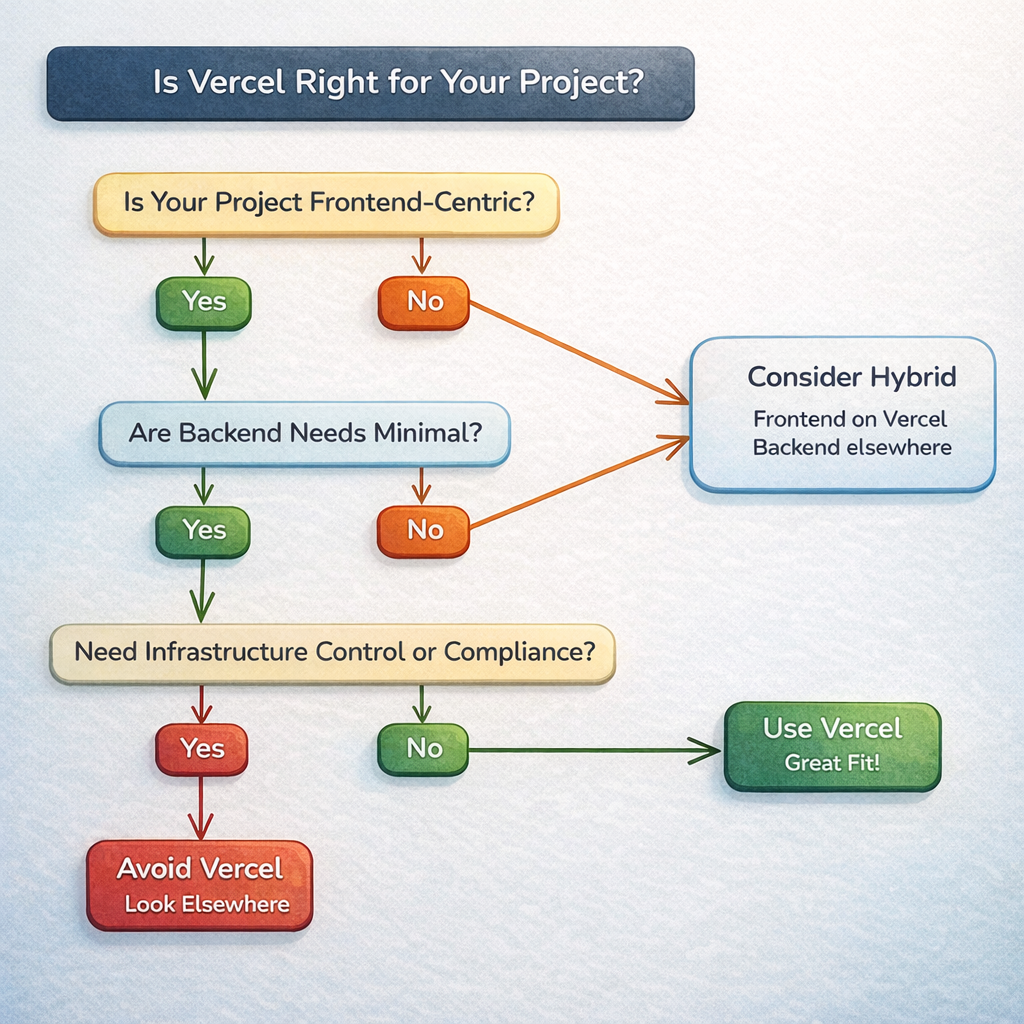
1. Is Your Project Frontend-Centric?
If your app is mostly about delivering UI – static pages, dynamic React/Svelte/Vue views, marketing sites, blogs, docs – that’s a big win for Vercel. The platform excels at this and minimizes operational overhead.
If your application depends on heavy backend compute, streaming, or stateful services, Vercel might still be part of your architecture (for the frontend), but not the only hosting solution you’ll need.
2. Do You Value Git-Driven Workflows and Preview Deploys?
Vercel’s automatic deployments and preview URLs for every branch are huge productivity boosters.
If your team thrives on collaborative Git workflows and you want simple staging environments without extra setup – that’s a strong positive.
If you don’t use Git or your workflow demands manual control of every environment, the benefit may be less dramatic.
3. Does Performance Matter to You (Without Deep DevOps)?
Vercel gives you strong defaults: edge delivery, automated caching, lightweight serverless routes, and good performance metrics out of the box.
If you want performance without configuring CDNs, caches, or servers manually, Vercel will likely feel like a win.
If you already have an advanced performance stack or need fine-grained control of caching and infrastructure, another platform might fit better.
4. Are Your Backend Requirements Lightweight?
Vercel’s serverless and edge functions are great for small to medium logic – like simple APIs, form handlers, authentication checks, and personalization.
But if you need persistent connections, long-running processes, large upload handling, WebSockets, or heavy compute, that’s a clue you’ll need backend services outside of Vercel.
5. Is Cost Predictability Important?
Vercel is easy to start with – the free tier and entry plans are generous for small projects. But as function invocations, build minutes, and bandwidth scale, you’ll want to model your usage and costs (especially for serverless functions and team plans).
If you want always-predictable bills (e.g., flat server costs), traditional cloud VMs or container clusters might make more sense.
6. Do You Need Infrastructure Control or Compliance Features?
Because Vercel abstracts away much of the infrastructure, you get simplicity – but you lose some control. If your organization needs:
- specific data residency,
- PCI/DSS or HIPAA compliance,
- custom networking (VPCs, private endpoints, etc.),
Then you’ll want to evaluate whether Vercel supports those needs or if you’ll pair it with more customizable backend infrastructure.
7. Are You Building Something That Will Grow Over Time?
If you anticipate growth – both in traffic and complexity – it’s worth planning:
- Can your tech stack evolve without major rewrites?
- Are you ready to integrate backend services later?
- Does your team understand where Vercel’s limits are?
If you answer yes (you can grow incrementally), Vercel can serve you well early and mid-stage. If your roadmap includes strong backend commitments from day one, consider a hybrid approach.
This checklist isn’t magic – but it does help you make a decision based on your project’s actual needs rather than buzzwords or trends. If you want, in the next section, we can turn this into a visual decision flow (a simple yes/no tree), which can be great for social shares or quick reference.
Final Verdict: Choosing the Right Tool for Your Product Stage
After walking through Vercel’s strengths, real-world usage, limitations, and alternatives, the final question many developers ask is simple: “Should I choose Vercel?” The honest answer isn’t a flat yes or no – it depends on where your product lives on its growth curve and what problems you’re trying to solve right now.
If You’re in the Early or Validation Stage
For prototypes, landing pages, MVPs, side projects, or early-stage products, Vercel is often a great first choice. You can:
- Deploy in minutes with minimal setup
- Get instant preview builds on every branch
- Deliver fast experiences without infrastructure overhead
That lets you focus on shipping features and validating ideas, not wrestling with servers or config files.
If You’re Growing and Scaling
As traffic and complexity grow, Vercel continues to be valuable for the frontend layer – especially if your team prioritizes performance, developer velocity, and global distribution. But this is also the point where you should think about:
- Backend systems and APIs hosted elsewhere
- Cost modeling for serverless functions and bandwidth
- Whether you need more control over infrastructure
In other words, Vercel can stay in your architecture, but it doesn’t always have to be the whole architecture.
If You’re Building Backend-Heavy Services
For products where backend logic, persistent services, long-running connections, or complex stateful systems are core to the business, Vercel is often just one piece of the puzzle. It might host your frontend or part of the edge logic, while beefier infrastructure (like dedicated cloud services or container platforms) handles the engine that powers your product.
Everyday Reality: Mixed Ecosystems Win
In practice, many teams choose a hybrid approach:
- Vercel for frontend sites, static pages, and edge functions
- Managed cloud or container platforms for APIs, databases, and backend services
- Third-party APIs for authentication, payments, or search
This lets you get the best of both worlds – the developer experience and performance benefits of Vercel, plus the flexibility and control of traditional backend hosting.
Bottom line:
Use Vercel when it smooths your workflow, accelerates delivery, and aligns with your product’s current needs. Don’t use it just because it’s popular – use it because it fits your stage, team dynamics, and technical goals.
When you evaluate tools with that mindset, you make fewer surprises and more confident decisions – and that’s what being a good developer is all about.