Are you a beginner with Figma and want to sharpen your skill set? Then you will need the Best Figma Course for beginners & in this collection, you will find the best and easy-to-follow tutorials for Figma. Here we have gathered the in-depth & best Figma tutorials for beginners. Before we start the collection of the Figma Design Course, let’s learn a bit about Figma.
Table of contents
What Is Figma?
Figma is an innovative and brilliant tool for User Interface design. It’s used by everyone from entrepreneurs and start-ups to Apple, Airbnb, Facebook, etc. Besides, it is by far one of the best tools used by modern designers and is replacing all outdated design tools of the past.
While it’s similar in many ways to apps like Adobe XD and Sketch, the fact that it runs in the browser, coupled with some awesome collaboration features, makes it unique and thus far very well received both for interface design and as prototyping software.
It is by far one of the ground-breaking tools since both the desktop and browser versions retain all of its features. Regardless of which one you choose to utilize, the web version will still astound you with how effective it is! Interface design is just one of its many advantages, too. You can easily able to modify graphic assets using this tool because of its user-friendly, intuitive design.
Figma stands out from other, comparable tools like Photoshop and Sketch mostly due to its incredible collaboration features, which allow multiple people to collaborate on a project simultaneously!
With Figma, a web-based vector graphics editor and prototype tool, you can collaborate with developers and designers to create wireframes and designs for the web and mobile. The workflow is simple for designers to understand because it is based on the same ideas as other design software like Adobe XD, Sketch, InVision, and others. While working on Figma Projects, you can use the Figma UI Kits to speed up your projects.
But what makes Figma Awesome?
Advantages of Using Figma:
To begin with, Figma offers a restricted yet free account that could help learn about and determine whether or not this application is the right fit for your company. Even though it has some restrictions, the Starter plan can help you get far if you work for yourself or own a small business.
Following are some of the advantages that make Figma preferable over other UI Design tools.
- Collaboration in Figma is simple and familiar
- Figma uses Slack for team communication
- Sharing is uncomplicated and flexible
- Embedded Figma files provide real-time updating
- It is great for design review feedback
- Also, it has Team Libraries that are ideal for designing systems
- Built to enhance design teamwork
- Automatic or On-demand file versioning
Features:
- API
- Third-Party Integrations
- Data Import/Export
- Drag & Drop
- Collaboration Tools
- Search/Filter
- Version Control
- Prototyping
- Design Management
Well, before you start the list, we recommend checking the Materio Figma Admin Dashboard UI Kit. It consists of 500+ organized components. Besides, this is one of the best Figma UI kits that is built with an atomic design system & auto layout.
This Figma Design System template also offers 3 dashboards, 100+ Screens, and light & dark modes. You can now kick start your next Figma project by using just the drag and drop pre-made components from the Assets panel. Also, you can configure them in the right sidebar. Fast and simple, as should be.

Features:
- Atomic Design
- Auto Layout
- Easy to Customize
- 500+ Components
- 100% Vector
- Light & Dark Layout
- 100+ Screens and much more
In case you are looking for a React-based NextJS admin template, then this template is also available in the React version. This Admin Panel is developer-friendly, highly customizable, and responsive.

This is one of the best Vercel Template to use for professional web apps.
Official Resources For Figma
Following are the official Figma resources that you should keep in check. If you are working on an eCommerce project then using Figma eCommerce Admin Template is a good option. Such templates come with ready-to-use Figma components and you will not need to search for them here and there.
To explore the usage of Figma, check the article: What Is Figma Used For?
Figma Courses
Figma is useful for a wide range of tasks, including wireframing, vector art, prototyping using animations, and creating UI/UX mockups. The power of this program is undeniable. Given the limitations of running web programs, working from any machine is possible due to it being web-based; you may run it from a Windows, Mac, Linux, or Chromebook without any issues.
Along with Adobe XD and Sketch, Figma is one of the main companies in the market and has experienced exponential growth in recent years, reaching 4M+ users. Therefore, it is necessary to learn Figma & master your skills with it. For that reason, here we have gathered some of the best Figma Courses that will help you learn Figma in-depth.
It is recommended to use Figma Plugins to boost your workflow. Now, let’s start the list of Best Figma Tutorials and courses. You can also consider using the Figma dashboard template for your project to speed up the design process.
Youtube Video Courses
The following are some of the best YouTube video courses for learning Figma in-depth.
2026 Figma Crash Course – Brand & UI/UX Design
In this Figma course, you will go through a complete crash course on UI and UX design, starting with brand identity basics and moving into practical design workflows. Designers use Figma as a scalable interface design tool to craft UI screens, create brand elements, and prototype interactions. This course suits both beginners and intermediate learners who want to understand how designers use Figma in real-world projects.
Moreover, this course is presented as a crash course video on YouTube, where brand logo creation and identity design are shown first, before moving into deeper UI/UX design techniques inside Figma.
This Figma course covers:
- Starting the project inside Figma and setting up artboards
- Creating a brand logo and identity design
- Introduction to UI/UX design workflows
- Building basic UI screens using Figma tools
- Designing layout and spacing for UI components
- Understanding visual hierarchy and alignment
- Applying consistency in colors and typography
After you watch this crash course, you will be more confident in combining brand identity elements with practical UI/UX design inside Figma — especially for real-world design tasks.
Figma Website Design Tutorial 2026
In this Figma course, you will be shown how to design a complete website layout inside Figma from scratch. Figma is a powerful UI/UX design tool that is used to create web screens, prototypes, and visual layouts in a simple and collaborative way. This Figma course video is perfect for beginners who want to learn real web design steps using Figma and build practical skills quickly.
Moreover, this video serves as a crash course where essential web design fundamentals are explained and applied inside Figma, making it easier for you to follow along and practice on your own.
Through this course, you will learn about the following topics:
- Setting up a new web design project in Figma.
- Creating layout frames for web screens.
- Designing navigation headers.
- Adding text, shapes, and visual elements.
- Using Figma tools to structure web page sections.
- Applying spacing and alignment for a cleaner UI.
- Refining design elements for web presentation.
- Building a simple responsive layout.
After finishing this Figma course, you will be familiar with how a website layout is built step by step inside Figma and be ready to explore more advanced UI/UX design concepts.
Figma Design for Beginners 2025 (Official — Latest Series)
In this Figma course, you will learn how to use Figma for UI design, from the basics to practical, hands-on skills. Figma is a powerful interface design and prototyping tool that UX/UI designers use widely. If you are new to Figma or just starting your journey with design tools, this course will help you build a strong foundation.
The course delivers lessons on a free YouTube playlist, arranged in a beginner-friendly sequence so you can follow along and learn step by step with confidence.
This Figma course covers the following topics:
- Getting started with Figma interface and basics
- Understanding design tools in Figma
- Creating shapes and frames
- Working with typography and text layouts
- Designing UI components and icons
- Building layouts for screens
- Prototyping simple interactions
- Many more beginner-friendly design lessons
Along with these topics, you will find additional practical tips and demo projects which are shown throughout the playlist to help you apply what you learn.
FREE Figma Web Design Course: Design a WEBSITE in FIGMA (Series)
In this Figma course, you will be guided through designing a website layout inside Figma, starting with basic structure and moving into practical UI design steps. Figma is a cloud-based design and prototyping tool used by UI/UX designers to create screens, layouts, and interactions with ease. If you want to learn how real website design is built inside Figma, then this Figma course can be very useful for you.
Along this Figma course, you will find hands-on lessons that show how simple screen parts are created and combined into a full design workflow step by step.
This Figma course covers the following topics:
- Setting up Figma workspace and files
- Designing the header menu and layout structure
- Building UI sections for website screens
- Using frames and layout tools in Figma
- Adding text, shapes, and image elements
- Applying basic UI layout and spacing
- Organizing design layers for clarity
Moreover, each lesson in this playlist focuses on a core part of web design inside Figma, so you can follow along easily and practice with your own file.
Figma Web Design Tutorials
In this Figma course, you will learn to use the Figma design tool from scratch through clear, step-by-step lessons. Figma is a cloud-based UI/UX design and prototyping platform that designers widely use to create user interfaces, layouts, and design systems. If you are new to design or just starting with Figma, this course will help you build a strong foundation.
Moreover, the course is organized as a free YouTube playlist, where each lesson guides beginners through key concepts and helps them develop practical design skills.
If you’re a beginner then, we would like to recommend using the Figma Dashboard UI Kit in your project. You will get 300+ organized Bootstrap 5 components built with an atomic design system & auto layout in this Free UI Kit.
Besides, this course will teach you to work with,
- Introduction to the Figma interface and workspace
- How to set up files and artboards for design
- Creating shapes, frames, and layouts
- Working with text, colors, and styles
- Use of tools like Auto Layout and grids
- Building simple UI elements and components
- Basic prototyping and interaction design
- Practical tips for real-world UI design problems
After going through this course, you will be familiar with the core features of Figma and able to start creating your own UI screens and layouts with confidence.
Free Figma UX Design UI Essentials Course
In this Figma course, you will learn essential UI/UX design skills using Figma as the primary design tool. Figma is a cloud-based interface design and prototyping platform that professional designers widely use to create user-friendly layouts, screens, and interactive prototypes. If you want a complete beginner-friendly course that takes you from basic concepts to real UX projects, this video course will guide you step by step.
Moreover, this course is offered as a free video on YouTube with clear lessons that are structured to help beginners understand both UI and UX aspects while practicing inside Figma.
Besides, this course will teach you the following topics in depth.
- Getting started with this Figma essentials course
- What Figma is and how it works
- Understanding the difference between UI and UX
- Creating user interfaces and prototypes
- Working with UX briefs and personas
- Designing wireframes and choosing colors, images, and fonts
- Building UI components such as buttons and icons
- Mastering key concepts like components, constraints, and variants
- Using UI kits and plugins to boost efficiency
- Creating style guides and animations
- Building interactive prototypes and preparing files for developers
- Gaining hands-on project experience and understanding real-world UX workflows
After completing this Figma course, you will have a strong foundation in both UI and UX design using Figma and be more confident in building your own design projects.
Free Figma Advanced Course: Become a Figma Pro!
In this Figma course, you will learn advanced UI and UX design skills using Figma’s powerful features. Designers widely use Figma as a cloud-based design and prototyping platform to create professional UI screens, workflows, and design systems. This course targets learners who already understand the basics and want to level up with real-world design techniques.
Moreover, this course is presented as a free advanced tutorial on YouTube, where extended lessons are shared to help you build deeper design mastery beyond the essentials.
Through this comprehensive Figma course, you will learn:
- Reviewing essential Figma basics (so advanced concepts can be understood)
- Working with advanced layout techniques
- Mastering components and variants for reusable UI design
- Managing styles and design systems in Figma
- Using constraints and auto layout for responsive design
- Combining UI elements for consistency and efficiency
- Applying practical strategies for real design projects
After completing this Figma course, you will be more confident with advanced Figma tools and workflows that are commonly used by professional designers.
Figma Tutorial for Beginners
In this Figma course, you will be introduced to Figma basics in a short and simple way that is perfect for beginners. Figma is a UI/UX design and prototyping tool that is widely used to build layouts for websites and apps. If you are completely new to Figma and want to quickly grasp the core tools and UI design steps, then this Figma course video can be very useful for you.
Moreover, because this course is presented as a crash tutorial, essential design tools and basic functions are explained clearly so that beginners can follow along without feeling overwhelmed.
This Figma course covers the following topics:
- Why Figma is used for UI and app design
- Starting a new design project in Figma
- Basic tools like frames, shapes, and text
- Working with colors and layouts
- How to organize and move UI elements
- Simple techniques to build clean interface screens
After watching this Figma course, you will be familiar with the essential tools in Figma and ready to explore more detailed UI or UX design workflows.
The 2025 UI/UX Crash Course for Beginners – Learn Figma
In this Figma course, you will learn how to use Figma for UI and UX design from the very beginning. Designers widely use Figma as one of the most popular design and prototyping tools to create user interfaces, layouts, and interactive screens. This crash-course video helps beginners quickly understand Figma’s core features and build practical design skills.
Moreover, the course explains essential design techniques in a clear, step-by-step way, so even learners with no prior design experience can follow along with confidence.
This Figma course covers:
- What Figma is and why it is used
- How to create frames and shapes
- Using basic design tools in Figma
- Working with colors and text
- Aligning and organizing UI elements
- Introduction to prototyping in Figma
After watching this Figma course, you will be comfortable with core Figma features and ready to explore more detailed UI/UX design lessons on your own.
Figma AI Courses
The following are some of the best Figma AI courses for learning Figma in-depth.
Intro to Figma Make AI
In this Figma course, you will learn how to use Figma Make, the new AI-powered design feature in Figma that helps designers turn ideas into working prototypes fast with minimal manual work. Figma Make uses text prompts to generate real UI layouts and interactive screens, so you can move from idea to prototype much faster than doing everything by hand.
In this AI-focused Figma course video, you will see real examples of how simple prompts can be used to generate high-fidelity prototypes and interactive UI content. Along the way, the video shows how Figma Make speeds up workflows and helps with both design and prototyping tasks.
By the end of this course, you will be able to:
- What Figma Make AI is and how it works with prompts
- How to turn text ideas into functioning prototypes
- How to generate UI layouts using AI
- Tips for writing prompts that produce better results
- How AI speeds up prototype building without code
- Examples of interactive screens made with AI
Next, you will see how Figma Make lets you focus more on design thinking and less on repetitive tasks, making it a great tool for beginners and experienced designers alike.
Figma AI UI/UX Design Tutorial
In this Figma course, you will learn how to use Figma AI features to design user interfaces and speed up your UI/UX workflow. Figma’s AI tools help with generating layouts, suggesting design improvements, and automating repetitive tasks, so you can focus more on creativity and less on manual work. This video tutorial shows how AI can be used inside real UI design projects, step by step.
In this course, you will learn how AI can help you generate screen ideas, organize layouts, and suggest design options to improve visual quality. You will explore real design examples and see how teams integrate AI tools directly into Figma.
By the end of this course, you will master:
- What Figma AI tools are and how they work with UI/UX
- Using AI to generate UI layouts from prompts
- How to improve design with AI suggestions
- Adding AI-generated content to Figma screens
- Tips for making AI designs look clean and professional
- Examples of real UI screens built with AI-assisted steps
Next, you’ll see how using AI inside Figma can save time and make your design process more fluid, especially when you are working on bigger screens or multiple pages.
How to Get Better UI Design with Figma Make & AI
In this Figma course, you will learn how to use Figma Make and AI to create cleaner, more intentional UI designs faster than starting from scratch. Instead of relying on generic prompts, the course teaches a stronger workflow that uses clear visual UI references to guide the AI, helping you produce more structured and professional results.
In this video tutorial, you will explore real examples that show why prompts alone often lead to average outputs and how using existing UI screenshots as visual input can generate better results with Figma Make. You will also learn how to turn those results into reusable components and a clean, scalable design system.
By the end of this course, you will be able to:
- How Figma Make understands layout, spacing, and hierarchy from visual references
- Why does prompting alone often give generic results
- How to use UI screenshots as input for AI workflows
- Tips for building a design system with reusable components
- How to refine AI-generated designs into polished UI screens
- Real workflow examples where app designs are generated and improved
Next, you’ll see how Figma Make can be used to go beyond basic AI drafting and help you build more structured layouts and reusable styles that are ready for real design projects.
Figma Make for No-Code Web Apps
In this Figma course, you’ll learn how to turn your Figma designs into functioning web apps without writing any code. This video shows how Figma’s AI power can help you go beyond static screens and actually build interactive web products using Figma Make, which helps move designs toward real application output.
First, the video walks through basic steps where you start with your visual design and then use AI tools to bring those designs to life as a prototype that feels and works like a web app. Along the way, you’ll see how design layers and AI logic work together to generate useful UI exports.
This Figma course covers the following topics:
- Overview of Figma Make and what it can do for web UI
- Turning design files into interactive prototypes
- How AI helps convert screens into app-ready layouts
- Steps to test your prototype in a live environment
- Tips for improving output quality with smarter prompts
- Real examples of functional UI elements and navigation
After you watch this course, you’ll understand not just how to design in Figma but also how those designs can be pushed further into usable web output with AI workflows.
Figma Make AI for UI Design Workflow
In this Figma course, you will learn how to use Figma AI tools to improve your UI design workflow and create better screens faster with less manual effort. The video focuses on practical techniques that guide you from initial design ideas to polished interfaces with the help of AI features inside Figma.
First, the tutorial walks you through starting a design project in Figma and activating AI tools to generate layouts, components, and design suggestions. Along the way, it shares useful tips that help you guide the AI in a way that aligns with your design goals.
This Figma course covers the following topics:
- Introduction to Figma, Make AI, and setup steps
- How AI can speed up layout creation
- Using prompts to generate UI screens
- Ways to refine AI outputs for better design quality
- How components and styles are handled with AI
- Applying interactive elements with assistive AI tips
Then, the video moves into real examples where initial screens are transformed into more complete designs with the help of AI suggestions and refinements. By the end of this course, you’ll see how your workflow can become smoother and faster.
Check out the best Figma UI Kit – Sneat

Udemy Courses
The following are some of the best UDEMY courses for learning Figma in-depth.
UI/UX Web Design in Figma 2026

In this Figma course, you will learn how to design modern, responsive websites and app layouts from scratch using Figma. Professional UI and UX designers widely use Figma as a cloud-based design tool to create polished user interfaces, interactive prototypes, and scalable design systems. This Udemy course has been updated for 2026 and guides absolute beginners step by step while also introducing practical skills used in real-world projects.
Moreover, this course targets learners who want to master core Figma tools and real-world web design workflows, so you can confidently design layouts for desktop, tablet, and mobile devices.
What you will learn:
- Setting up Figma and getting familiar with the interface
- Creating modern website and app layouts in Figma
- Mastering all essential Figma tools for UI design
- Exploring AI features and integrations for design workflows
- Using Figma Jam and Figma Site for idea generation and web building
- Designing responsive layouts for any screen size
- Choosing colors and fonts the right way
- Working with images, grids, and visual elements
- Building wireframes and turning them into full interfaces
- Learning UX fundamentals alongside UI design logic
- Creating animations, sliders, and interactions in Figma
- Communicating with clients and writing design briefs
After completing this Figma course, you will gain confidence in designing professional-quality web interfaces, improving your design workflow, and preparing work that can be showcased in your portfolio.
Master Figma — Beginner to Pro Class

In this Figma course, you will progress from an absolute beginner to an advanced level through a clear and practical learning path. Figma is a powerful UI and UX design tool that designers use to build interfaces, wireframes, prototypes, and complete design systems. This Udemy course is designed especially for beginners who want to master core Figma features quickly and then move confidently toward real-world design workflows.
Moreover, this course uses a self-paced format, so you can learn step by step at your own pace and practice each concept with the exercises and files the instructor provides.
What you will learn:
- Setting up your free Figma account and learning the interface
- Creating complete UI designs from scratch using frames, shapes, and grids
- Using components and instances for reusable design elements
- Applying variables, color styles, and text styles for a consistent design
- Designing responsive layouts with Auto Layout and constraints
- Adding basic prototyping to bring your screens to life
- Sharing designs and collaborating with developers
- Building simple micro interactions and hover effects
- Using Figma community files and plugins to speed up your workflow
After completing this Figma course, you will be comfortable with both beginner and intermediate Figma features, and you will be able to design real UI screens, collaborate with teams, and develop a solid workflow used by professional designers.
Master Figma UI/UX Prototyping — Basic to Advanced Level

In this Figma course, you will master UI and UX design and prototyping skills, starting with the basics and progressing to advanced techniques. Designers use Figma as a popular design and prototyping tool to create interactive mobile and web app screens. This Udemy course guides learners from simple design foundations to advanced prototyping workflows used in real-world projects.
Moreover, the course works as a complete bootcamp, where you build practical projects that show how designers create complex interfaces and interactions, helping you practice each concept and strengthen your portfolio.
What you will learn:
- Setting up Figma and understanding essential tools
- Basics of UI/UX design foundations and layout principles
- Prototyping from basic to advanced levels (including hover, drag, and animation triggers)
- How to build real-world interactive prototypes with transitions and effects
- Uses of prototyping in real mobile and web apps
- Zooming and hover prototyping techniques
- Understanding different types of prototypes and when to use them
- Accordion, range slider, notification, and text animation prototyping
- How to use triggers like on click, on hover, after delay, and more
- Projects such as ride-sharing apps, e-commerce apps, chat app interfaces, and music player UI designs
After completing this Figma course, you will be confident in using Figma’s prototyping and UX workflows, and you will be ready to apply advanced prototyping techniques to your own designs or professional work.
Figma UX/UI Design & User Experience Essentials
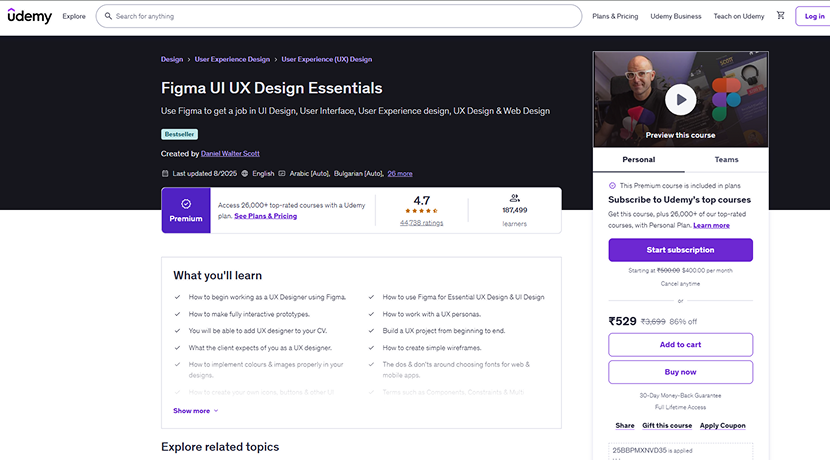
In this Figma course, you will learn to design user interfaces and user experiences with Figma, starting from the basics and building up to practical, hands-on skills. Designers widely use Figma as a UI and UX design and prototyping tool to create clean layouts, interactive prototypes, and real-world projects. This Udemy course focuses on beginners and aspiring UI/UX designers who want to master both the tool and the design thinking process.
Moreover, this course is structured to cover essential UX concepts, real design workflows, and interactive project steps so you can follow along at your own pace and build a practical portfolio.
What will you learn:
- How to begin working as a UX designer using Figma
- Mastering Figma for essential UX design and UI design
- Creating fully interactive prototypes with transitions and animations
- How to work with UX personas and briefs
- Understanding client expectations in UX design
- Creating simple wireframes and layout structures
- Best practices for using colours and images in design
- Choosing fonts – dos and don’ts – for mobile and web
- Building your own UI icons, buttons, and components
- Understanding terms like components, constraints, and variants
After completing this Figma course, you will confidently understand essential UI and UX design concepts, work efficiently with practical workflows in Figma, and create engaging design projects that you can add to your portfolio or use in professional work.
Books
Following are some of the best Books for learning Figma in-depth.
Design Beyond Limits with Figma

Design Beyond Limits with Figma goes beyond beginner tutorials and shows how teams use Figma in real professional workflows. The book covers advanced techniques for collaboration, design systems, prototyping, AI integration, and more, with over 50 practical solutions for modern UI and UX teams.
The book targets designers who already know the basics of Figma and want to strengthen their skills in teamwork, complex interface design, and large-scale projects. It also helps product managers and developers who work closely with design teams understand how modern design workflows are structured.
What you will learn:
- Advanced collaboration workflows that help design teams work together smoothly
- Building scalable design systems with tokens, components, and variables
- Efficient handoff methods using developer tools and specs
- Creating accessible, scalable libraries that follow design standards
- Using AI and plugins to automate repetitive tasks and speed up work
- Techniques for engaging stakeholders and running clear design reviews
- Strategies to streamline prototype creation and team feedback loops
Along the way, the author shares real-world patterns and expert tips that help you solve common design challenges and improve your process across multiple projects.
Figma for Designers and Developers 2026

Figma for Designers and Developers 2026 is a practical guide that teaches how to design responsive user interfaces and interactive prototypes using Figma, especially for modern web and mobile experiences. This book helps designers and developers work together, build reusable components, and keep design consistency across projects; a valuable skill as digital design keeps evolving.
This book is for people who already understand the basics of Figma and want to explore real-world design workflows in depth. It helps both UI and UX designers and front-end developers learn how teams integrate Figma into actual product design and development processes.
You will learn about:
- How to build responsive layouts that adapt across screens: desktop, tablet, mobile
- Creating reusable components that speed up design and teamwork
- Implementing interactive prototypes to communicate design behaviour
- Tips for keeping design consistency across different screens and projects
- Ways to improve collaboration between designers and developers using Figma
Along the way, practical examples and layouts are provided so you can see how real UI solutions are crafted in Figma, from early sketches to final responsive designs.
Figma Design Guide for Beginners

Figma Design Guide for Beginners helps you start designing modern digital products with Figma through a practical and friendly approach. The book targets beginners who want to build a strong foundation in interface design and workflow basics, while also offering insights into design thinking and collaboration that support your growth as your skills improve.
This Figma book doesn’t just list commands; it teaches how to think like a designer while using Figma’s tools to make real screens, layouts, and prototypes. You will learn to structure ideas, organize your workspace, and build UI that feels intentional and clear.
You will learn about:
- How to set up your design workspace and get comfortable with Figma’s tools
- Ways to turn ideas into structured designs with frames, shapes, and text
- How to create and manage reusable UI elements and styles
- Techniques for building responsive layouts and interface structures
- How to prototype simple interactions and flows
- Tips for thinking through design problems and producing thoughtful solutions
Along the way, this book emphasizes creative thinking, collaboration, and user empathy; qualities that help you design in a way that serves real users, not just make pretty screens.
Bonus:
Free Figma Bootstrap 5 UI Kit

Figma Bootstrap UI Kit comprising 300+ organized Bootstrap 5 components built with an atomic design system & auto layout. Kickstart your next Figma project Just drag and drop pre-made components from the Assets panel. Configure them in the right sidebar. Fast and simple, as should be.
Features:
- Auto Layout
- Resize any components horizontally or vertically
- 300+ organized Bootstrap 5 components built with atomic design
- Easy to customize
Conclusion:
Well, it is essential to take the help of the best Figma Course while learning it. Courses and tutorials are a great source to gain in-depth knowledge of any field. Therefore, to help you with learning Figma, we made this collection of the best tutorials and courses for Figma, including a dedicated list of Figma AI courses to help you learn modern, AI-powered design workflows.
It is a well-known fact that Figma is by far one of the most used design tools. And why not? Figma combines the features and capabilities of Sketch + Abstract + InVision + Craft + LiveShare + Freehand + Zeplin + Dropbox, as well as many others. It comes with features like Prototyping, built-in commenting, Version control, Multiplayer collaboration, and now powerful AI features that help designers work faster and smarter.
Therefore, Figma is something you shouldn’t ignore. If you are an aspiring UI/UX designer and want to start your career as a web designer, then it is crucial to sharpen your skills with Figma. Through the mentioned Figma courses, tutorials, and the newly added Figma AI learning resources, you can learn this tool more easily and stay updated with modern design workflows.
We hope you all find this collection helpful and noteworthy.