Table of Contents
The ticket says users are being logged out at random. Nobody can reproduce it. It never happens on localhost, it never happens on staging, and the two developers who tried to reproduce it on the office wifi both failed. Meanwhile, support keeps forwarding the same complaint, usually from people on mobile networks.
This class of auth bug has one root cause with several disguises. Somewhere in the request path, an address is being used as part of an identity decision, and that address is either wrong or unstable. It is one of the few problems in web development that you genuinely cannot debug from your own machine, because your own machine has exactly the one thing production users do not have: a single, stable, correctly reported IP.
Where an address sneaks into an auth flow
Most teams do not deliberately bind sessions to IP addresses. It happens through four mechanisms that are all reasonable in isolation.
- Rate limiting and throttling keyed on the client address, which is the framework default in both Laravel and ASP.NET Core.
- Session or token validation that stores the address at login and compares it on each request, usually added after a security review.
- Load balancer stickiness that routes a user to one instance, combined with instances that cannot decrypt each other’s cookies.
- Fraud or abuse scoring in a third party service that sees a changing address as account takeover. For applications that also monitor identity-related risk, an identity monitoring service can provide another layer of visibility into suspicious activity without relying solely on a user’s IP address.
The failure only appears when the address the server reads is not the address you think it is reading. That is almost always a proxy header problem.
The trusted proxy problem, in Laravel
Put a load balancer, an nginx layer, or a CDN in front of a Laravel app and every request arrives from the same place. Unless the framework is told to trust the forwarding layer, the client address becomes the address of that layer for every single user.
Under the hood Laravel delegates to Symfony, which walks the X-Forwarded-For header from right to left and returns the first entry that does not belong to a trusted proxy. With no proxies configured, it ignores the header entirely and hands back the remote address of the immediate peer, which is your own load balancer.
In Laravel 11 and later this is configured in bootstrap/app.php:
->withMiddleware(function (Middleware $middleware) {
$middleware->trustProxies(at: ‘*’);
})
Older applications carry an app/Http/Middleware/TrustProxies.php class with a $proxies property that does the same job. Either way, the important detail is that trusting every hop is only safe when your origin cannot be reached except through the balancer. If the origin is publicly routable, anyone can send an X-Forwarded-For header of their choosing and become whichever address suits them, which turns your rate limiter into decoration and your audit log into fiction. Restrict the value to your balancer’s range when you can.
The reason this shows up as an auth bug rather than as a logging bug is the throttle definition most projects ship with:
RateLimiter::for(‘api’, function (Request $request) {
return Limit::perMinute(60)->by($request->user()?->id ?: $request->ip());
});
Read that with a broken ip() call in mind. Every unauthenticated request in the entire application shares one bucket. Login attempts, password resets, and the token refresh endpoint all draw from the same sixty per minute. At low traffic nothing happens. Cross the threshold and users start receiving 429 responses on login, which most front ends surface as a failed session and handle by redirecting to the login page. The logout loop is now fully formed, and it will correlate with traffic volume rather than with anything a developer can reproduce.
The same trap in ASP.NET Core
The .NET version of this has an extra step that catches people. Calling UseForwardedHeaders is not enough, because the middleware ships with KnownNetworks and KnownProxies preloaded with loopback only. Headers arriving from anything else are discarded silently.
var options = new ForwardedHeadersOptions {
ForwardedHeaders = ForwardedHeaders.XForwardedFor | ForwardedHeaders.XForwardedProto
};
options.KnownNetworks.Clear();
options.KnownProxies.Clear();
app.UseForwardedHeaders(options);
Clearing both collections accepts the header from any peer, so the same warning applies as above. Ordering matters too. UseForwardedHeaders has to run before authentication and before anything that reads the scheme, otherwise a request that arrived over HTTPS looks like plain HTTP to the cookie middleware, secure cookies get dropped, and you are back to mystery logouts.
While you are in that file, check the Data Protection configuration. Auth cookies and antiforgery tokens are encrypted with the key ring, and a containerised app that persists keys to the local filesystem generates a fresh ring per instance. Two replicas behind a balancer will then reject each other’s cookies. The symptom is indistinguishable from an IP binding problem: users are logged out when they happen to land on the other instance. Persist the ring to shared storage and the class of bug disappears.
Reproducing it on purpose
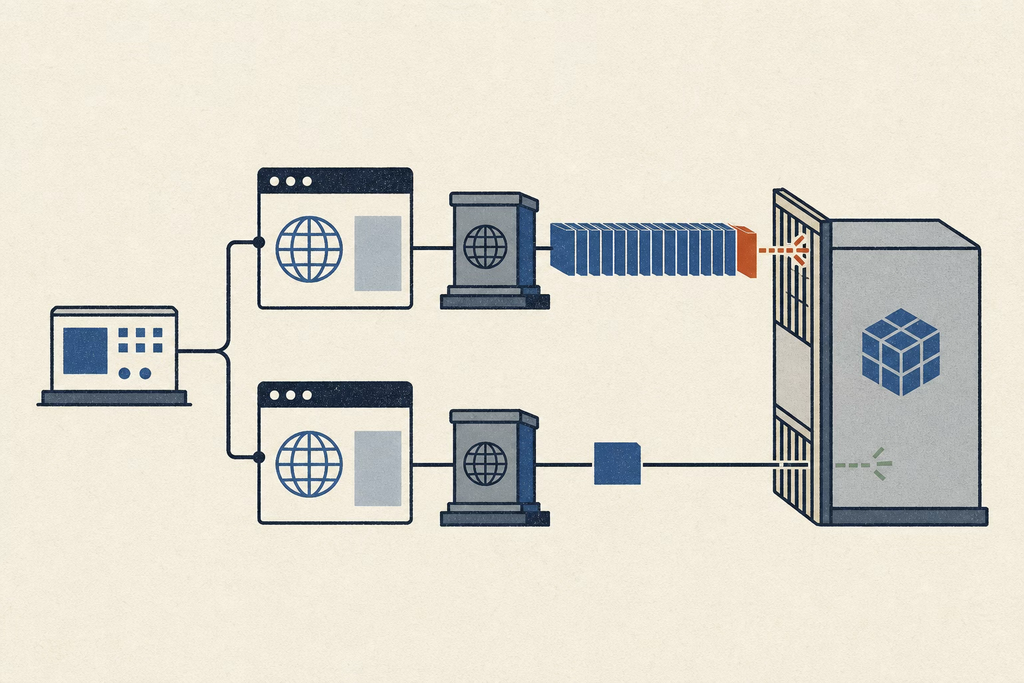
Reading code gets you a hypothesis. Confirming it needs a request that arrives from a known address, because the assertion you actually want to make is about what the server believes. Add a temporary diagnostic route that echoes back the resolved client address and the raw forwarding header, then call it from somewhere that is not your office.
Route::get(‘/_debug/ip’, fn (Request $r) => [
‘resolved’ => $r->ip(),
‘xff’ => $r->header(‘X-Forwarded-For’),
]);
If resolved comes back as your balancer for every caller, the diagnosis is finished in one request. The harder assertions are the behavioural ones. Does the sixty first request in a minute from address A affect address B? Does a session survive when the address changes mid flight? Neither question can be answered from a single machine on a single connection, and neither can be answered from CI, where hosted runners share egress addresses across many customers and hand you throttling that has nothing to do with your code.
What the test needs is two or three fixed egress addresses you control, which is why teams building this kind of harness buy ISP proxies rather than reaching for a rotating residential pool. Rotation is actively wrong here. A pool that changes address on every request destroys the session you are trying to observe, and you end up measuring the pool instead of the application. A static address on a consumer provider stays constant for the length of a test run, which is the property that makes the assertion meaningful.
Wiring it into a suite takes very little. Most HTTP clients honour the HTTPS_PROXY environment variable, so the same test file runs locally and in CI with no code change. For browser level checks, Playwright accepts a proxy per browser context, which lets one spec drive two contexts from two different addresses in the same run:
const a = await browser.newContext({ proxy: { server: PROXY_A } });
const b = await browser.newContext({ proxy: { server: PROXY_B } });
Now the throttle test is expressible. Exhaust the limit from context A, then assert that context B still receives a 200. If it does not, your limiter is keyed on something shared, and you have reproduced the production bug on demand.
The front end half of the problem
Not every random logout is a server bug. Two front end patterns produce the identical symptom, and both are worth ruling out before touching infrastructure.
The first is refresh token rotation racing across tabs. If your refresh endpoint invalidates the old token as it issues a new one, and reuse of an old token revokes the whole token family, then two tabs waking from sleep at the same moment will both present the same refresh token. One succeeds, the other trips reuse detection, and the user is signed out of every tab at once. The fix is to serialise refresh across tabs rather than to weaken the detection. A lock in localStorage works, a BroadcastChannel works better, and a single shared promise in the interceptor handles the common case where several requests fail with a 401 simultaneously.
The second is cookie attributes. A session cookie set with SameSite=Lax will not be sent on a cross site POST, which is precisely how a user returns from some identity providers. The browser drops the cookie, the app sees an anonymous request, and the redirect chain starts over. In a Laravel and Sanctum setup the neighbouring mistake is SESSION_DOMAIN and the stateful domain list disagreeing about subdomains, so the CSRF cookie is issued for one host and read from another.
Deciding what to actually fix
Once the mechanism is identified, the remediation is short. Read the table below as a priority order rather than a menu.
| Symptom | Likely cause | Fix |
| All users share a throttle bucket | Proxies not trusted, ip() returns the balancer | Configure trusted proxies, scoped to the balancer range |
| Logouts correlate with traffic | Login or refresh route hitting a shared limit | Key the limiter on user id, fall back to address |
| Logouts alternate per request | Instances cannot decrypt each other’s cookies | Share the Data Protection key ring or session store |
| Only mobile users affected | Session validated against a stored address | Drop the address check, bind to device or token instead |
| Logouts after an external redirect | SameSite blocking the cookie on cross site POST | Set SameSite=None with Secure, or keep the flow same site |
The one item worth arguing about is the address check. It gets added because it sounds like defence in depth, and it fails constantly in practice. Mobile users change carrier address during normal handover. Users behind carrier grade NAT share an address with thousands of strangers, so the check passes for the wrong people and fails for the right ones. If the goal is detecting stolen tokens, token binding and reuse detection do the job without punishing anyone who walks out of a building.
A short pre release checklist
- Hit the diagnostic route through the real balancer and confirm the resolved address is the caller, not the infrastructure.
- Confirm the trusted proxy value is a range rather than a wildcard, unless the origin is unreachable from outside.
- Exhaust a rate limit from one address and assert a second address is unaffected.
- Restart one instance mid session and confirm the session survives on the other.
- Open the app in three tabs, let the access token expire, and confirm exactly one refresh request goes out.
- Check that the login and refresh routes are not sharing a limiter with public read endpoints.
None of this is exotic work. It takes an afternoon and it removes a category of ticket that otherwise stays open for months, because the people who can reproduce it are not the people who can read the middleware stack. The reason it stays unfixed for so long is simply that a developer on a stable connection is the least likely person in the system to ever see it happen.
FAQ
Is trusting all proxies with a wildcard ever acceptable?
Only when the application cannot receive traffic except through the balancer, which means a private subnet or an equivalent network policy. If the origin answers a direct request from the internet, a wildcard lets any caller declare its own address.
Why not just use a VPN to test from another address?
A consumer VPN gives you one shared address at a time and no way to run two callers from two known addresses in the same test. Endpoint locations are also frequently mislabeled, which matters if any part of the behaviour under test is geographic.
Should the rate limiter ever fall back to the IP address?
Yes, for unauthenticated routes there is nothing better available. The point is that it should be a fallback after user id rather than the primary key, and that the address it uses has to be the real one.
Does any of this apply to a static front end on a CDN?
The cookie and refresh token parts do, because they live in the browser. The throttling and proxy header parts belong to whatever API the front end talks to, which is where the address is resolved.
How do I tell an instance affinity problem from an address problem?
Check whether the logouts alternate. Cookie decryption failures tend to flip on roughly every other request as the balancer rotates instances, while throttling and address checks produce sustained failures that clear after a fixed window.