Looking for the best VS Code Laravel Extensions for your next projects? Then check the collection of the 10+ Best laravel vs Code extensions to boost your productivity. Before we start the collection, let’s get to know about laravel and VS Code extensions.
Table of Contents
About Laravel:
Laravel is a free, open-source PHP web framework, created by Taylor Otwell and intended for the development of web applications following the model–view–controller architectural pattern and based on Symfony. The latest version is Laravel 11.
Laravel attempts to take the pain out of development by easing everyday tasks used in the majority of web projects, such as authentication, routing, sessions, and caching. It is primarily used for building custom web apps using PHP. It handles many things that are annoying to build yourself, such as routing, templating HTML, and authentication.
Thus, it is really a good choice for web development. Also, if you are working with laravel projects, you may need to keep the Laravel Package List handy. Laravel packages will help you smoothen your development process.
Now, while working on a laravel project you can always take the help of the best Laravel admin templates to save time and develop the best web app.
The Admin dashboard template is basically a collection of web pages created with HTML, CSS, and JavaScript or any JavaScript libraries used to construct the backend user interface of an online application.
Advantages of Laravel:
Web applications developed using Laravel Services have performance relatively higher than their counterpart services. The presence of caching systems in Laravel is a big reason. The file cache driver stores a variety of cached items inside the file system, offering a chance to promptly develop web applications.
Following are some of the considerable advantages of Laravel:
- Easy Unit Testing
- Top-level security mechanism
- Superior performance
- Faster Time-to-market
- Robust and powerful authentication
- Powerful community support
- Database Migration
- Multilingual capabilities
- Blade Templating
If you are a beginner looking for project inspiration and want to practice it, then you will find the Laravel Projects with source code extremely helpful. These projects will help you sharpen your skills.
What are VSCode Extensions?
VS Code extensions let you add languages, debuggers, and tools to your installation to support your development workflow. VS Code’s rich extensibility model lets extension authors plug directly into the VS Code UI and contribute functionality through the same APIs used by VS Code.
With support for hundreds of languages, VS Code helps you be instantly productive with syntax highlighting, bracket-matching, auto-indentation, box selection, snippets, and more. Intuitive keyboard shortcuts, easy customization, and community-contributed keyboard shortcut mappings let you navigate your code with ease.
We also recommend using the best IDE in Programming to boost your workflow. IDEs can help you work effectively and also save you time by providing you with the best development environment.
Now, let’s start the collection of VS Code Laravel Extensions for developers.
Check out the latest JetShip – Laravel SaaS Starter kit.

VS Code Laravel Extensions:
Following are some of the best VS Code extensions for Laravel developers. These extensions will help you boost your productivity and ease your development.
– Install Visual Studio Code
– Install the Laravel extension for Visual Studio Code. To do this, open Visual Studio Code and click on the Extensions icon on the left-hand side of the window. Pick any you want.
– Install the Laravel extension for Visual Studio Code. To do this, open Visual Studio Code and click on the Extensions icon on the left-hand side of the window.
– Enable the extension and run the project

This free Material Design Dashboard is one of the best resource for developing engaging web apps.
VSCODE Laravel Extra Intellisense

The “VS Code Laravel Extra Intellisense” extension enhances the development experience for Laravel developers using Visual Studio Code. It integrates seamlessly with the code editor, providing intelligent suggestions and autocompletion specific to Laravel syntax. This extension proves invaluable for streamlining coding tasks, reducing errors, and boosting overall productivity in Laravel projects.
Developers utilizing VS Code for Laravel projects will appreciate the time-saving features this extension brings to the table. From quick navigation to efficient code completion, “VS Code Laravel Extra Intellisense” stands out as a valuable tool for those seeking a more intuitive and accelerated Laravel development workflow.
Features:
- Intelligent code suggestions
- Enhanced autocompletion for Laravel syntax
- Streamlined code navigation
- Time-saving features for increased productivity
Laravel blade snippets

The Laravel Blade snippets extension adds syntax highlight support for Laravel Blade to your VS Code editor. Besides, it offers blade snippets and blade syntax highlights support for VSCode. Furthermore, it also consists of a set of triggers that, when typed, give the respective blade snippets. This also makes your blade templating easier and faster.
Features:
- Blade syntax highlight
- Blade snippets
- Emmet works in blade template
- Blade formatting
Laravel Snippets

Another one in the list of VS Code Laravel Extensions is the Laravel Snippets extension. It adds snippets for the Facades like Request::, Route:: etc. Besides, this package also gives Laravel snippets to use in VSCode when building our applications. Instead of typing out longer Laravel commands, you just use prefixes like: Auth, Cache, Config, Route, Mail, View etc.
Some of the supported snippet prefixes include:
- Auth
- Broadcast
- Cache
- Hash
- Helper
- Log
- Config
- Console
- Cookie
- Crypt
- DB
- Event
- View and many more.
DotENV

The DotENV VS Code extension is used to highlight the syntax of your .env file, which could be quite handy for spotting some problems.
Sneat Bootstrap 5 HTML Laravel Admin Template (Best Laravel Admin Template💥)

Sneat Bootstrap 5 Laravel Admin Template – is the most developer-friendly & highly customizable Laravel Admin Template based on Laravel 11 and Bootstrap 5. If you’re a developer looking for the latest Laravel templates that are developer-friendly, rich with features, and highly customizable look no further than Sneat.
Furthermore, you can also build premium-quality single-page applications with ease by using this best laravel dashboard. It also comes equipped with ready-to-go templates including 3 niche dashboards, and carefully crafted 10 Applications.
Additionally, this Admin panel dashboard comes with unique and useful tools such as Quick Search, Dark, Semi-Dark & Bordered layout options, Advanced cards, and Charts.
Features
- Based on Bootstrap 5.3.2
- Laravel 11
- Integrated CRUD App
- Vertical and horizontal layouts
- Default, Bordered & Semi-dark themes
- Light & Dark mode support
- Jetstream and ACL Ready
- Localization & RTL Ready
- 5 Dashboards
- 10 Pre-designed App
- 2 Chart libraries, and many more.
If you are looking for a Laravel-based VueJS Admin Template then do check the Sneat VueJS Laravel Admin Dashboard.

Apart from that, this Laravel Admin Dashboard provides you with 45+ Basic and advanced Cards for eCommerce Analytics, CRM, Statistics, and Interactive Charts.
Laravel Artisan

The Laravel Artisan extension makes running artisan commands a breeze when using Laravel. To use it, you just need to trigger the VSCode command palette by pressing Ctrl+Shift+P and then typing Artisan and the artisan commands will show up to be executed.
Features:
- Make files like Controllers, Migrations, etc.
- Run Your own Custom Commands
- Manage your database
- Clear the Caches
- Generate Keys
- View all application routes
- Manage your local PHP server for test purposes
Laravel Extra Intellisense
The Laravel Extra Intellisense extension provides auto-completion for Laravel in VSCode. Besides, this extension runs your Laravel application automatically and periodically to get the information needed to provide autocomplete.
The extension comes with auto-completion for:
- Views and variables
- Route Middlewares
- Configs
- Route names and route parameters
- Laravel mix function
- Translations and translation parameters
- Validation rules
- Env
- View sections and stacks
Laravel goto View VScode extension

The Laravel Go to View VScode extension allows you to go from your Controller or Route to your view. You can use <strong>Ctrl + Alt + Click</strong> to jump to the first matched Blade View file. It works similarly to the Laravel goto Controller extension.
Laravel Blade Formatter
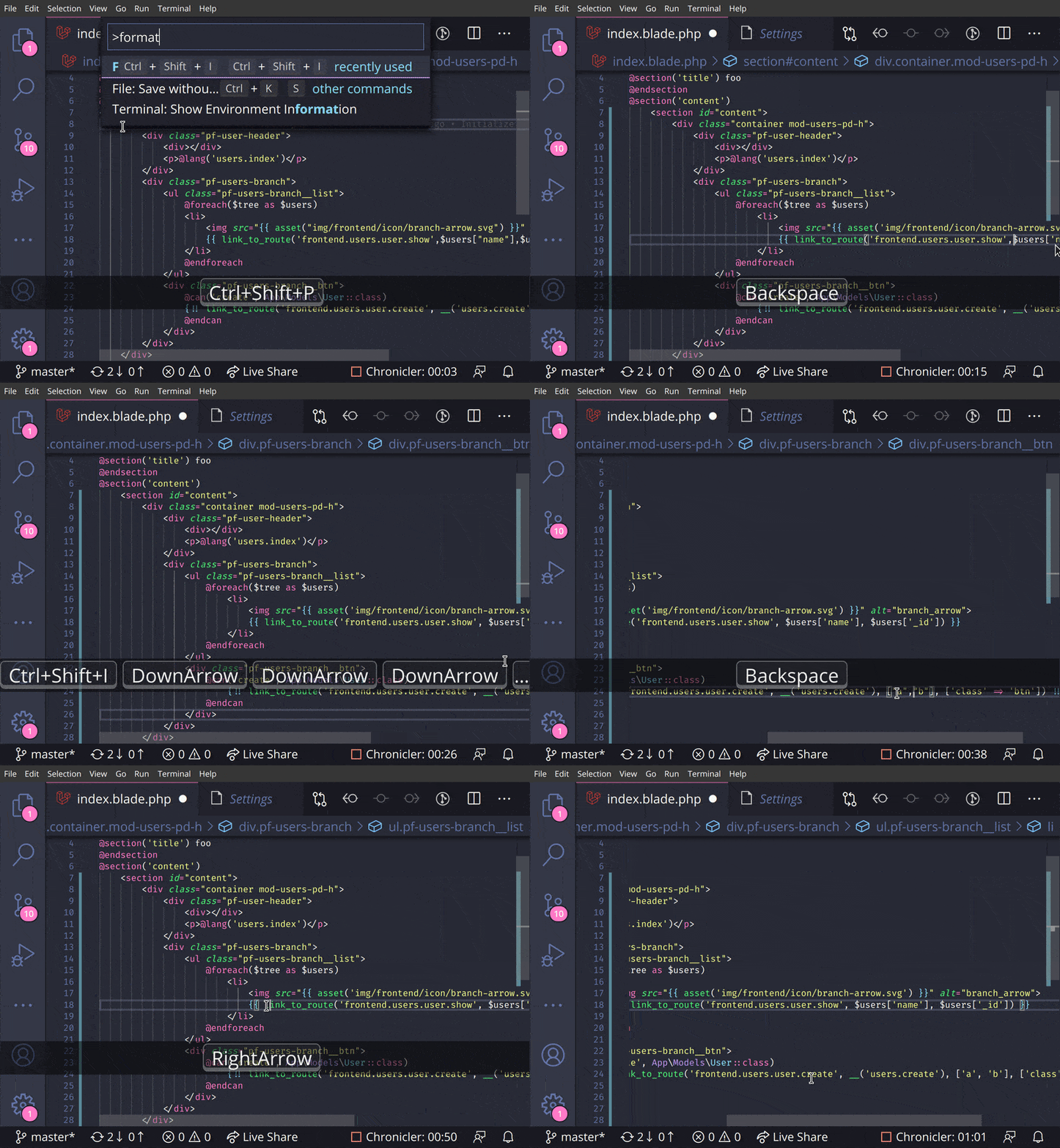
Blade-formatter is an opinionated Blade file formatter for VSCode. You can also format by the same syntax programmatically with the blade-formatter that this extension relies on.
Features:
- Automatically Indents markup inside directives
- PHP 8 support (null safe operator, named arguments)
- Automatically add spacing to blade templating markers
- PSR-2 support (format inside directives)
Now, we’d like to suggest a useful open-source resource for developers. Check out one of the best Next js free templates (Dashboard).

This is one of the best Vercel Template to use for professional web apps.
This React Admin Dashboard contains all the commonly used pages to develop any kind of application that will ease the developer’s efforts.
Also available in AspNET Core MVC Admin Template Free version

This Material Design Admin Dashboard is one of the best resource for developing engaging web apps.
File Utils

File Utils extension mainly comes to help when you want to rename, duplicate, move, or delete files and directories. Here, you no longer have to open the file explorer in the sidebar to perform these actions.
To use the File Utils , you just need to run Ctrl + P and then type File and the options will pop up for you to decide what you want to do with the file in question.
This plugin helps generate helper files for better code suggestions for laravel.
Laravel IDE Helper

This plugin helps generate helper files for better code suggestions for Laravel.
Features:
- Improved Laravel code suggestion of
facades. - Laravel code suggestion of
models. - Laravel code suggestion of
macrosare improved as well.
Conclusion:
So, here is the collection of the best 10+ VS Code Laravel Extensions for web developers. These Laravel VS Code extensions will help you boost your productivity.
Well, VS Code extensions are extremely helpful for developers as they ease the process of web development and also save lots of time. Thus, using extensions in projects is always helpful.
While working on the Laravel project you will need some extensions. So, to save you time we have gathered up some of the best VS Code Extensions for Laravel here. Also, in case you need any admin template while working with the Laravel project, we suggest using Sneat Bootstrap 5 HTML Admin Template & Materio VueJS Laravel Admin Template for it.
We hope you find this collection helpful. Do tell us which Laravel vs code extension you are using and which one from the list you find the most helpful in the comment section below.
In case you are interested in VueJS vs codes then you can check the VSCode Extensions for VueJS
Also, don’t forget to share..!! Happy Coding.🙂
Apart from this, we also suggest using UI kits while working on any web apps as UI kits are very helpful to create appealing web apps.