If you’re reading this, you’re likely on the hunt for a better React table library solution; one that eases your work, not just checks a box. We get it: sifting through GitHub repos and patchy docs for something as fundamental as a table should not feel like a chore. Well, React table component libraries are essential tools for developers building data-driven web applications.
Whether you’re creating dashboards, data grids, or interactive spreadsheets, choosing the right React table component library can significantly impact your project’s performance, usability, and development speed.
In this collection, we have collected the best 9 React table libraries that come with awesome React table components.
Now, let’s start the collection.
Table of contents
What Are React Table Components?
React tables are UI components built with React, a JavaScript library, to display and manage tabular data in web applications. Besides, they provide a structured way to present data in rows and columns, often with features like sorting, filtering, pagination, and editing.
Unlike static HTML tables, React tables are dynamic, using React’s component-based architecture for interactivity and efficient updates. They can be customized to handle large datasets, integrate with APIs, and support user interactions, making them ideal for dashboards, data grids, or any data-heavy interface.
Moreover, popular libraries like TanStack Table, Material-UI Data Grid, and AG Grid offer pre-built solutions with varying levels of flexibility and functionality.
Why Use React Table Component?
While not every project demands a React table library, there are clear scenarios where they become necessary:
- Dynamic Data Handling: Easily manage and update large datasets with React’s efficient rendering.
- Interactivity: Built-in features like sorting, filtering, pagination, and editing enhance user experience.
- Customizability: Tailor appearance and functionality to match specific project needs.
- Component-Based: Integrates easily with React’s ecosystem for modular, reusable code.
- Performance: Optimized for fast rendering, even with complex or large tables.
- Extensibility: Supports integration with APIs, state management, and 3rd party libraries.
- Community Support: Popular libraries offer robust documentation and active communities.
Best React Table Library:
If you’re reading this, you’re likely on the hunt for a better table solution; one that eases your work, not just checks a box. We get it: sifting through GitHub repos and patchy docs for something as fundamental as a table should not feel like a chore.
So, to save you time by clearly explaining what each library excels at and when it might not be the right fit, we have prepared this article that dives into the 9 best React table libraries for 2025, covering their features, strengths, weaknesses, use cases, and key factors to consider when choosing one.
Let’s check them out:
React Virtualized

React Virtualized focuses on rendering large lists and tabular data efficiently through virtualization, minimizing DOM elements for optimal performance.
Key Features:
- Windowing for rendering only visible rows & columns.
- Dynamic content loading and smooth scrolling.
- Column resizing and cell range selection.
- Support for fixed headers and columns.
- Custom cell renderers.
Pros:
- High performance with large datasets (e.g., thousands of rows).
- Reduces memory usage by rendering only visible elements.
- Flexible for dynamic and scrollable tables.
- Lightweight and focused on performance.
Cons:
- Limited UI flexibility, requires custom styling.
- May constrain design options for complex UIs.
- Less feature-rich compared to AG Grid or Material Table.
Use Cases:
- Applications with large, scrollable datasets.
- Performance-critical projects with minimal UI requirements.
- Dynamic tables with frequently updating data.
Getting Started:
Install react-virtualized using npm:
npm install react-virtualized --saveReact Virtualized has very few dependencies, and most are managed by NPM automatically. However, the following peer dependencies must be specified by your project in order to avoid version conflicts: react, react-dom.
NPM will not automatically install these for you, but it will show you a warning message with instructions on how to install them.
For further details, see the documentation.
TanStack Table (React Table Component Library)

TanStack Table, previously known as React Table, is a headless library that provides the logic for building powerful tables without dictating the UI.
Besides, its flexibility and performance make it a top choice for developers who need full control over styling and functionality.
Key Features:
- Agnostic core (JS/TS)
- 1st-class framework bindings for React, Vue, Solid
- Sorting, filtering, pagination, grouping, and row selection.
- Virtualization via TanStack Virtual for handling large datasets.
- TypeScript supports excellent type safety.
- Robust plugin ecosystem for extensions like column resizing and drag-and-drop.
- Lightweight bundle size (~15kb or less).
- Server-side/external data model support
- Auto out of the box, opt-in controllable state
Pros:
- Highly customizable due to its headless nature.
- Framework-agnostic, works with React, Vue, Solid, and more.
- Strong TypeScript integration for fast development.
- Small footprint, ideal for performance-critical applications.
Cons:
- Steeper learning curve for beginners due to the need to build custom UI.
- Requires manual styling, which can increase development time.
- Advanced use cases may lack detailed documentation.
Use Cases:
- Custom data grids with unique UI requirements.
- Applications requiring high performance with large datasets.
- Projects needing TypeScript support and extensibility.
Getting Started:
Install:
npm install @tanstack/react-tableWe have used Tanstack Table in our React template: Materio MUI NextJS Admin Template. You can check the demo.

Materio MUI is one of the best NextJS templates. With these Next.js themes, users can quickly and easily create custom web applications that meet their specific requirements.
The template includes a range of pre-built components and layouts, such as charts, tables, forms, and widgets, that can be easily customized to fit the needs of any project.
Features:
- Built with Next.js v15 (App Router)
- Built with MUI Core v6 stable version
- Tailwind CSS 4
- 100% React hooks & Functional Components
- React Context API
- Includes Both TS & JS Versions
- Next Auth support
- Internationalization/i18n & RTL Ready
- Code Splitting, Lazy loading
AG Grid

AG Grid is an enterprise-grade data grid known for its robustness and extensive feature set. Additionally, this React table library is also widely used in professional applications where performance and scalability are critical.
Key Features:
- Mapping Values
- Text Formatting
- Cell Components
- Resizing Columns
- Sorting, filtering, pagination, and row grouping.
- Virtualization for large datasets.
- Excel-like features (e.g., copy & paste, cell editing).
- Accessibility support (WCAG compliance).
- Advanced charting and aggregation tools.
Pros:
- Exceptional performance for enterprise-scale applications.
- Comprehensive documentation and community support.
- Highly customizable with a modular architecture.
- Supports both community (free) and enterprise editions.
Cons:
- Requires a commercial license for non-open-source projects.
- Steeper learning curve due to its extensive API.
- Larger bundle size compared to lightweight alternatives.
Use Cases:
- Enterprise applications like CRM or ERP systems.
- Complex data grids require advanced features like charting.
- Projects need robust accessibility support.
Quick Start:
NPM Install: Install the ag-grid-react package, which also installs ag-grid-community:
npm install ag-grid-reactRegister Modules: Register the AllCommunityModule to access all Community features:
import { AllCommunityModule, ModuleRegistry } from 'ag-grid-community';

// Register all Community features
ModuleRegistry.registerModules([AllCommunityModule]);
Import the React Data Grid:
import { AgGridReact } from 'ag-grid-react'; // React Data Grid ComponentFor further information, refer to the documentation.
React Data Grid

React Data Grid – this React table component library is suitable for high-performance rendering of large datasets. Additionally, it offers spreadsheet-like functionality. Thus, it’s a great choice for applications requiring complex data interactions.
Key Features:
- React 19.0+ support.
- Evergreen browsers and server-side rendering support.
- Tree-shaking support.
- Virtualization for handling millions of rows efficiently.
- Excel-like filtering and inline editing.
- Mobile-first design with touch support.
- Export to PDF, CSV, and Excel.
- Custom renderers and formatters.
- Light and dark mode support.
Pros:
- Lightning-fast performance with large datasets.
- Rich editing capabilities, ideal for spreadsheet-style interfaces.
- Responsive design for mobile and desktop.
- Supports advanced features like column pinning.
Cons:
- Complex setup process, especially for advanced configurations.
- Documentation lacks depth for certain use cases.
- Occasional bugs in edge cases, requiring workarounds.
Use Cases:
- Data-heavy applications like financial dashboards or analytics platforms.
- Spreadsheet-like interfaces with inline editing.
- Mobile-friendly applications with large datasets.
Getting Started:
Install:
npm i react-data-grid

or
pnpm add react-data-grid

or
yarn add react-data-grid

or
bun add react-data-grid
Additionally, import the default styles in your application:
import 'react-data-grid/lib/styles.css';For further details, consider the documentation.
React-Datasheet

React-Datasheet is a spreadsheet-like component for creating interactive, Excel-like tables with a focus on user interaction.
Key Features:
- Cell selection and keyboard navigation.
- Custom cell renderers and editors.
- Extensive customization for cell behavior.
- Support for copy-paste and undo/redo.
- Lightweight and focused on spreadsheet functionality.
- Callbacks for onCellsChanged, valueRenderer(visible data).
Pros:
- Ideal for Excel-like, interactive interfaces.
- Simple to use with a small learning curve.
- Highly customizable for specific use cases.
- Lightweight for basic spreadsheet needs.
Cons:
- Limited documentation for advanced customization.
- Not suited for large-scale data grids.
- Smaller community compared to other libraries.
Use Cases:
- Spreadsheet-style interfaces for data entry.
- Small-scale, interactive tables with custom behavior.
- Projects needing Excel-like functionality without heavy dependencies.
Getting Started
Install from npm:
$ npm install react-datasheet --saveImport into your project:
import ReactDataSheet from 'react-datasheet';
// Be sure to include styles at some point, probably during your bootstrapping
import 'react-datasheet/lib/react-datasheet.css';
For further details, check out the documentation.
Material Table – Feature-rich React Table Library

Built on Material-UI, Material Table is a feature-rich library that combines a polished, modern UI with powerful table functionality.
Besides, it’s ideal for developers seeking a balance between ease of use and customization.
Key Features:
- Actions (e.g., edit, delete), custom column rendering, and detail panels.
- Built-in filtering, sorting, grouping, and search.
- Localization and export options (CSV, etc.).
- Responsive design with Material-UI styling.
Pros:
- Seamless integration with Material-UI-based projects.
- Beginner-friendly with quick setup and pre-styled components.
- Strong community support for troubleshooting and extensions.
- Comprehensive feature set out of the box.
Cons:
- Limited TypeScript support.
- Example code can occasionally be outdated or buggy.
- Less flexible for non-Material-UI projects.
Use Cases:
- Rapid prototyping of professional-looking tables.
- Applications already using Material-UI for consistent styling.
- Projects need built-in features like export and localization.
Getting Started:
The minimum React version material-table supports is ^16.8.5 since material-table v1.36.1. This is due to utilising react-beautiful-dnd for drag & drop functionality, which uses hooks.
Install the table with npm or yarn
# use npm
npm install material-table @material-ui/core --save

# or use yarn
yarn add material-table @material-ui/core
Import material icons:
npm install @material-ui/icons --save
or
yarn add @material-ui/icons
For further details, check the documentation.
MUI-Datatables
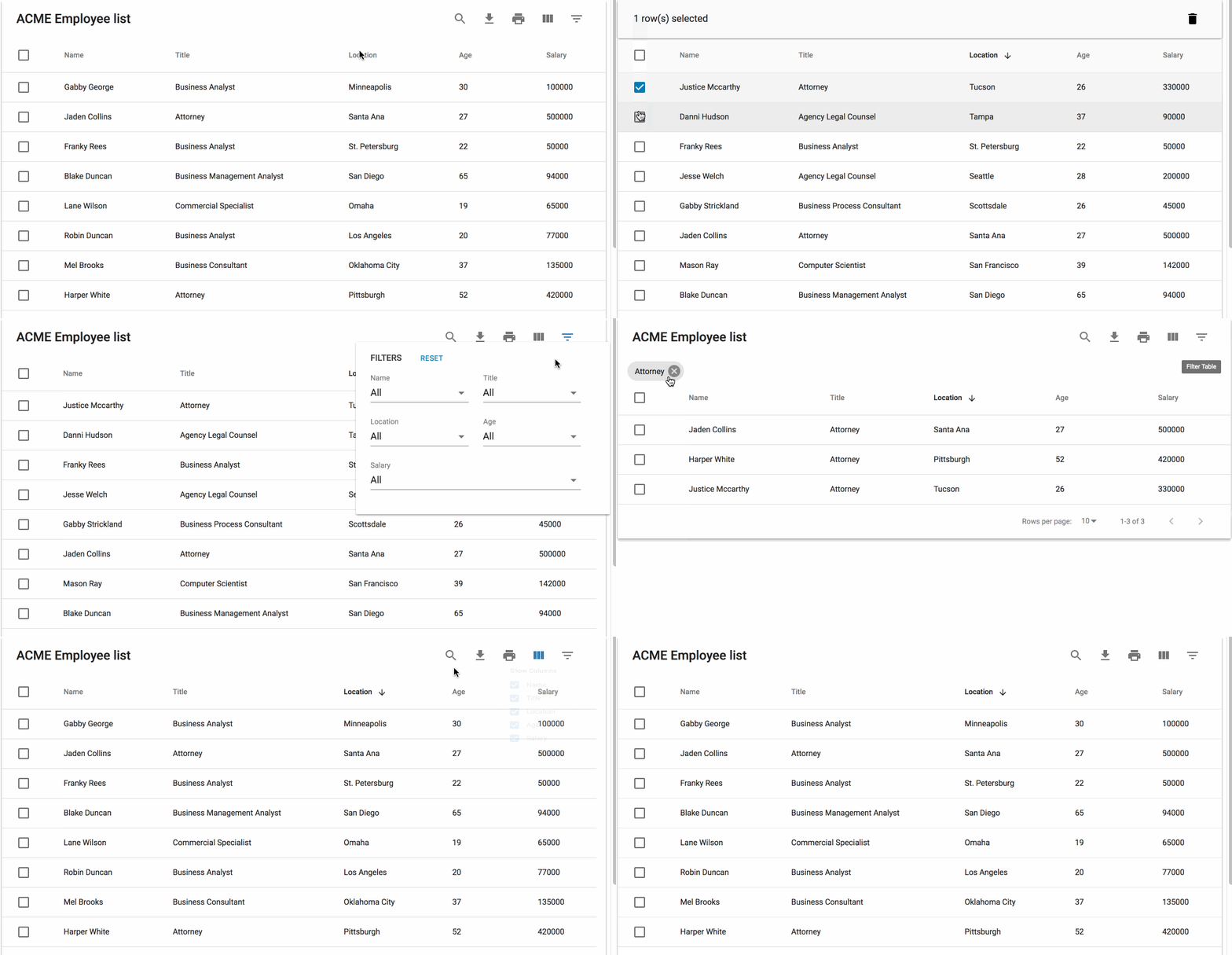
MUI-Datatables is a Material-UI-based library designed for responsive and interactive tables, offering a clean UI and essential features.
Key Features:
- Filtering, column view/hide, and search.
- Export to CSV with customizable options.
- Responsive modes for mobile devices.
- Custom toolbar and styling with Material-UI.
- Row selection and pagination.
Pros:
- Responsive design with mobile support.
- Concise documentation for quick setup.
- Easy styling with Material-UI’s theming system.
- Good for small to medium-sized datasets.
Cons:
- Lacks localization support via external libraries.
- Based on older Material-UI V1, which may limit compatibility.
- Fewer advanced features compared to AG Grid.
Use Cases:
- Material-UI projects need responsive tables.
- Simple dashboards with export and filtering needs.
- Applications prioritizing ease of use and styling.
Getting Started:
npm install:
npm install mui-datatables --saveInstall MUI V5
npm --save install @mui/material @emotion/react @emotion/styled @mui/icons-materialFor further details, check the documentation.
Mantine React Table

Built on TanStack Table and Mantine UI, Mantine React Table combines the flexibility of a headless library with pre-styled, modern components for quick development.
Key Features:
- Sorting, filtering, pagination, and virtualization.
- Seamless integration with Mantine UI components.
- TypeScript supports strong typing.
- Customizable UI with Mantine’s styling system.
- Responsive design for mobile and desktop.
- Lightweight (< 44kb gzipped)
Pros:
- Easy to use for Mantine-based projects.
- Balances pre-built UI with customization flexibility.
- Strong TypeScript support for type-safe development.
- Modern, clean design out of the box.
Cons:
- Best suited for projects already using Mantine UI.
- Less flexible for standalone use compared to TanStack Table.
- Smaller community than older libraries.
Use Cases:
- Applications using Mantine UI for consistent styling.
- Projects need a modern, pre-styled table with flexibility.
- TypeScript-heavy projects with moderate data needs.
Getting Started:
Ensure you have React 17 or later installed
Install Peer Dependencies (Mantine V6 and Tabler Icons)
npm install @mantine/core @mantine/hooks @mantine/dates @emotion/react @tabler/icons-react dayjsInstall mantine-react-table
npm install mantine-react-tableFor further details, check the documentation.
Rsuite Table

Rsuite Table, part of the React Suite (RSuite) component library, offers a flexible table component with unique features like RTL support and virtualization.
Key Features:
- Fixed headers and columns for scrollable tables.
- Tree views and expandable nodes.
- Adjustable column widths and sorting.
- Virtualization for large datasets.
- Right-to-left (RTL) language support.
Pros:
- Unique features like RTL support for multilingual applications.
- Detailed documentation with clear examples.
- Good for complex layouts with tree-like data structures.
- Lightweight and integrates well with RSuite components.
Cons:
- Styling customization can be challenging due to default styles.
- Smaller community compared to TanStack or AG Grid.
- Less suited for non-RSuite projects.
Use Cases:
- Multilingual applications require RTL support.
- Hierarchical data displays with tree-like structures.
- Projects using the RSuite component ecosystem.
Getting Started:
Install using npm/yarn/pnpm
# use npm
npm i rsuite-table

# or use yarn
yarn add rsuite-table

# or use pnpm
pnpm add rsuite-table
Key Considerations for Choosing a React Table Library
Selecting the right table library depends on your project’s requirements. Here are key factors to consider:
- Performance: For large datasets (thousands to millions of rows), prioritize libraries with virtualization, such as React Virtualized, AG Grid, or React Data Grid. These libraries also optimize rendering by only displaying visible data.
- Customization: Headless libraries like TanStack Table offer maximum flexibility for custom UIs, while Material Table, Mantine React Table, and MUI-Datatables provide pre-styled components for faster development.
- Ease of Use: Beginners may prefer Material Table or React Bootstrap Table for their straightforward setup and pre-built features. Moreover, advanced developers might opt for TanStack Table or AG Grid for their robust APIs.
- Integration: Ensure the library aligns with your tech stack. For example, Material Table and MUI-Datatables suit Material-UI projects, while React Bootstrap Table is ideal for Bootstrap-based apps. Mantine React Table is perfect for Mantine UI ecosystems.
- Community Support: Libraries with higher GitHub stars (e.g., TanStack Table, React Virtualized, AG Grid) typically have better community support, more frequent updates, and extensive resources.
- Advanced Features: For enterprise applications, AG Grid stands out with features like charting, accessibility, and Excel-like functionality. For simpler needs, Material Table or React-Datasheet may suffice.
- TypeScript Support: If type safety is critical, TanStack Table, Mantine React Table, and AG Grid offer strong TypeScript integration.
Conclusion
The React table library ecosystem offers diverse options for every use case, from lightweight, customizable solutions like TanStack Table to enterprise-grade grids like AG Grid. Moreover, for projects needing quick setup and modern styling, Material Table and Mantine React Table are excellent choices.
For large datasets, React Virtualized and React Data Grid excel in performance. Meanwhile, niche libraries like React-Datasheet cater to spreadsheet-like interfaces, and Rsuite Table offers unique features like RTL support.
Thus, evaluate your project’s needs—dataset size, UI requirements, tech stack, and team expertise—before choosing a library. Most of these libraries are free and actively maintained, ensuring they remain relevant in the fast-evolving React ecosystem.
Explore their documentation and GitHub repositories to test their suitability for your application. With the right choice, you can build efficient, user-friendly, and scalable data tables that elevate your React projects.