At first glance, a React admin template and a custom build appear to deliver similar outcomes. But the gap becomes visible once the admin begins supporting more complex workflows, such as approval flows, reporting logic, and service actions.
By the time these needs become operationally critical, the initial architectural choice has already influenced how efficiently the system can evolve. That’s why teams should consider not just delivery speed but also workflow alignment, long-term flexibility, migration risk, and expected ROI.
What Is a React Admin Template?
A React admin template is a prebuilt foundation for common internal product patterns such as dashboards, forms, tables, navigation, settings, and authentication. Many teams choose templates when the admin mainly needs to support:
- reporting and CRUD-heavy screens
- internal operational workflows
- user and role management
- access control and role management views
What Does Custom Development Really Mean?
Custom development means building the admin around your product’s actual workflows, permissions, state logic, and operational requirements, instead of adapting those needs to a prebuilt structure. It becomes more valuable when the admin must support needs that standard templates may not handle cleanly over time, such as:
- specialized processes,
- deeper integrations, and
- multi-step coordination.
What’s the Cost and ROI Difference Between a React Admin Template and Custom Development?
A React admin template usually costs less upfront because it gives your team a ready-made structure for common admin patterns. Custom development costs more because teams must design, build, test, and maintain the interface, logic, and interaction model from the ground up. Since the overall budget depends on project complexity, features, and development requirements, businesses can use Creole Studios’ software development cost calculator to get an initial estimate before deciding which approach best fits their needs
But upfront cost is rarely where the real difference shows up. The right question is which option creates a stronger ROI over the life of the product. In admin systems, ROI often shows up in faster approvals, lower handling time, fewer manual workarounds, easier onboarding, and less friction as workflows become more complex.
When Does a React Admin Template Create Better ROI?
A template often creates better ROI when the business mainly needs:
- faster rollout for internal teams
- quicker usability gains for standard admin work
- lower effort rebuilding common interface patterns
When Does Custom React Admin Development Create Better ROI?
Custom React Admin Dashboard Development creates better ROI when the business gains measurable value from:
- faster task completion in complex, multi-step flows
- fewer process delays and less manual coordination
- lower rebuild risk as workflows and permissions evolve
The risk usually appears when teams optimize too early for the wrong problem. Choosing a template that cannot support real workflows often leads to ongoing adjustments, patch fixes, and eventually a rebuild. On the other hand, investing in custom development before workflows are stable risks engineering for requirements that may never materialize.
Custom development can become more expensive faster than teams initially expect. What begins as a manageable build often expands once the full delivery picture becomes clear. Even with an experienced React development team, the full scope often grows once design support, QA, product input, iteration cycles, integration work, and post-launch stabilization come into view. The final investment depends on several variables, including geography, team structure, seniority, delivery model, and the overall complexity of the admin.
That is why custom development creates the most value when the product truly demands it, specifically when workflows are complex, operational dependencies are highly specific, and long-term scalability is critical. In those cases, the higher investment can be justified. The risk is not the cost itself, but committing to that investment before there is enough clarity on what the admin actually needs to support.
What Technical Foundation Supports a Maintainable React Admin in 2026?
The right technical foundation for a React admin in 2026 should support maintainability, extensibility, and a cleaner, more sustainable workflow growth over time. For many teams, React with TypeScript is enough. A framework such as Next.js becomes more relevant when the admin needs opinionated routing, layout conventions, server-side data boundaries, or tighter integration with a broader product platform.
Not every admin panel needs SSR, server components, or a highly opinionated framework. What it does need is a foundation that doesn’t become a negotiation every time workflows, permissions, integrations, or automation push into new territory. In 2026, the real cost of a fast start isn’t the build; it’s what teams spend later forcing an architecture to do things it wasn’t designed for.
What Does a Modern React Admin Dashboard Look Like in 2026?
A modern React admin dashboard in 2026 is built to help teams act faster, find information more easily, and work through operational tasks with less friction. The strongest admin experiences now combine clearer navigation, better decision support, and more usable data presentation.
Stronger admin experiences increasingly include:
- command palettes that reduce navigation time for frequent actions
- copilot-style sidebars that summarize records, surface context, or suggest next steps
- LLM-assisted queries that help teams retrieve operational information faster
- better dashboard grouping that makes dense data easier to scan and act on
- clearer visual hierarchy that improves focus instead of adding noise
A command palette reduces the steps between intent and action. A copilot surface cuts lookup time. A better dashboard layout helps teams read a situation and respond, rather than just observe.
The stronger admin systems are the ones that can handle governed actions, role-aware workflows, and approval-based steps without making those constraints feel like obstacles. As AI-assisted features move from experimental to expected, the implementations that hold up are the ones that improve execution without sacrificing auditability, control, or operational reliability.
What Are Migration Risks Teams Most Often Underestimate?
Migration risk isn’t just about moving screens. It’s about whether the new setup can support reuse, customization, stable architecture, and long-term maintainability without creating delays or expensive rework.
Before choosing a template or a more custom route, teams should check:
- how much React admin template customization will be needed
- whether design tokens, spacing rules, and branding systems map cleanly to the new setup
- whether state management will remain stable as the interface grows
- whether data grids, form logic, authentication flows, and RBAC can move without heavy rework
- whether the chosen component system and architectural approach can be extended cleanly without introducing rendering complexity or expensive workarounds later
Key takeaway for business leaders
Migration risk rarely announces itself as a technical failure. It usually starts as a business decision that looked efficient at the time, a foundation chosen for speed, a scope defined before workflows were fully understood, a tradeoff that made sense in the short term and created drag in every quarter after. By the time the friction becomes visible, the cost of changing course is rarely just a rebuild but a delayed roadmap, priorities, accumulated workarounds, and a team spending capacity on maintenance instead of progress.
How Should You Evaluate Your App Before Choosing?
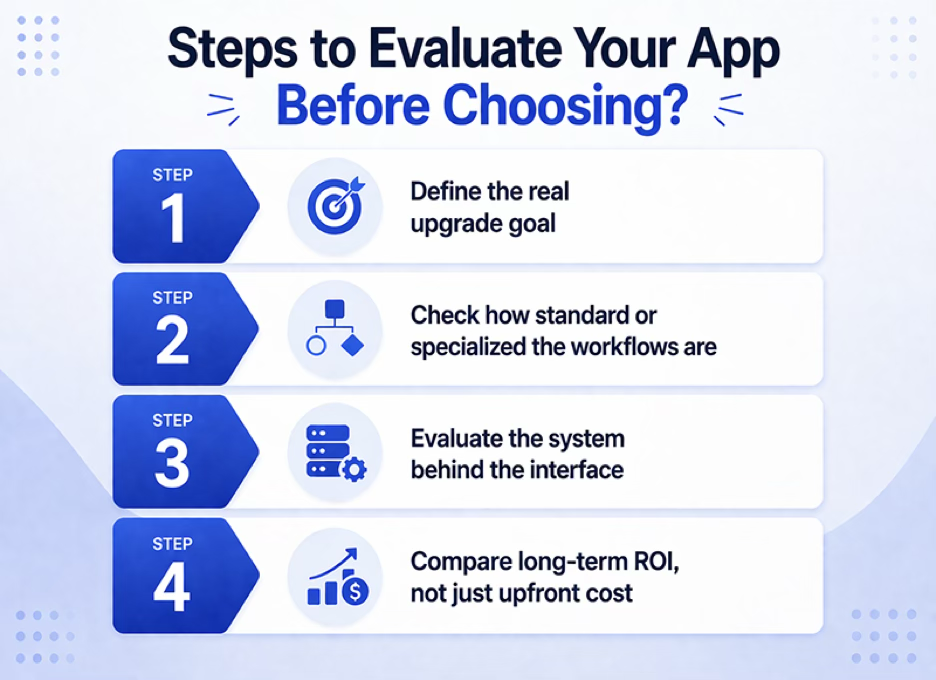
The decision between a React admin template and custom development comes down to four factors: the real upgrade goal, the degree of standardization or specialization of the workflows, the flexibility of the underlying system, and which option holds up better over time.
Step 1: Define the real upgrade goal
Is the core problem outdated UI, slow internal operations, poor usability, or a structural workflow limitation? If it’s mostly visual, a template may be enough. If it’s structural, custom development deserves a closer look.
Step 2: Check how standard or specialized the workflows are
Templates work best when the admin mainly handles dashboards, settings, reporting, and CRUD-heavy tasks. If the product depends on approvals, role-heavy actions, exceptions, or multi-step flows, custom development gives you more room to build without constraint.
Step 3: Evaluate the system behind the interface
Don’t just compare screens. Check the design system, token flexibility, component architecture, and whether the setup is loosely structured or tightly coupled.
Step 4: Compare long-term ROI, not just upfront cost
The better option is the one that improves the app now without increasing migration pain, rebuild cost, or delivery friction later.
React admin template vs Custom development vs Hybrid Approach
| Decision factor | React admin template | Custom development | Hybrid approach |
| Speed matters most | Best fit | Not ideal | Possible |
| Workflows are mostly standard | Best fit | Usually unnecessary | Possible |
| Workflows are specialized or multi-step | Limited fit | Best fit | Strong fit |
| You need long-term flexibility for unusual features | Limited | Best fit | Strong fit |
| You want quick modernization without a full rebuild | Best fit | Not ideal | Strong fit |
| The admin is part of your product’s competitive value | Limited | Best fit | Strong fit |
Which One Should You Choose?
Choose a React admin template when the goal is faster modernization, improved usability, and support for mostly standard workflows. Choose custom development when the admin becomes a strategic product layer requiring complex workflows, granular permissions, decision support, or long-term feature flexibility.
A hybrid approach works when teams want a faster, more structured start but need custom-built, workflow-heavy modules. The key question is not which option looks modern today, but which will continue to support integrations, operational needs, and evolving workflows over the next two years.
Frequently Asked Questions
Is a React admin template cheaper?
Usually, yes, in the short term. But the real cost depends on how much customization you need. A template is only cheaper if it continues to fit your roadmap.
When does custom development create better ROI?
When the admin directly affects operational efficiency, approval speed, service quality, or future product differentiation. In those cases, a better workflow fit can justify a higher upfront build cost.
Which option is safer for long-term maintainability?
Templates are often easier early on. Custom systems are often better in the long term when built around the product’s real needs and supported by a disciplined component and architecture strategy.
Can templates support AI-assisted admin features?
Yes, within limits. Assistant-style surfaces can fit well inside a template-led admin, while more workflow-heavy or deeply contextual implementations usually need a more custom foundation.