In today’s fast-paced software development world, automated testing tools play a critical role in ensuring the quality, reliability, and performance of web applications. By automating repetitive testing tasks, teams can accelerate release cycles, reduce human errors, and improve overall software quality.
With so many testing tools available, choosing the right one can be challenging. This collection presents the best 15+ automated testing tools for web applications in 2025, covering a range of features, use cases, and technical requirements to help you make an informed decision.
Table of contents
- Why Automated Testing Matters for Web Applications?
- Top 20 Automated Testing Tools for Web Applications
- Selenium: Free Best Automated Testing Tools
- Cypress
- Playwright
- TestCafe: Free Best Automated Testing Tools
- Appium: Free Best Automated Testing Tools
- Katalon Studio
- Robot Framework: Free Best Automated Testing Tools
- Rainforest QA
- Testsigma
- LambdaTest
- BrowserStack
- TestComplete
- Gauge
- Cucumber
- Ranorex
- Tricentis Tosca
- SoapUI
- Selenium IDE
- Ghost Inspector
- How to Use Automated Testing Tools?
- Conclusion:
Why Automated Testing Matters for Web Applications?
Manual testing is time-consuming, error-prone, and difficult to scale. Automated testing enables developers and QA teams to:
- Run tests quickly and consistently across multiple browsers and devices
- Catch bugs early in the development lifecycle
- Improve test coverage and reliability
- Integrate testing into continuous integration/continuous deployment (CI/CD) pipelines
How Many Types of Automation Testing Tools Are There?
Automation testing tools can generally be categorized into four main types based on their functionality and use cases:
- Functional Testing Tools:
These tools verify that the application behaves as expected by automating user interactions and validating outputs. Examples include Selenium, Cypress, and TestComplete. - Performance Testing Tools:
These focus on testing application speed, scalability, and stability under load. Examples are JMeter, LoadRunner, and Gatling. - API Testing Tools:
These tools automate the testing of application programming interfaces (APIs) to ensure correct functionality and security. Examples include SoapUI, Postman, and RestAssured. - Security Testing Tools:
These tools identify vulnerabilities and security loopholes by automating penetration testing and threat assessments. Examples include OWASP ZAP and Burp Suite.
Top 20 Automated Testing Tools for Web Applications
Automated testing tools help developers and QA teams efficiently test web applications by executing test scripts automatically. This reduces manual testing effort, improves test coverage, and speeds up the release cycle. Similarly, automated legal intake software streamlines client onboarding processes for law firms by automating data collection, appointment scheduling, and lead qualification, improving efficiency while reducing administrative workload.
Why Use Automated Testing Tools?
- Speed & Efficiency: Execute large test suites quickly and repeatedly.
- Consistency: Avoid human errors and ensure tests run the same way every time.
- Continuous Integration: Integrate tests into CI/CD pipelines for faster feedback.
- Reusability: Reuse test scripts across multiple projects or releases.
- Better Coverage: Automate complex scenarios, cross-browser tests, and data-driven tests.
Now, let’s start the collection.
Selenium: Free Best Automated Testing Tools

Selenium is the most popular open-source test automation framework for web applications. It supports multiple programming languages like Java, Python, C#, Ruby, and JavaScript. Selenium WebDriver allows you to write robust browser automation scripts.
Features:
- Cross-browser testing: Chrome, Firefox, Safari, Edge, IE
- Supports multiple languages and platforms
- Large community and extensive documentation
- Integrates with CI/CD tools like Jenkins and Travis CI
Pros:
- Highly flexible and customizable
- Supports complex test scenarios
- Free and open-source
Cons:
- Steeper learning curve, requires programming knowledge
- Limited built-in reporting and test management
Ideal for:
- Teams with coding skills needing a highly customizable solution.
Practical Use Case:
Automate Google search and verify the page title using Python.
from selenium import webdriver
from selenium.webdriver.common.keys import Keys

driver = webdriver.Chrome()
driver.get("https://www.google.com")

search_box = driver.find_element("name", "q")
search_box.send_keys("Selenium WebDriver")
search_box.send_keys(Keys.RETURN)

assert "Selenium WebDriver" in driver.title

driver.quit()
Cypress

Cypress is a next-generation JavaScript testing framework designed for modern web applications. It runs tests directly in the browser, offering fast execution and real-time reloading.
Features:
- Automatic waiting for commands and assertions
- Time-travel debugging to inspect test runs
- Supports Mocha and Chai for test syntax
- Built-in dashboard for test results and analytics
Pros:
- Easy setup and developer-friendly
- Great for frontend apps with heavy JavaScript
- Fast and reliable test execution
Cons:
- Limited support for multiple tabs or iframes
- Browser support primarily Chrome-family and Firefox
Ideal for:
- JavaScript teams looking for a fast, integrated testing experience.
Practical Use Case:
Visit a page and verify the header text.
describe('My First Test', () => {
  it('Visits the example page and checks header', () => {
    cy.visit('https://example.cypress.io')
    cy.contains('h1', 'Kitchen Sink')
  })
})
Playwright
Created by Microsoft, Playwright is a powerful framework for end-to-end testing across Chromium, Firefox, and WebKit browsers. Additionally, this JavaScript Web Scraping Library supports multiple languages, including JavaScript, Python, and C#. For comprehensive test reporting and observability, TestDino excels with Playwright-native integration, AI flaky test detection, and shareable dashboards, perfect for scaling E2E workflows in admin panels and dashboards.
Features:
- Auto-waiting for elements and network events.
- Cross-browser and cross-platform testing.
- Network interception and mocking.
- Headless and headed test execution.
- Supports multi-page and multi-tab scenarios.
Pros:
- Reliable tests with less flakiness.
- Rich API for complex workflows.
- Multi-language support.
Cons:
- Younger ecosystem compared to Selenium.
- Requires programming knowledge.
- Larger installation size due to multiple browser binaries.
- More resource-intensive than lightweight HTTP clients.
- It can have a steeper learning curve for beginners.
Ideal for:
- Teams seeking cross-browser testing with advanced automation capabilities.
Practical Use Case:
Navigate to GitHub and take a screenshot.
const { chromium } = require('playwright');

(async () => {
  const browser = await chromium.launch();
  const page = await browser.newPage();
  await page.goto('https://github.com');
  await page.screenshot({ path: 'github.png' });
  await browser.close();
})();
TestCafe: Free Best Automated Testing Tools
TestCafe is an open-source JavaScript tool that requires no browser plugins and works with any modern browser. It simplifies test setup and execution.
Features:
- Runs tests in all major browsers
- Parallel test execution for speed
- Easy test syntax in JavaScript or TypeScript
- Automatic waiting and smart assertions
Pros:
- No WebDriver dependency, easy installation
- Supports ES6+ JavaScript features
- Parallelism and remote testing support
Cons:
- Less extensible than Selenium
- Smaller community
Ideal for:
- Teams wanting a straightforward JS testing tool without a complex setup.
Practical Example:
Open a mobile browser and navigate to Google using Java.
import io.appium.java_client.MobileElement;
import io.appium.java_client.android.AndroidDriver;
import org.openqa.selenium.remote.DesiredCapabilities;
import java.net.URL;

public class AppiumTest {
    public static void main(String[] args) throws Exception {
        DesiredCapabilities caps = new DesiredCapabilities();
        caps.setCapability("platformName", "Android");
        caps.setCapability("deviceName", "Android Emulator");
        caps.setCapability("browserName", "Chrome");

        AndroidDriver driver = new AndroidDriver<>(new URL("http://localhost:4723/wd/hub"), caps);
        driver.get("https://www.google.com");
        System.out.println("Title: " + driver.getTitle());
        driver.quit();
    }
}
Also, check the best Bootstrap Themes.

Appium: Free Best Automated Testing Tools

Appium is a popular open-source framework for automating native, hybrid, and mobile web applications on iOS and Android.
Features:
- Supports multiple languages and test frameworks
- Cross-platform mobile automation
- Leverages vendor-provided automation APIs
- Integrates with Selenium WebDriver for web apps
Pros:
- Broad mobile device coverage
- Supports real devices and emulators/simulators
- Open-source and free
Cons:
- Complex setup and configuration
- Mobile automation can be slower and flakier
Ideal for:
- Mobile app teams need cross-platform automation.
Practical Example
Open a mobile browser and navigate to Google using Java.
import io.appium.java_client.MobileElement;
import io.appium.java_client.android.AndroidDriver;
import org.openqa.selenium.remote.DesiredCapabilities;
import java.net.URL;

public class AppiumTest {
    public static void main(String[] args) throws Exception {
        DesiredCapabilities caps = new DesiredCapabilities();
        caps.setCapability("platformName", "Android");
        caps.setCapability("deviceName", "Android Emulator");
        caps.setCapability("browserName", "Chrome");

        AndroidDriver driver = new AndroidDriver<>(new URL("http://localhost:4723/wd/hub"), caps);
        driver.get("https://www.google.com");
        System.out.println("Title: " + driver.getTitle());
        driver.quit();
    }
}
Katalon Studio

Katalon Studio is an all-in-one test automation solution for web, API, mobile, and desktop applications. It offers a low-code environment suitable for both technical and non-technical users.
Features:
- Record and playback feature for easy test creation
- Supports scripting with Groovy for advanced use cases
- Integrates with CI/CD and bug tracking tools
- Rich reporting and analytics
Pros:
- User-friendly with rich features
- Supports various app types and protocols
- Commercial with free tier
Cons:
- Limited customization compared to pure code frameworks
- License costs for enterprise features
Ideal for:
- Teams are seeking a powerful yet user-friendly tool that supports multiple platforms.
Robot Framework: Free Best Automated Testing Tools

Robot Framework is a generic open-source automation framework with keyword-driven testing, often used for acceptance testing and robotic process automation (RPA).
Features:
- Uses simple tabular syntax for test cases
- Supports external libraries for web, API, and databases
- Extensible with Python and Java
- Active community and plugins
Pros:
- Easy to learn and read test cases
- Highly extensible and modular
- Supports data-driven testing
Cons:
- Less intuitive for complex UI tests
- Limited out-of-the-box reporting
Ideal for:
- Teams emphasize readable tests and automation extensibility.
You may also find the GitOp tools useful for your project.
Rainforest QA

Rainforest QA is a no-code, cloud-based testing platform designed for cross-functional teams to write and execute automated tests without programming skills.
Features:
- Visual test editor with drag-and-drop components
- Supports functional and regression testing
- Integrates with CI/CD pipelines
- Provides real-time test reporting
Pros:
- No programming required, accessible to non-developers
- Scalable cloud execution
- Fast test creation and maintenance
Cons:
- Subscription-based pricing
- Less control for complex test scenarios
Ideal for:
- Business analysts and QA teams want quick test automation without coding.
Testsigma
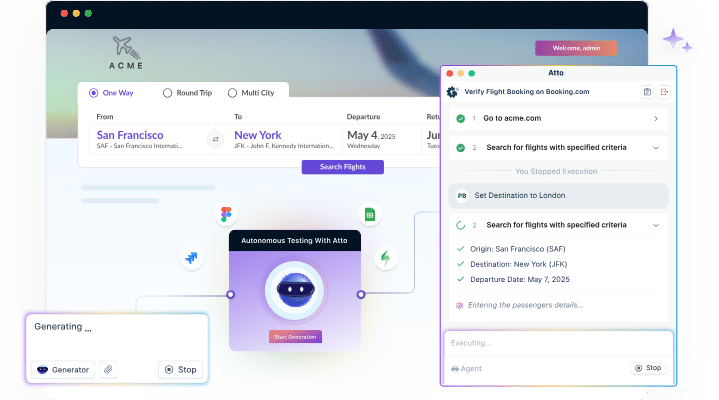
Testsigma is a cloud-based, Agentic AI-driven test automation platform designed to automate web, mobile, API, Salesforce, SAP, and desktop testing. It is a codeless testing platform that is built to make test automation accessible for both technical and non-technical users. It offers an intuitive visual interface with AI capabilities that help teams accelerate testing, improve collaboration, and ensure high quality releases.
At the core are Atto and Copilot, which spin a crew of AI agents to handle various testing activities from test planning to bug reporting.
Features:
- Agentic test automation for testing autonomously, allowing testers to focus on strategic testing activities.
- Faster test creation using Natural Language and Copilot.
- Unified platform to automate web, mobile, API, desktop, Salesforce, SAP, and ERP testing in one place.
- 3000+ real environments for real device testing on the cloud
- Seamless integration with 30+ tools, including CI/CD, test management tools, etc.
Pros:
- No coding or setup required.
- AI-powered auto-healing makes maintenance easy.
- Scalable and reusable tests
- Simple and easy-to-use interface
Ideal for:
- QA teams that focus on faster and efficient testing.
- Medium and Enterprise teams that use Agile/DevOps workflows and require broad device/browser coverage.
Practical Example
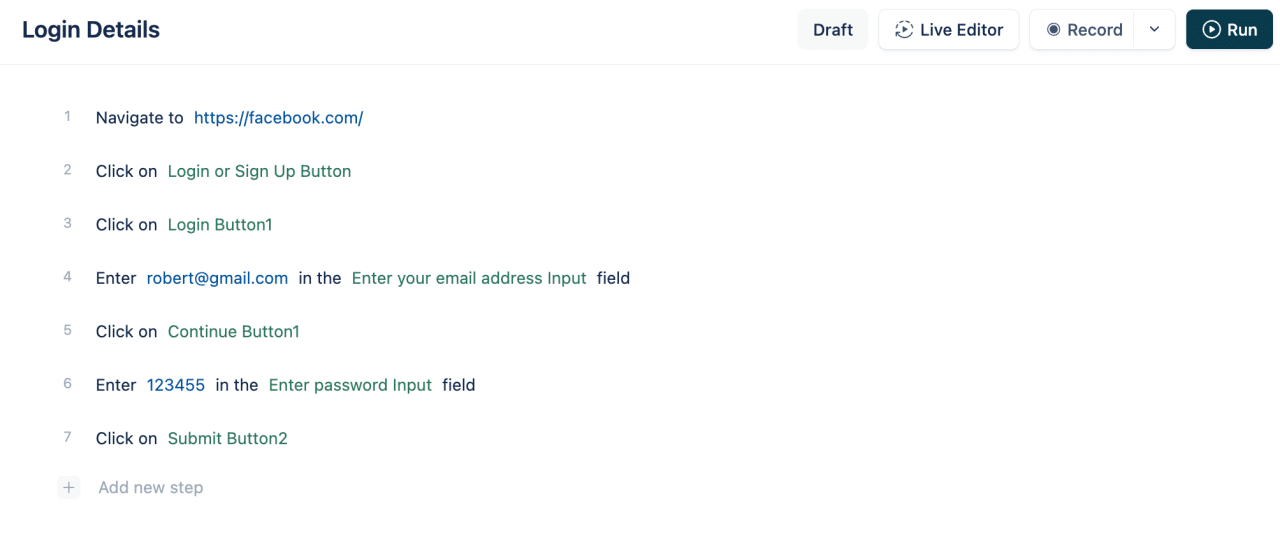
Automate a login workflow in plain English:
LambdaTest
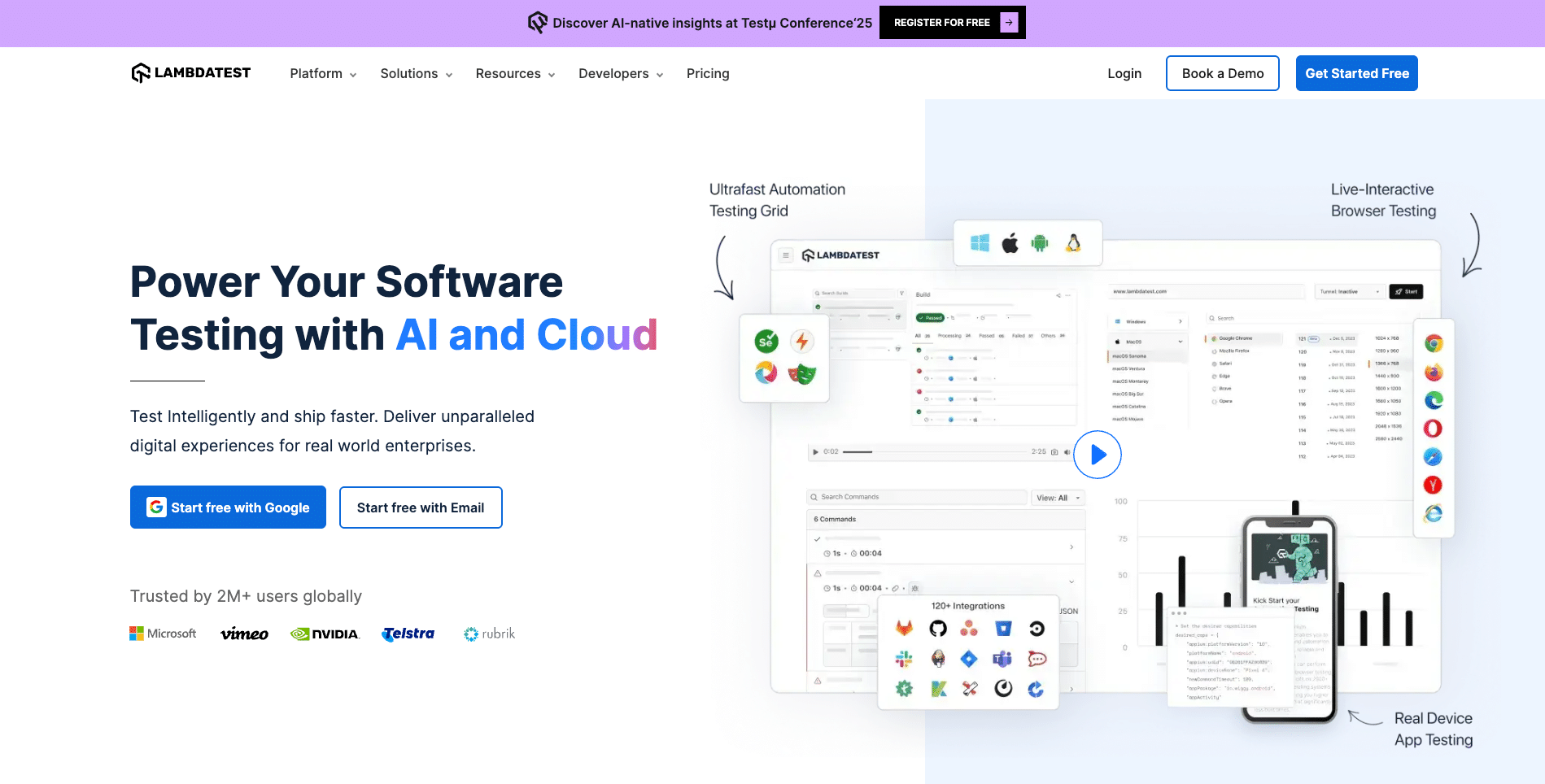
LambdaTest is a cloud-based cross-browser testing platform that enables running automated Selenium, Cypress, and other tests on 2000+ real browsers and devices.
Features:
- Supports parallel and remote test execution
- Integrates with popular CI/CD tools
- Real-time browser testing and debugging
- Automated screenshot and visual testing
Pros:
- Vast browser/device coverage
- Easy cloud setup, no infrastructure needed
- Integrates with popular frameworks
Cons:
- Subscription costs are based on usage
- Dependent on internet connectivity
Ideal for:
- Teams need extensive cross-browser and device coverage without managing infrastructure.
Practical Example:
Running Selenium tests on LambdaTest’s cloud.
from selenium import webdriver

desired_caps = {
    "platform": "Windows 10",
    "browserName": "Chrome",
    "version": "latest"
}

driver = webdriver.Remote(
    command_executor='https://username:[email protected]/wd/hub',
    desired_capabilities=desired_caps)

driver.get("https://www.google.com")
print(driver.title)
driver.quit()
BrowserStack

BrowserStack offers real device cloud testing for web and mobile applications with support for automated and manual testing.
Features:
- Access to thousands of real devices and browsers
- Selenium, Appium, and Cypress integration
- Live interactive testing and debugging
- Visual testing and screenshots
Pros:
- No device lab maintenance
- Reliable and fast infrastructure
- Supports local testing behind firewalls
Cons:
- Paid subscription plans
- Test concurrency limits
Ideal for:
- Enterprises requiring real-device testing at scale.
Practical Example
Selenium test on BrowserStack.
import org.openqa.selenium.WebDriver;
import org.openqa.selenium.remote.DesiredCapabilities;
import org.openqa.selenium.remote.RemoteWebDriver;
import java.net.URL;

public class BrowserStackTest {
    public static final String USERNAME = "your_username";
    public static final String AUTOMATE_KEY = "your_access_key";
    public static final String URL = "https://" + USERNAME + ":" + AUTOMATE_KEY + "@hub-cloud.browserstack.com/wd/hub";

    public static void main(String[] args) throws Exception {
        DesiredCapabilities caps = new DesiredCapabilities();
        caps.setCapability("browserName", "Chrome");
        caps.setCapability("browserVersion", "latest");
        caps.setCapability("os", "Windows");
        caps.setCapability("osVersion", "10");

        WebDriver driver = new RemoteWebDriver(new URL(URL), caps);
        driver.get("https://www.google.com");
        System.out.println(driver.getTitle());
        driver.quit();
    }
}
TestComplete

TestComplete by SmartBear is a commercial test automation tool supporting desktop, web, and mobile apps, offering both script and scriptless test creation.
Features:
- AI-powered object recognition
- Keyword-driven and data-driven testing
- Supports multiple scripting languages (JavaScript, Python, VBScript)
- Integrates with CI/CD and ALM tools
Pros:
- User-friendly interface
- Powerful and stable test execution
- Extensive reporting and debugging tools
Cons:
- Licensing costs can be high
- Requires training for advanced features
Ideal for:
- Enterprise teams are looking for a versatile commercial automation suite.
Practical Example
Record a test to open a browser and click a button using UI.
function TestButton() {
    Browsers.Item(btChrome).Run("https://www.google.com");
    var page = Sys.Browser("chrome").Page("https://www.google.com");
    page.NativeWebObject.Find("name","q").SetText("TestComplete");
    page.NativeWebObject.Find("name","btnK").Click();
}
Gauge
Gauge is a lightweight, open-source test automation tool focusing on readable and maintainable test specifications written in Markdown.
Features:
- Supports multiple languages like Java, C#, Ruby, and JavaScript
- Extensible with plugins
- Data-driven and modular tests
- Integrates with CI/CD systems
Pros:
- Simple and human-readable test specs
- Easy to maintain and extend
- Open-source and free
Cons:
- Smaller community and ecosystem
- Less feature-rich UI compared to commercial tools
Ideal for:
- Teams value maintainability and simplicity in test design.
Cucumber

Cucumber supports Behavior-Driven Development (BDD), allowing writing test scenarios in plain language (Gherkin), bridging the gap between developers and business stakeholders.
Features:
- Supports multiple languages and platforms
- Integration with Selenium and other tools
- Promotes collaboration via readable specs
- Extensive community support
Pros:
- Enhances communication between teams
- Facilitates living documentation
- Supports automated acceptance testing
Cons:
- Requires setup and maintenance of step definitions
- Can be slower for complex test suites
Ideal for:
- Organizations practicing BDD and wanting collaboration across technical and non-technical teams.
Ranorex

Ranorex is a commercial all-in-one test automation solution supporting web, desktop, and mobile testing with robust UI object recognition.
Features:
- Record and playback test creation
- Supports multiple scripting languages
- Cross-browser and cross-platform testing
- Integrates with CI/CD tools and test management
Pros:
- Easy for beginners with advanced features for experts
- Strong object recognition and maintenance
- Good customer support
Cons:
- Licensing cost
- Windows-based with limited Linux/macOS support
Ideal for:
- Teams need a comprehensive commercial automation tool with strong UI testing.
Tricentis Tosca

Tricentis Tosca is an enterprise continuous testing platform with model-based test automation, risk analysis, and test management capabilities.
Features:
- Model-based test creation reduces maintenance
- Supports API, web, mobile, and legacy apps
- Integration with DevOps tools and CI/CD pipelines
- Advanced analytics and reporting
Pros:
- Enterprise-grade scalability and governance
- Reduces test maintenance overhead
- Supports risk-based testing strategies
Cons:
- High licensing and implementation costs
- Requires expert training
Ideal for:
- Large enterprises with complex test automation needs.
SoapUI

SoapUI is one of the leading automated testing tools for API functional, regression, and load testing. While it focuses on APIs, it integrates with web testing suites.
Features:
- Supports SOAP, REST, JMS, and JDBC protocols
- Scriptable via Groovy
- Data-driven testing
- Ready for security and load testing
Pros:
- Rich feature set for API testing
- Open-source and Pro versions
- Integrates with CI/CD pipelines
Cons:
- UI can be complex for beginners
- Primarily focused on APIs, less for UI testing
Ideal for:
- Teams are emphasizing API test automation.
Selenium IDE

Selenium IDE is a browser extension that enables record-and-playback for Selenium tests without coding.
Features:
- Easy test recording in Chrome and Firefox
- Export tests to multiple languages/frameworks
- Supports debugging and breakpoints
- Useful for quick prototyping
Pros:
- No programming needed for simple tests
- Great for beginners and testers
- Free and open-source
Cons:
- Limited for complex or scalable testing
- Less flexible than Selenium WebDriver
Ideal for:
- Testers new to automation or quick test creation.
Ghost Inspector

Ghost Inspector is a cloud-based platform for automated browser testing and monitoring, allowing users to create tests visually.
Features:
- Record and edit tests via browser UI
- Scheduled and triggered test runs
- Integrations with CI/CD tools and Slack
- Visual testing and screenshot comparisons
Pros:
- No coding required
- Cloud-hosted with real browser testing
- Easy collaboration and reporting
Cons:
- Subscription-based pricing
- Limited offline or local testing
Ideal for:
- Teams wanting fast, no-code UI testing with cloud execution.
How to Use Automated Testing Tools?
- Set Up the Testing Environment
- Install the tool: Download and install the automation tool or framework (e.g., Selenium WebDriver, Cypress CLI).
- Configure dependencies: Install required programming language runtimes (Node.js, Python, Java, etc.) and package managers (npm, pip, Maven).
- Set up browsers or devices: Ensure target browsers or emulators/simulators are installed for cross-browser/device testing.
- Configure test runners: Set up test runners or frameworks (JUnit, Mocha, TestNG) to execute test suites.
- Design Test Strategy and Identify Test Cases
- Determine which test scenarios to automate (preferably stable, repetitive, or critical workflows).
- Define clear test objectives and expected results.
- Structure tests for reusability and maintainability (using page object model or modular test design).
- Develop Automated Test Scripts
- Write scripts using the supported language and APIs of the tool.
- Use locators (CSS selectors, XPath, IDs) to interact with web elements precisely.
- Implement assertions to verify expected outcomes.
- Handle waits and synchronization (explicit/implicit waits) to avoid flaky tests.
- Parameterize tests for data-driven execution when applicable.
- Integrate with Version Control and CI/CD
- Store test scripts in a version control system like Git for collaboration and versioning.
- Configure Continuous Integration pipelines (e.g., Jenkins, GitHub Actions) to trigger automated tests on code commits or pull requests.
- Execute Automated Tests
- Run tests locally during development or on remote/cloud grids (LambdaTest, BrowserStack) for broader coverage.
- Schedule regular test runs or trigger tests based on events in CI/CD workflows.
- Monitor and Analyze Test Results
- Review detailed logs, screenshots, and test reports generated by the tool.
- Track test failures and diagnose issues via stack traces and debug information.
- Maintain a defect backlog for bugs found during test runs.
- Maintain and Refine Test Suites
- Update tests to reflect application changes or enhancements.
- Refactor scripts to improve readability and reduce duplication.
- Remove obsolete tests and add new ones as needed.
How to Choose the Right Automated Testing Tool?
- Skillset: Does your team prefer coding or low/no-code tools?
- Application Type: Web-only, mobile, or hybrid apps?
- Budget: Open-source or commercial tools?
- Test Types: Functional, regression, performance, security?
- Integration: Compatibility with your CI/CD pipeline and project tools.
Conclusion:
Automated testing is essential for delivering robust and reliable web applications in today’s competitive landscape. The best tool depends on your project’s unique requirements and your team’s expertise. For teams looking to build custom AI-powered testing pipelines or integrate machine learning into their QA workflows, ai software development services can provide the expertise to go beyond what off-the-shelf tools offer. Whether you choose popular frameworks like Selenium or Cypress or opt for no-code platforms like Rainforest QA, investing in automation will boost your development speed and software quality. quality.
Explore the options above, assess your needs, and choose the tool that best suits your workflow. Happy testing!