


Are you looking for important SaaS spend management features to look at before choosing any software? Or researching on building a solution, then we’ve got you covered!
As you all know, businesses are heavily relying on SaaS (Software as a Service) tools to streamline operations, enhance productivity, and support remote teams.
Furthermore, as the business grows so does the number of SaaS subscriptions they manage, leading to ballooning expenses.
Therefore, SaaS spend management is now important for businesses to avoid overspending and optimize software usage.
In this blog, we’re going to explore the must-have features that developers or business owners should consider when building or selecting a SaaS spend management solution.
Table of Contents
Why SaaS Spend Management is Crucial
For many organizations, tracking SaaS expenses is complex and often neglected, resulting in wasted resources and a lack of visibility into actual spending.
The average mid-sized company uses over 112 different SaaS tools, according to the Backlinko SaaS Trends Report, with SaaS spending rising by 20% year-over-year. As companies keep adding more tools, managing software budgets can quickly become challenging
As a result, an effective SaaS spend management tool not only helps control costs but it also cuts down on waste from unused or duplicate subscriptions. In addition, it ensures resources are used where they’re needed most across the organization.
Not only that, but it also helps…
- Cost Reduction: Identify and eliminate unused or duplicate software.
- Visibility: Centralize all SaaS expenses and usage data.
- Risk Management: Control unauthorized software and ensure compliance.
- Contract Tracking: Manage renewals to avoid unexpected charges.
- Spending Optimization: Allocate budgets based on actual usage.
- Vendor Negotiation: Leverage usage data for better deals.
- Efficiency Boost: Automate license management and renewals.
- Scalability: Support flexible, manageable growth in SaaS spending.
Top SaaS Spend Management Features
Now without wasting any time let’s explore the key features of robust SaaS spend management solutions including the following:
Centralized SaaS Dashboard

Imagine having all your SaaS subscriptions, costs, and usage metrics in one place. This centralized SaaS dashboard does exactly that—bringing everything together to give you a complete overview of your software ecosystem.
It helps you see where your resources are going in real time, so you can make smart decisions about what tools to keep, upgrade, or cut.
Why It Matters:
- Gives you a bird’s-eye view of your SaaS tools.
- Makes tracking expenses and usage a breeze.
- Eliminates the need to jump between multiple platforms.
- Helps you make quicker, well-informed decisions.
Pro Tip for Developers: Use REST or GraphQL APIs to bring in data from various SaaS platforms into a single, easy-to-navigate dashboard.
In case you’re working on a SaaS project check out,
JetShip Laravel SaaS Starter Kit

The Jetship Laravel Starter Kit is a robust solution designed to streamline the development of SaaS applications, offering developers a comprehensive set of features and tools to jump-start their projects.
Besides, JetShip SaaS Boilerplate boosts the development process by providing a clean, modular, and scalable foundation for building SaaS platforms.
Additionally, it simplifies the most challenging aspects of SaaS development by offering pre-built components, blocks, and features.
Key Features:
- Based on FilamentPHP
- Ready for production
- Easy Laravel Forge Deployment
- In Built Blog Page
- Seamless Authentication
- Subscriptions & One-Time Purchases
- Appealing Admin Panel
- 2-Factor Auth
- Plugins
- Customizable & Scalable
- Mobile Friendly & much more
Built on the TALL stacks:
- Tailwind CSS
- Alpine.js
- Laravel
- Livewire
Why Choose JetShip?
JetShip laravel SaaS Starter Kit is ideal for developers who want to quickly prototype, launch, and scale their SaaS applications without building everything from scratch.
- Provides flexibility with multiple themes and customizable blocks, helping you create a unique look for your SaaS product.
- Offers access to ready-made components for user management, payment gateways, subscriptions, SEO optimization, and much more.
- It comes with lifetime access to the codebase and regular updates, ensuring your application stays up to date with the latest features and security standards.
Besides, it is a perfect choice for those looking to boost their SaaS app development with Laravel. Moreover, it is built using FlyonUI which is an Open Source Tailwind CSS Components Library, which offers the semantic class with powerful JS plugins.
Automated Expense Tracking

No more manual data entry! This feature can automatically capture and categorize your SaaS expenses by connecting to payment processors or accounting platforms.
Therefore, You’ll get real-time insights without the hassle, meaning fewer missed transactions and more control over your spending.
Why It Matters:
- Cuts down on manual work and reduces human errors.
- Keeps you updated on your SaaS spending in real-time.
- Makes it easier to find areas for potential savings.
- Simplifies your financial reporting process.
Pro Tip for Developers: Integrate with services like Stripe or PayPal using APIs to capture all SaaS-related expenses automatically.
Usage Analytics and Reporting
Ever wonder if you’re really getting value from every tool you pay for? With usage analytics, you can see how much each SaaS tool is actually used. This helps you determine which tools are worth keeping and which might be overkill.
Regular reports provide insights into usage patterns, empowering you to make smart decisions about optimizing or cutting back.
Why It Matters:
- Helps identify underused tools to cut waste.
- Lets you right-size your subscriptions.
- Supports informed decisions about renewals or cancellations.
- Keeps stakeholders informed with structured reports.
Pro Tip for Developers: Use tracking tools or custom APIs to pull in usage data from each SaaS provider, and build customizable reports for better insights.
License Management
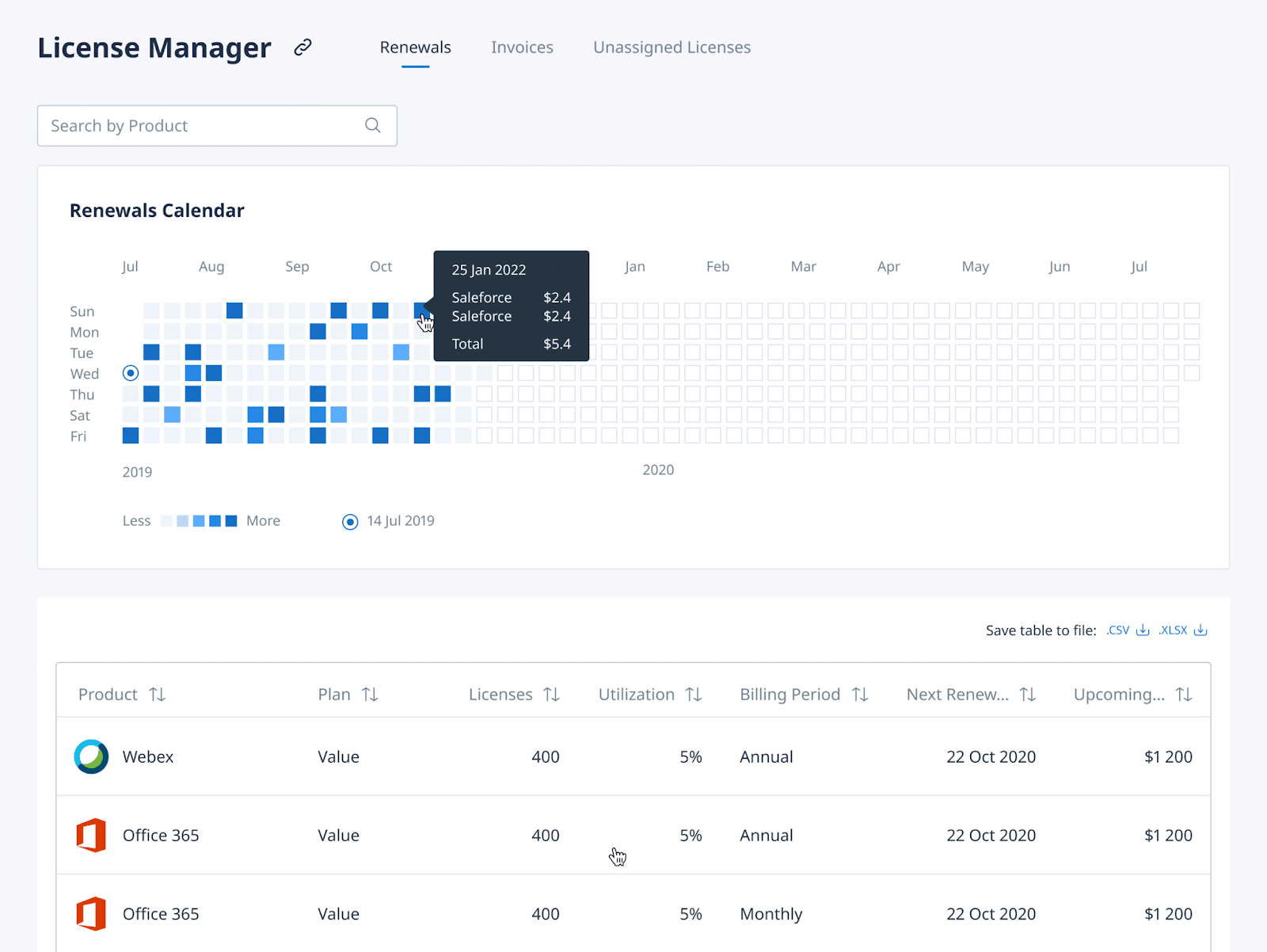
Managing licenses across departments can get messy fast.
Therefore, adding this SaaS spend management feature will help you track all of your SaaS licenses, ensuring no resource is wasted.
With this, you can also eliminate duplicate subscriptions, avoid paying for unused licenses, and make sure everything is properly allocated.
Why It Matters:
- Avoids over-licensing by optimizing license use.
- Cuts down on costs for unused or duplicate subscriptions.
- Improves visibility into license allocation across teams.
- Reduces unauthorized use of software.
Pro Tip for Developers: Set up role-based access controls to manage licenses based on specific team needs.
Renewal Reminders & Alerts
Don’t let auto-renewals catch you by surprise! Adding renewal reminders helps you stay on top of subscriptions.
With this feature, you’ll get a chance to evaluate whether you still need the tool or if it’s time to cancel or look for other options.
Why It Matters:
- Stops unwanted auto-renewals, saving unnecessary costs.
- Gives you time to assess and make decisions.
- Prevents losing access to important tools due to missed renewals.
- Keeps your budget on track with timely notifications.
Pro Tip for Developers: Use APIs to link to scheduling and messaging services (like Twilio) to automate reminders and alerts.

Vendor and Contract Management
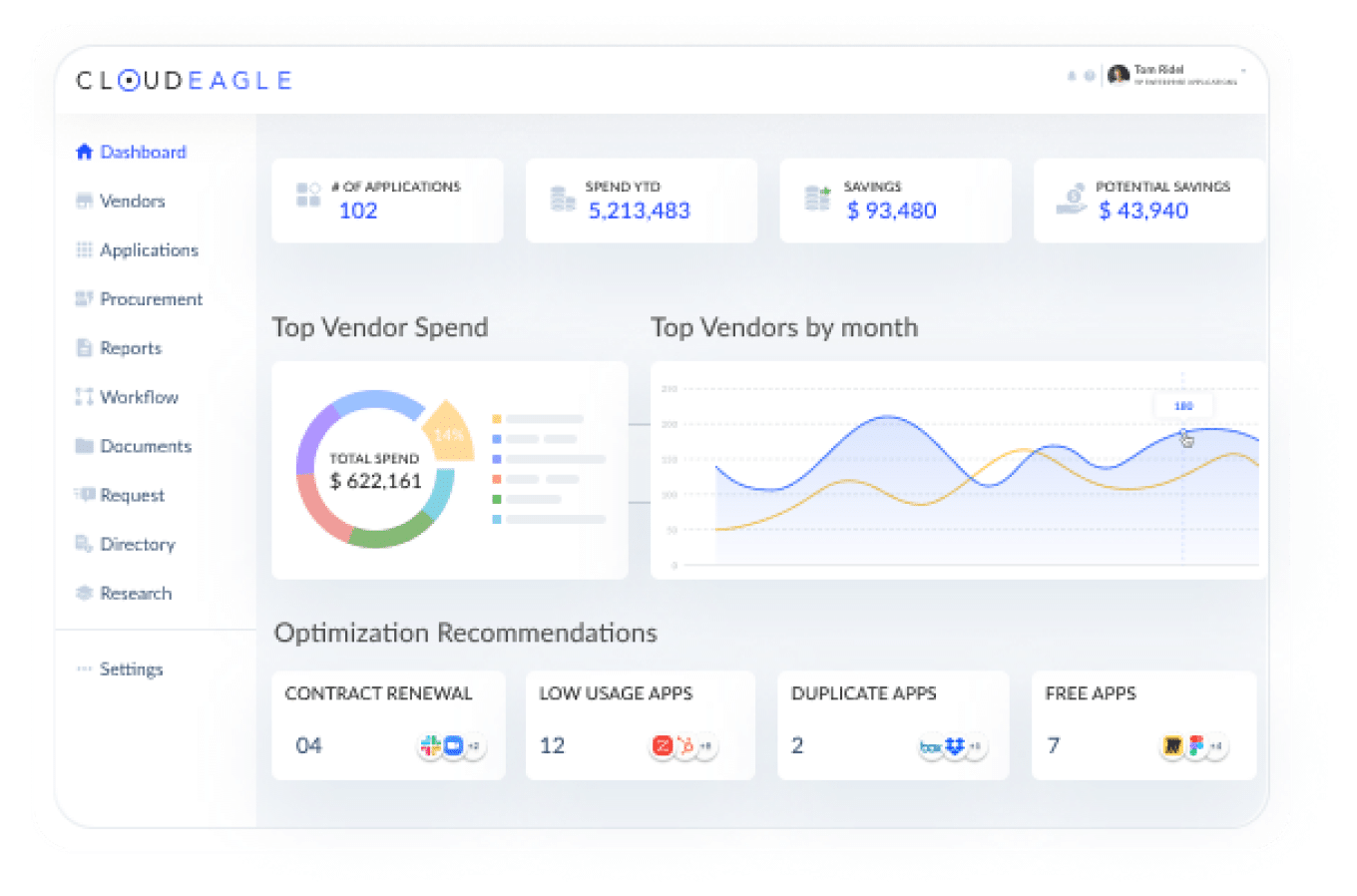
Adding Vendor and contract management features to your spend management will help you to stay organized, avoid surprises, and maintain strong vendor relationships, ensuring compliance and smooth renewals.
Therefore, keep all the vendor details and contracts in one secure place.
Why It Matters:
- Makes it easier to track and comply with contracts.
- Supports better vendor relationships and negotiations.
- Avoids missed renewals or overlooked terms.
- Reduces mistakes by organizing contract details.
Pro Tip for Developers: Store contracts securely using cloud storage and set up alerts for upcoming contract renewals.
Role-Based Access Control (RBAC)
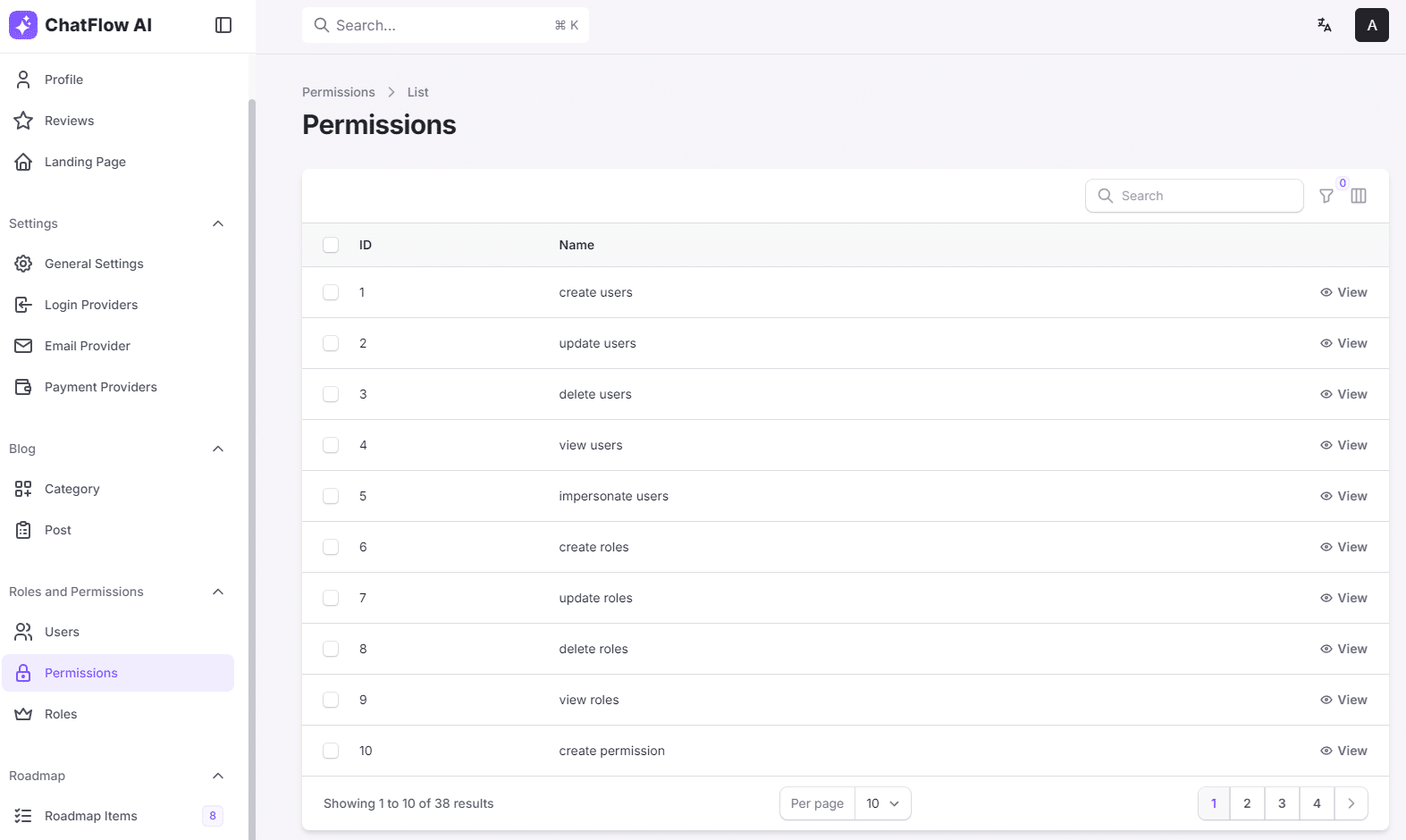
As an admin you already know that not everyone needs to see everything.
A Role-based access control feature helps you assign specific permissions based on team roles, ensuring only authorized people can manage SaaS subscriptions or access sensitive financial information.
This keeps the data safe and the workflow organized. For refrence, you can see the example RBAC in the JetShip demo
Why It Matters:
- Boosts security by restricting access to critical data.
- Prevents unauthorized purchases or changes.
- Improves compliance by defining clear roles.
- Controls spending by limiting who can make decisions.
Pro Tip for Developers: Use RBAC libraries in the development framework to set up and manage access control easily.
Budgeting and Forecasting
Having Budgeting and forecasting in your spend management will enable to set spending limits and predict future SaaS expenses based on historical data. Keeping a clear view of your overall financial obligations can also make managing debts easier alongside day-to-day business expenses
It will ensure that you don’t go over budget, allocate funds effectively, and avoid unnecessary expenses.
Why It Matters:
- Improves financial planning and fund allocation.
- Prevents budget overruns by setting clear limits.
- Allows proactive adjustments based on predictions.
- Increases visibility into future costs.
Pro Tip for Developers: Use visualization libraries like D3.js or Chart.js to create easy-to-read budget trends and projections.
Integrations with Financial Systems
Integrating the SaaS spend management with financial systems simplifies tracking, budgeting, and reporting.
Therefore, by connecting it with platforms like QuickBooks or Xero, this feature reduces time spent on manual entry and minimizes errors, keeping financial data accurate and consolidated.
This is especially helpful for audits, where having all expense data in one place speeds up the process. In addition, automatic data updates allow departments to see real-time budgets, helping them make informed spending decisions and maintain control over SaaS expenses.
Why It Matters:
- Cuts down manual work and prevents errors.
- Enhances the accuracy of your financial reports.
- Makes audits easier with consolidated expense data.
- Streamlines budgeting across departments.
Pro Tip for Developers: Leverage open APIs to automate the flow of data, ensuring all spending is captured in real time.
Customizable Reporting and Dashboards
We already discussed about having centralized SaaS dashboard but having a customizable reporting and dashboard is another story.
Now, every team has unique needs. Customizable reports and dashboards let each department create views that work for them.
Marketing may want to track different tools than Finance, for example. With tailored dashboards, every stakeholder can see what’s important to them at a glance.
Why It Matters:
- Supports specific reporting needs for each department.
- Improves decision-making with customized insights.
- Makes relevant data accessible across the organization.
- Boosts efficiency by letting users create their own views.
Pro Tip for Developers: Add drag-and-drop features so users can personalize dashboards and easily create their own reports.
If you want to create a quick Admin Dashboard then check out the Sneat Free Bootstrap 5 Admin Template, fully customizable and easy to use.

Cost Optimization Suggestions
Cost optimization suggestions help you control SaaS spending by identifying areas where you can save.
This feature will help you to analyze how your tools are being used and it should offer recommendations which we generally see in Google webmaster or search console.
It helps you maximize the value of every dollar spent, preventing waste and boosting your return on investment. The same discipline extends to infrastructure, where dedicated cloud cost optimization tools flag idle cloud instances and rightsizing opportunities alongside software-spend dashboards.
Why It Matters:
- Helps reduce SaaS expenses proactively.
- Identifies inefficiencies in tool usage.
- Supports informed, cost-saving decisions.
- Boosts ROI by getting rid of or downgrading unused tools.
Pro Tip for Developers: Implement machine learning algorithms to analyze data and generate actionable cost-saving recommendations.
Conclusion:
There you go! these are some of the best features one should opt for while looking or building a SaaS spend management software.
Now, as more companies rely on SaaS tools, keeping software costs under control is key. A good SaaS spend management tool brings clarity, control, and savings, making it easier for businesses to cut down on extra expenses.
For developers, building these features means creating real value. With these tools, companies can make smart decisions, keep budgets in check, and make the most out of every SaaS subscription they invest in.
If you found these tips helpful, don’t keep them to yourself! Share this post with your network or community and help others make smarter choices with their SaaS spending.

