


Your SaaS website is live. The pages look good, the sign-up button works, and you’ve finally shared the link.
Now comes the next question: what should you do first?
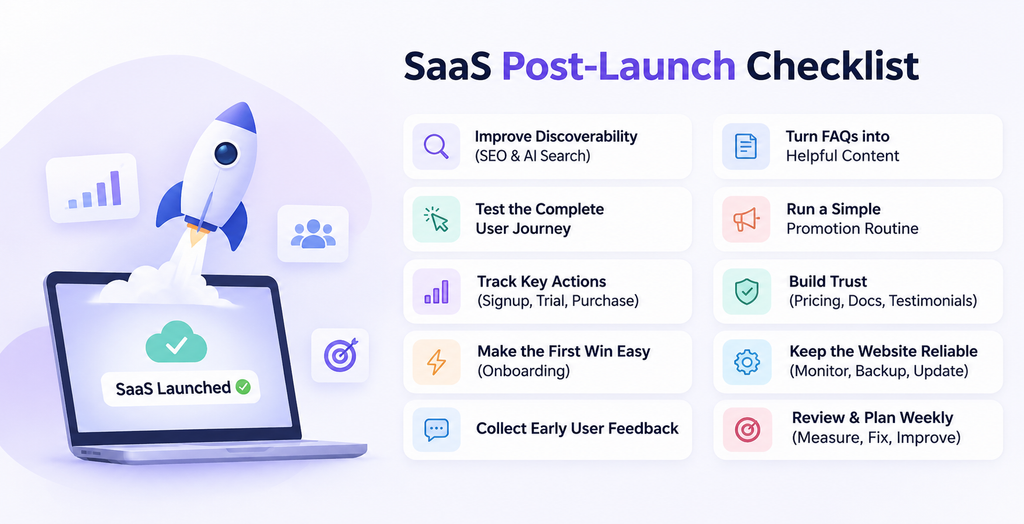
Once your site is live, knowing what to do after launching a SaaS website can help you focus on the right priorities for growth.
The first few weeks are a chance to learn how people find your business, where they get stuck, and what helps them become active users. You don’t need to change everything at once. Start with the steps below and let real feedback guide your next move.
1. Check How People Can Find Your Website
Publishing your website makes it available online. You still need to check whether potential customers can find it.
Start with your homepage, pricing page, and main product pages. Use Google Search Console to inspect important URLs and submit your sitemap. A sitemap helps Google discover pages, but it doesn’t guarantee that they will be indexed.
For AI search, AI Visibility Tool helps you track selected prompts and review whether your brand appears in the answers, along with the sentiment of those mentions. This gives you a starting point for understanding how AI platforms present your business.
Think about questions a potential customer might ask before they know your name. An invoicing platform, for example, could follow prompts about billing software for freelancers.
Record where you stand today. You can use that starting point to review progress as you improve your website and build your online presence.
2. Test the Full Journey From Visitor to Customer
Your pages may look perfect while the signup process quietly loses users.
Open your live website in a private browser window and go through it as a new customer. Use a phone as well as a desktop. Where possible, ask someone who hasn’t worked on the site to do the same.
Check the actions that matter:
- Can visitors understand what the product does?
- Do the main buttons lead to the right pages?
- Does account creation work?
- Do verification and password reset emails arrive?
- Can users sign in after creating an account?
- Does the payment process show the correct plan and price?
- Is there a clear confirmation after a successful action?
For payment checks, use your provider’s supported testing process or a controlled transaction. Check how failed payments are handled too.
Write down each problem with the page, device, and steps needed to reproduce it. Fix anything that blocks registration, payment, or access before spending more money on promotion.
3. Track Actions That Show Real Interest
Traffic tells you that people arrived. It doesn’t tell you whether they found the product useful.
Set up measurement around the steps that matter to your business. For a self-service SaaS product, that might mean:
- Account created.
- Trial started.
- First useful task completed.
- Subscription purchased.
For a sales-led product, demo requests and qualified enquiries may matter more.
Google Analytics provides recommended events, including signup and purchase events. You may also need product analytics or your own application data to understand what happens after someone signs in.
Choose one early action that shows a user has experienced value. For a project management app, that could be creating a project and inviting a teammate. For a reporting tool, it might be generating the first report.
Test your tracking yourself. Make sure each event records the completed action, rather than only a button click. Someone clicking “Create account” and seeing an error hasn’t signed up.
4. Make the First Useful Action Easy
A new user should be able to answer one question quickly: “What do I do now?”
A dashboard packed with empty charts, unfamiliar labels, and setup options can make a simple product feel difficult.
Give users a clear first step. Depending on your product, you could:
- Add a short setup checklist.
- Offer a sample project or demo workspace.
- Provide a template for a common task.
- Explain what each empty section will show.
- Highlight one useful action on the welcome screen.
Keep the instructions short and close to the task. If someone needs to import a file, show the accepted format beside the upload button.
For example, a scheduling app could guide new users through three steps: set availability, connect a calendar, and share a booking link.
Watch whether users complete those steps. If many stop at the same point, review that part of the experience before adding more onboarding screens.
5. Ask Early Users Where They Get Stuck
Your first customers can show you problems that your launch checklist missed.
After someone has had a reasonable chance to try the product, ask a few focused questions:
- What were you trying to get done?
- Was anything confusing?
- What almost stopped you from signing up?
- What would make the product more useful?
A reply to a short email can be more helpful than a long survey with few responses.
When possible, watch someone use the website or app while they explain what they expect to happen. Let them try the task before stepping in to help. The moment they hesitate often tells you more than a general rating.
Keep feedback in one place. Include the user’s goal, the issue, and how often it appears.
Look for repeated problems. Several users struggling to choose a plan is a stronger signal than one person requesting a feature that serves a very specific workflow.
6. Turn Common Questions Into Clear Website Content
Early conversations often reveal what your website hasn’t explained.
If people keep asking whether your tool works with their existing software, your integration information may be hard to find. If they ask what happens when a trial ends, your pricing page needs a clearer answer.
Use those questions to improve:
- Product and feature pages.
- Pricing explanations.
- Setup guides.
- FAQs.
- Help articles.
- Short product demonstrations.
Be specific. “Save time with powerful automation” gives visitors little to work with. “Send an invoice reminder three days before payment is due” explains a task they can picture.
You can also create pages for a few clear use cases. A document tool might need separate explanations for collecting client approvals and managing internal reviews.
Keep each page focused on the problem, the steps involved, and the result. Add screenshots where they make an action easier to understand.
7. Build a Small, Repeatable Promotion Routine
Once the main customer journey works, give people a reason to visit.
Start with one or two channels where your intended customers already spend time. Trying to maintain a blog, newsletter, video channel, community, and five social profiles at once can quickly become a full-time job.
A manageable weekly routine could include:
- Publish one helpful tutorial or use-case article.
- Share a short product demonstration.
- Answer relevant questions in an industry community.
- Send a useful update to people who opted into your emails.
- Contact a small number of suitable partners.
Make each activity useful on its own. A tutorial should solve a problem, and a community reply should answer the question before mentioning your product.
You can reuse a good idea across formats. Turn a setup guide into a short video, an email tip, and a few screenshots for social media.
Review which channels bring people who sign up and use the product. A small audience with a clear need can be more valuable than a large burst of unrelated traffic.
8. Strengthen Trust and Make Support Easy to Find
New visitors need enough information to feel comfortable taking the next step.
Review your website from the perspective of someone who has never heard of your company. Can they quickly find:
- What each plan includes.
- Any limits that affect their likely usage.
- Trial, billing, and cancellation details.
- A working way to contact support.
- Privacy and terms pages that match your service.
- Information about the people or company behind the product.
Use real screenshots and accurate product descriptions. If a feature is still being developed, make its status clear.
As customers begin to see results, ask whether they would be comfortable sharing a testimonial or case study. Get permission and keep their wording faithful to their experience.
You can build trust before you have many reviews. Clear documentation, honest pricing, and helpful support all give people something concrete to assess.
9. Keep the Live Website Reliable
A launch is also the start of ongoing maintenance.
Assign someone to check availability, review errors, and keep important software dependencies up to date. Set up backups for the data your business needs, and confirm that you can restore them.
Pay particular attention after a deployment. Changes to shared components can affect several pages at once, while updates to authentication or billing can interrupt essential tasks.
Keep a short set of checks for each release:
- Open the homepage and pricing page.
- Complete a signup.
- Test sign-in and password recovery.
- Check the main mobile navigation.
- Confirm that key forms and tracking still work.
If you started with a website template or UI kit, review the details that are easy to miss during customization. Remove demo links, replace placeholder text, and check that menus and form labels make sense for your product.
10. Review Progress Each Week and Choose the Next Fix
Set aside time each week to review the same small set of numbers and user comments.
You could start with:
- Relevant website visits.
- Completed signups or demo requests.
- Users who reach the first useful action.
- New paying customers.
- Repeated support questions.
- Errors affecting important tasks.
Compare steps in the journey. If visits grow but signups stay flat, check the audience, message, and registration process. If people sign up but never complete a useful task, focus on onboarding.
Early numbers can be noisy. Consider traffic sources, user feedback, and changes you’ve made before deciding that a single week proves something.
Choose one or two improvements for the next week and give each one an owner. Keep a record of what changed so you can connect later results to the work you did.
Give Your SaaS Website a Useful First Month
You don’t need to rebuild your website as soon as it goes live.
Make sure people can find it, complete essential tasks, and understand the value of your product. Then use their behaviour and feedback to decide what needs attention.
A good first month gives you a working customer journey, reliable measurements, and a clearer picture of what your audience needs. Those are the foundations you can keep improving long after launch day.

