- Quality Checked
- Well Documented
- Created: 01 Feb 2022
- Version: v1.0.0
Choose from unique layouts
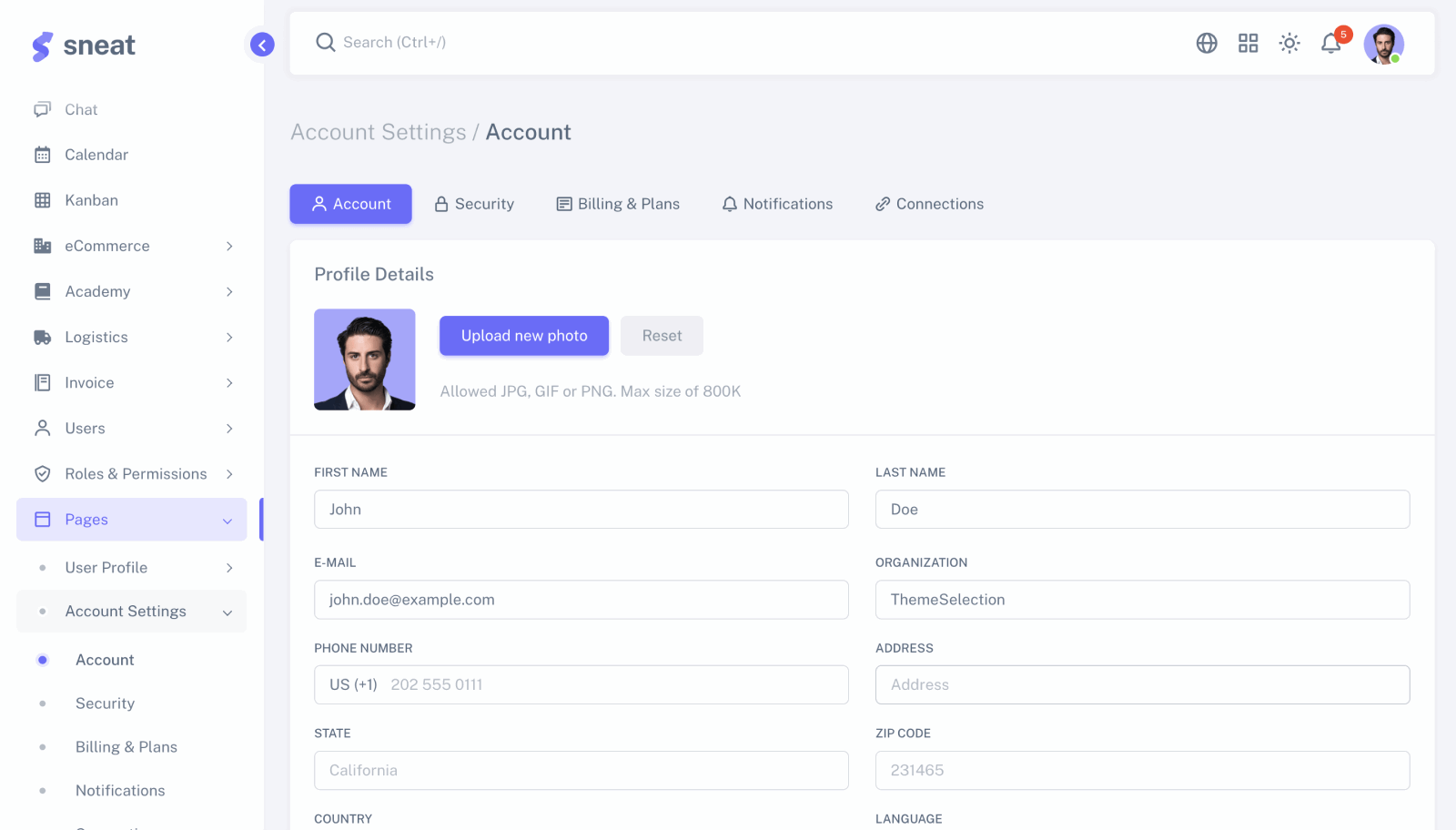
Sneat – Sketch Admin Dashboard UI Kit provides 6 unique layouts like Default, Bordered, Semi-Dark, Dark, Horizontal & Horizontal Dark 😎
Description
Design your powerful template in minutes 🚀 with ready-to-use Bootstrap 5 components in Sketch.
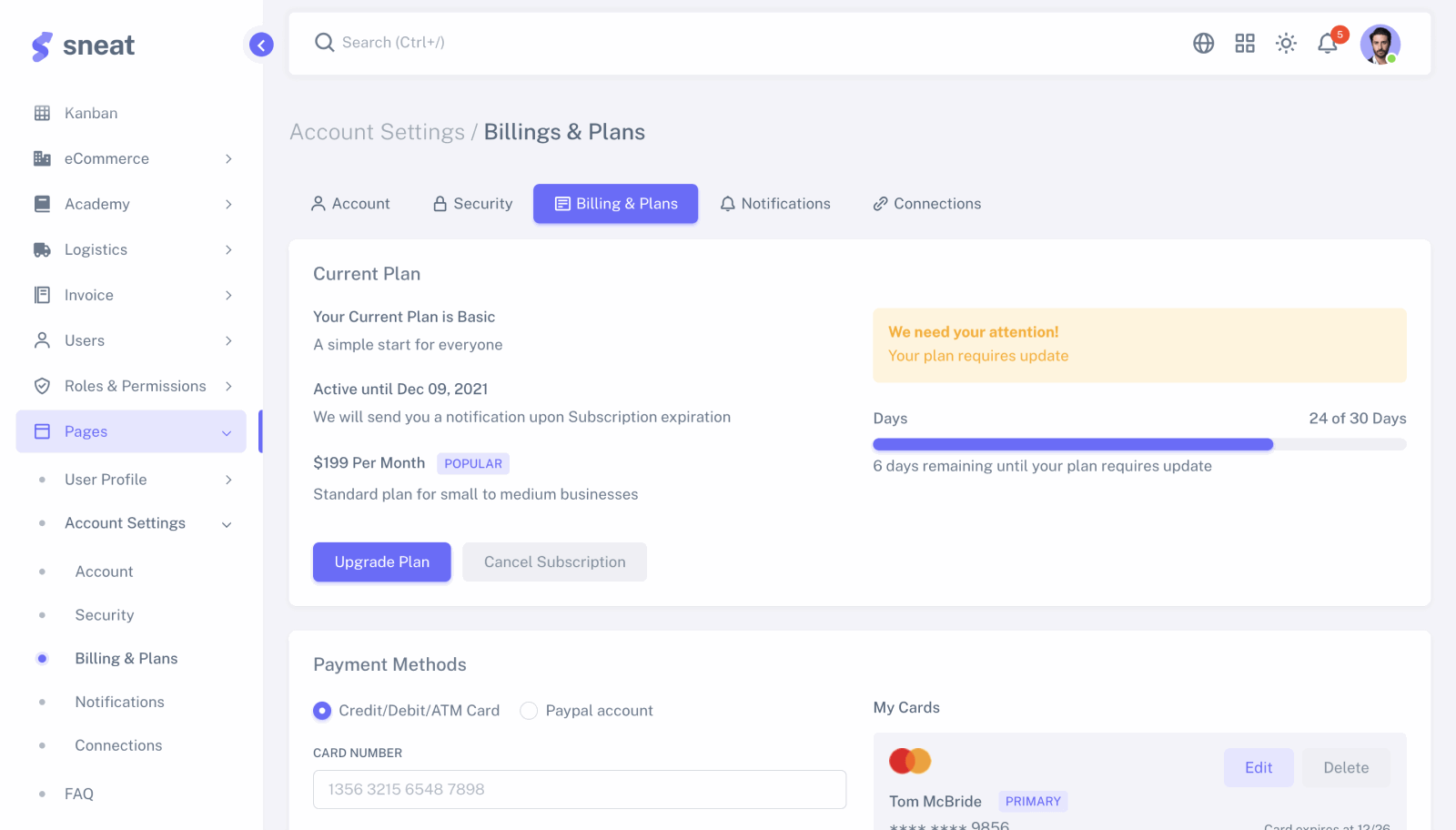
Sneat Sketch Admin Dashboard UI Kit template consists of 500+ organized Bootstrap 5 components. Besides, this sketch UI kit is built with an atomic design system & smart layout. Furthermore, this sketch Admin dashboard UI Kit template also offers 3 dashboards, 6 layouts, 40+ pages, and light & dark modes. You can now kickstart your next Sketch project by using just drag and drop pre-made components from the Assets panel. Also, you can configure them in the right sidebar. Fast and simple, as should be. Thus, by far it is one of the best Sketch UI Kits you will ever need.
In addition, the Sneat Sketch Admin Dashboard UI kit also helps you to easily set up colors, typography & border radius that changes everywhere instantly in UI Kit. Also, this sketch admin dashboard UI Kit template allows you to easily update the state of the component. You don’t need to be afraid to change a variant if you edited a component. The settings you have configured will be saved, such as text, icons, and even size. Thus, it is one of the best Sketch UI Kits you will ever need.
Features:
- Atomic Design
- Easy to Customize
- 500+ Components
- Bootstrap Grid
- Text Variables
- Well Organized
- 100% Vector
- Smart Layout
- Light & Dark Layout
- Pixel Perfect
- 100+ Screens and much more
Why Sketch Admin Dashboard UI Kit Template? 🎉
Comprising of 500+ organized Bootstrap 5 components built with an atomic design system & smart layout. Kick start your next Sketch project in no time.
A complete Sketch UI kit 😇
Sneat – Sketch Admin Dashboard UI kit provides you with UI elements, form elements, typography, tables, charts, form wizards, and many more.
Change Colors Like Pro 😎
All the colors and stored in variables just like bootstrap. Hence, just changing the theme’s main color will generate all shades from 100 to 900 and will also apply to all the components, dashboards, pages, and design.
Design With Smart Layout 😍
Smart Layout helps you to design your website or application faster and saves hours of work!
Effortless Resizing 😱
Resize any components horizontally or vertically like a pro!
Design & Dev Consistency 🚀️
Layers and groups are made to match bootstrap class names, with components following the exact order of the official bootstrap documentation, it boosts your workflow and bridges the gap between designer & developer.
Global Border Radius 😱
We provide a global border-radius variable according to bootstrap, change to the border-radius value will apply to all components, dashboards, pages & design.
Easy To Customize ⚙️
Easily set up colors, typography & border-radius that changes everywhere instantly in UI Kit. Also, allows you to easily update the state of the component.
Useful Features
A Complete Sketch UI Kit
Includes UI elements, typography, tables, charts, form wizards, and much more.
Organized Components
Easily searchable & importable components with consistent naming conventions.
Speed Up Your Workflow
The fastest way to get your projects done, and never wait for anything again.
Change Colors Like Pro
A Change in theme’s main color will affect all the components, dashboards & pages.
Design With Smart Layout
Smart Layout helps you to design your web app faster and saves hours of work!
Effortless Resizing
Resize any components horizontally or vertically like a pro!
Design & Dev Consistency
Bridges the gap between your design and development workflow.
Global Border Radius
Change border radius of all components, dashboards, pages globally using variable.
Smart and easy-to-use
Start designing right away with our simple, intuitive and scalable file structure.
Stunning Applications
Sneat Sketch UI Kit provides 10 useful applications which enable you to get started and build your applications faster.
Github Repository Access
As a developer, there is nothing better than getting GitHub Repo access. Get all the latest changes, new features, and bug fixes without waiting for the next release on the platform. Raise a join request by filling up the repository access form by clicking the following button.
Useful Pages
Sneat – Sketch Admin Dashboard UI Kit provides 40+ Pages.
It contains all the commonly used pages to develop any kind of application that will ease the designer’s efforts.
Real Customers Reviews
See what our customers have to say about their experience with our products.
Mike
CAHimani
CAChoose the right plan for your business
Trusted by over 125k designers, developers and software companies
Pricing Details
Single Use
Multiple Use
Extended Use
Unlimited Use
Info: All prices include taxes & Fees. Still have any doubt? read below FAQs and licenses in detail.
Our 100% Money back Guarantee!
We guarantee 100% satisfaction with our quality product and strong support service. However, If you find that product is not as advertised, not as per the demo or facing any challenge while installing/using it, we will definitely resolve your concern or issue a full refund within 14 days of your purchase.
Please note that, we do not refund if the product has been purchased on bundle offer.
Ajay Patel
CEO, ThemeSelection
Payment Options:
Frequently Asked Questions
Browse through these FAQs to find answers to commonly asked questions.
General Questions
An admin theme is an HTML, CSS, and JavaScript dashboard that is used to build the user interface for the admin side of a web application. They usually contain the HTML, and CSS code for designs that you can use while building your admin dashboard.
Using admin themes in your projects saves you a lot of time and money simply because you don’t need to design and code the frontend themes from scratch and you can get your application up and running in a short time.
The purchased package includes a full source code with starter-kit as well which contains SASS, JavaScript/TypeScript, HTML, media, compiled assets, and build config files depending on the technology/framework.
All demos, apps, pages, components, and plugins shown in the preview will be included as well.
Yes, you can! Feel free to change the dashboard branding ex: Name, and Logo, and customize it as per your requirement.
No need to provide any attribution to ThemeSelection.
For most of the PRO items, we do provide a free version to try.
On the PRO version page, click on the Free Demo button to check and download the free trial.
You can use our products to create an application where the end-user is charged with a monthly/annually subscription plan (SaaS – Software as a Service)
License
A License is for a lifetime. That means, once you buy it, you can use the Item forever.
If you transfer the project with the source code to your customer, you also need to transfer your license to your customer. No additional license is required for this transfer.
Any artifact (website, software, web app, mobile app) produced that incorporates the Item or derivatives of the Item or created using the item.
Users of an End Product are End Users (The actual users who use your website/web app). They can be unlimited for any license.
Depending on the License you purchase, you can use our products to either code a website/web app for you, for a client, or for multiple clients, which will be hosted on one or multiple domains:
For example, if you purchased a Single License (where the end user can’t be charged) or an Extended License (where the end-user can be charged), you can create only one website (for you or a client). With this license, you can have subdomains, like “staging.yoursite.com” or “dev.yoursite.com”.
If you want to create multiple websites/web apps, you need to purchase a Multiple License (where the end-user can’t be charged) OR an Unlimited License (where the end-user can be charged). For ex: To create a platform like a SaaS and have “client1.yoursite.com” and “client2.yoursite.com” and “clientx.yoursite.com”, you will need a multi-domain License like Multiple OR Unlimited Licenses.
Payment
It may possible that your bank/card has a limitation, we request you to please get in touch with your respective authority OR you can also try your colleague or friend’s bank/card.
Still, don’t have luck, feel free to get in touch with us via Contact Us
Support
When you buy our item you have access to our Premium Support Team, so you can submit tickets/issues to us regarding product functionalities, usage, and bug fixes.
You will get responses directly from the product’s creators in 24-48 hours (during business days).
We use GitHub issues as support tickets to manage Item support. Please don’t use our email for support purposes as the core development team does not handle emails.
- In order to raise the GitHub issue, you must have Item/product repository access. Get repo access
- Make sure you use our Raise Support form to create an issue.
Basic support is always free and available for everyone.
By default purchased item includes 12 months/lifetime support based on the license terms.
After the premium support period ends, you can easily renew/extend it.
To renew Premium Support, simply login to your ThemeSeleciton account > Open My Account > Click on Renew/Extend License button.
Got a question(s) that is not listed here? Read all the FAQs